FL Studio -> Bitwig 6 - Please help me adjust Bitwig :)

Official support for: bitwig.com
Post Reply New Topic
RELATED
PRODUCTS

Post

hey all,
so yeah i renewed my license from Bitwig Studio 4 and I didnt use it since then, I was about to switch primarily but didnt spend much time at all, maybe this time :D, cause with Bitwig 6 I thought just go for it, it wont be easy coming from FL Studio but I dunno, I think I dont really need so much stuff as I dont use all the fancy FL Studio stuff and am using it pretty basic maybe? or maybe I use the fancy stuff and will notice it while use another DAW.

so my first stuff I didnt find out yet are these points, maybe someone can help out and I am writing this in my FL Studio vs Bitwig manual, so later I wanna share it for anyone coming also from FL Studio and trying to switch.

1. Can I switch the Sample Browser from the right side to the left side?

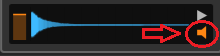
2. is it possible to have the sample be played automatically and not having to hit play?

3. can i set that the sample clicked on, is automatically stretched to the Project tempo?

4. The Playlist playarea is so easy to choose in FL Studio what to play, hold right click with the mouse and boom, in Bitwig I only see the option with left clicking the bar here, correct?
FL Studio playlist.jpg
Bitwig playlist.jpg

5. is there a way to snap to the grid the midi clip?
Playlister snap to grid.jpg

6. somehow Bitwig play on and on and I would love that it only plays and loops when it reaches the last midi clip, is there a way without marking the loop?
Playlister stop play at midiclip.jpg

thx, there will be more of course :D
You do not have the required permissions to view the files attached to this post.
DAW FL Studio Audio Interface Focusrite Scarlett 1st Gen 2i2 CPU Intel i7-7700K 4.20 GHz, RAM 32 GB Dual-Channel DDR4 @2400MHz Corsair Vengeance. MB Asus Prime Z270-K, GPU Gainward 1070 GTX GS 8GB NT Be Quiet DP 550W OS Win10 64Bit

Post

Caine123 wrote: Sun Jun 28, 2026 5:34 pm 1. Can I switch the Sample Browser from the right side to the left side?
No
Caine123 wrote: Sun Jun 28, 2026 5:34 pm 2. is it possible to have the sample be played automatically and not having to hit play?
Image
Caine123 wrote: Sun Jun 28, 2026 5:34 pm 3. can i set that the sample clicked on, is automatically stretched to the Project tempo?
Im not sure what you mean here. Stretching samples with single mouse click?
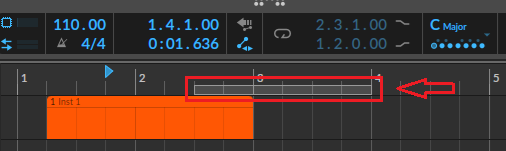
Caine123 wrote: Sun Jun 28, 2026 5:34 pm 4. The Playlist playarea is so easy to choose in FL Studio what to play, hold right click with the mouse and boom, in Bitwig I only see the option with left clicking the bar here, correct?
Do you mean selecting loop region? You do that by moving/resizing this bar:
Image
I agree – it's a bit easier in FL Studio.
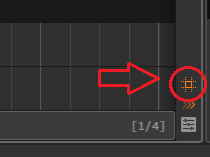
Caine123 wrote: Sun Jun 28, 2026 5:34 pm 5. is there a way to snap to the grid the midi clip?
Image
Caine123 wrote: Sun Jun 28, 2026 5:34 pm 6. somehow Bitwig play on and on and I would love that it only plays and loops when it reaches the last midi clip, is there a way without marking the loop?
No

Post

Maykie wrote: Sun Jun 28, 2026 11:43 pm
Caine123 wrote: Sun Jun 28, 2026 5:34 pm 1. Can I switch the Sample Browser from the right side to the left side?
No
thanks a lot! noted and put on my list.
Maykie wrote: Sun Jun 28, 2026 11:43 pm
Caine123 wrote: Sun Jun 28, 2026 5:34 pm 2. is it possible to have the sample be played automatically and not having to hit play?
Image
so easy.... thx
Maykie wrote: Sun Jun 28, 2026 11:43 pm
Caine123 wrote: Sun Jun 28, 2026 5:34 pm 3. can i set that the sample clicked on, is automatically stretched to the Project tempo?
Im not sure what you mean here. Stretching samples with single mouse click?
no when you click on this box it gives you 3 options, i clicked "Sync To Project" but it doesnt do it :/
Bitwig Browser stretch audio.jpg
Maykie wrote: Sun Jun 28, 2026 11:43 pm
Caine123 wrote: Sun Jun 28, 2026 5:34 pm 4. The Playlist playarea is so easy to choose in FL Studio what to play, hold right click with the mouse and boom, in Bitwig I only see the option with left clicking the bar here, correct?
Do you mean selecting loop region? You do that by moving/resizing this bar:
Image
I agree – it's a bit easier in FL Studio.
also noted on my list, thx
Maykie wrote: Sun Jun 28, 2026 11:43 pm
Caine123 wrote: Sun Jun 28, 2026 5:34 pm 5. is there a way to snap to the grid the midi clip?
Image
great, awesome, thx!!
Maykie wrote: Sun Jun 28, 2026 11:43 pm
Caine123 wrote: Sun Jun 28, 2026 5:34 pm 6. somehow Bitwig play on and on and I would love that it only plays and loops when it reaches the last midi clip, is there a way without marking the loop?
No
not a big thing but would be cool in future.
You do not have the required permissions to view the files attached to this post.
DAW FL Studio Audio Interface Focusrite Scarlett 1st Gen 2i2 CPU Intel i7-7700K 4.20 GHz, RAM 32 GB Dual-Channel DDR4 @2400MHz Corsair Vengeance. MB Asus Prime Z270-K, GPU Gainward 1070 GTX GS 8GB NT Be Quiet DP 550W OS Win10 64Bit

Post

4. The Playlist playarea is so easy to choose in FL Studio what to play, hold right click with the mouse and boom, in Bitwig I only see the option with left clicking the bar here, correct?
In Bitwig, you can switch tools temporarily by holding the tool's hotkey like a modifier key. So, just hold 3 to bring up the pen tool and you can draw the loop area the same way right-click drag works in FL.

But what I usually do is select the clip(s) I want to loop and press Cmd/Ctrl + L, which will set the loop area to match the clips.

5. is there a way to snap to the grid the midi clip?
In addition to what Maykie wrote, I'd recommend to enable "Snap relative to original event" in the arranger and the event editor, and optionally disable "Snap to beat grid" for the original FL snapping behaviour.

6. somehow Bitwig play on and on and I would love that it only plays and loops when it reaches the last midi clip, is there a way without marking the loop?
Have you tried the Clip launcher yet? It lets you keep clips of different lengths looping independently from each other and you don't need to bother with arranger looping.

If you give it a try, I'd recommend the following settings:
  • Change the Clip Launcher's default launch settings to something like the below, which prevents clips from going out of sync.
    Screenshot 2026-06-29 at 10.50.32.png
  • From the "Play" menu, pin the Clip launcher "Overdub" button to the main toolbar, to make it easy to record into existing clips in the launcher. (The normal record button won't do that.)
You do not have the required permissions to view the files attached to this post.

Post Reply

Return to “Bitwig”