



Hi everyone,
I've posted a short workflow demo for MixBrain.
The basic workflow is:
1. Insert MixBrain Node on every track
2. Insert MixBrain Master on the master bus
3. Press Analyze All.
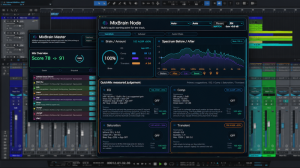
MixBrain is a mix-assist plugin system focused on track relationships.
Instead of analyzing each track as an isolated channel, each Node sends information about its track's role, tone, dynamics, transient behavior, width, and harmonic character to the Master. The Master then looks at the session as a connected mix and suggests coordinated moves across tracks.
The idea is not to replace your favorite EQs, compressors, or creative plugins. MixBrain is more like a second brain for checking where the mix is crowded, which tracks are fighting, and where small distributed moves may help the whole session breathe better.

This first video shows the basic Analyze workflow. I'll continue adding short videos for individual features, including Mix Control, Node suggestions, EQ/dynamics guidance, gain matching, genre/era direction, and practical use cases.
Available for macOS VST3 / AU.
Gumroad:
https://kiyohbimbo.gumroad.com/l/rgjgus
Thanks for checking it out.
