Log InCreate An Account
  1. Plugins
  2. »
  3. TBProAudio
  4. »
  5. AccessiblePeakMeter3
  6. »
  7. Details

AccessiblePeakMeter3

AccessiblePeakMeter3
AccessiblePeakMeter3 by TBProAudio is a Virtual Effect Audio Plugin for macOS and Windows. It functions as a VST Plugin, an Audio Units Plugin, a VST 3 Plugin and an AAX Plugin.

MyKVR: Groups, Versions, ...

16 KVR members have added AccessiblePeakMeter3 to 11 MyKVR groups 18 times.

Download KVR Studio Manager (FREE)

Not In Your MY KVR Groups
(or group limitation prevents versioning)
+11 in private groups

KVR Rank

Overall: 14525   10902   12301

30-Day: 29810; 7-Day: 31909; Yesterday: 35351

AccessiblePeakMeter3 is a development of AccessiblePeakMeter. It adds more meter modes (RMS, EBU, VU/PPM, Truepeak, Dialnorm and Dynamic Range).

It uses real-time sonification to deliver information to the user about audio levels and peaks in audio signals, and so supports core activities in audio production.

AccessiblePeakMeter was developed in 2014/2015 at Queen Mary University of London as part of the Design Patterns for Inclusive Collaboration research project.

Usage

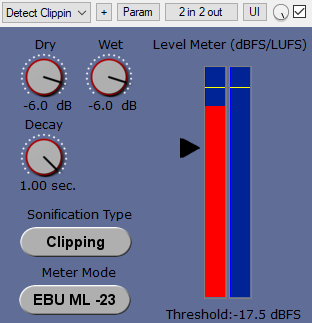
The plug-in comes with the following tweakable parameters:

  1. Sonification Type: to switch between continuous mode, clipping mode and clip tone mode. "Clip tone" sonficates as soon level is above threshold.
  2. Dry: controls the level of the input audio, namely the audio content you want to analyze;
  3. Wet: controls the level of the sonification;
  4. Tone: controls height of the sonification tone in clip tone mode;
  5. Threshold: sets the threshold for the clipping mode, it has no effect on the continuous mode.
  6. Decay: this only affects the continuous mode sonification. The value ranges from 1 second down to 0.05 seconds. This is the time the meter would take to decay from 0 db to -inf after an impulse. These numbers don't give a real feeling of how the sonification will sound - it is easier to think that when set to 0.05 the sonification will stop pretty immediately when you stop the audio; whereas if the value is set to 1, it will take longer to decay. In general, though, the latter sounds cleaner and normally the audio level doesn't go all the way down to silence, as during the decay it encounters other peaks that bring it back up. So it's up to you to find the right trade off.
  7. DAW sync: if set to "on", meter reset is synced with DAW start playing. Only applicable for program loudness modes like RMS/EBU/DialNorm IL and PLR.
  8. Meter Mode: sets the meter modes. Please to note that all meter modes are calibrated to 0 dBFS, 0 dBTP, 0 LUFS, 0LKFS, 0 VUFS and 0 PPMFS
    1. Peak: same as AccessiblePeakMeter, dBFS.
    2. TruePeak: based on ITU BS1770.4, dBTP.
    3. VU: peak meter, 300ms integration time, VUFS.
    4. PPM: peak meter, target, PPMFS.
    5. RMS: 600ms integration time, AES-17, dBFS.
    6. EBU: EBU R128, target level -23 LUFS, LUFS.
    7. DialNorm: gated, target level -24 LKFS, LKFS.
    8. DR: PLR/PSR, dB.

The AccessiblePeakMeter3 provides access to the parameters by exposing them to inspectors - such as ReaAccess plug-in or the Cakewalk Sonar inspector - in a clear and well formatted way.

Latest User Reviews

Average user rating of 0.00 from 0 reviews

Products similar to AccessiblePeakMeter3...

Comments & Discussion for TBProAudio AccessiblePeakMeter3

Discussion
Discussion: Active

Please log in to join the discussion

Log In To KVR Audio
