
18 KVR members have added AccessibleSpectrumAnalyser to 10 MyKVR groups 19 times.
Download KVR Studio Manager (FREE)
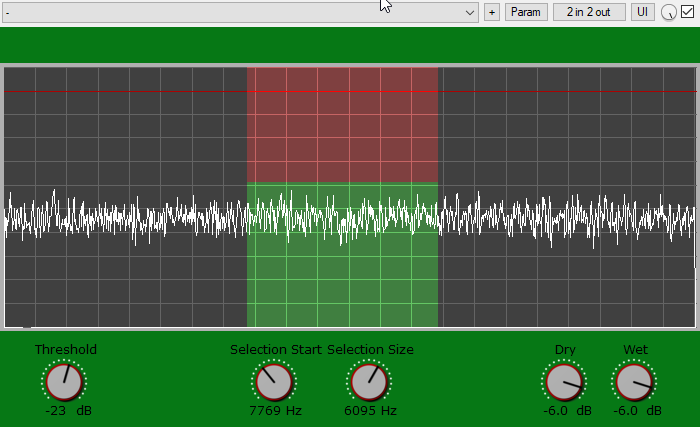
AccessibleSpectrumAnalyser is a real time spectrum analysis plug-in that allows visual impaired users to inspect spectrograms using the same sonification as the accessible peak meter. Instead of monitoring the amplitude of the audio signal though, you will be monitoring the frequency components of the signal within a customizable selection of frequencies.
The plug-in uses the "clipping" sonification of the AccessiblePeakMeter. That is, you can set a threshold in dB and, as soon as the energy of any frequency in the selection goes past the threshold, you will hear a short beep. Like in the AccessiblePeakMeter, the beep starts at 440 Hz and it's raised one semitone for each dB of difference between the frequency magnitude and the threshold. In case more than one frequency within the selection is higher than the threshold, then the highest one is taken into account for the sonification purpose.
There is only one single spectrum for both left and right channels: the two channels are mixed together before being analysed. In AccessiblePeakMeter, there is a separate sonification for peaks in the left and the right audio channel. In the AccessibleSpectrumanalyser instead, one single sonification is panned from left to right and the panning represents the position of the peaking frequency in the whole spectrum, ranging from 20 Hz on the very left, to 20050 Hz on the very right. For example, if the selected spectrum peaks at 50 Hz then you'll hear the beep towards the left, whereas if the peak is at 20 kHz the beep will occur towards the right.
The plug-in comes with five tweak able parameters:
The AccessibleSpectrumAnalyser provides access to the parameters by exposing them to inspectors - such as ReaAccess plug-in or the Cakewalk Sonar inspector - in a clear and well formatted way.

Please log in to join the discussion
Submit: News, Plugins, Hosts & Apps | Advertise @ KVR | Developer Account | About KVR / Contact Us | Privacy Statement | Sell @ KVR | KVR Marketplace Terms & Conditions
© KVR Audio, Inc. 2000-2026

