
17 KVR members have added Air-G Clip to 14 MyKVR groups 18 times.
Download KVR Studio Manager (FREE)
Air-G Clip is part of Air-G Audio, a collection of plugins built on the open source work of Airwindows, Chris Johnson's project that has been publishing high-quality free DSP algorithms for years.
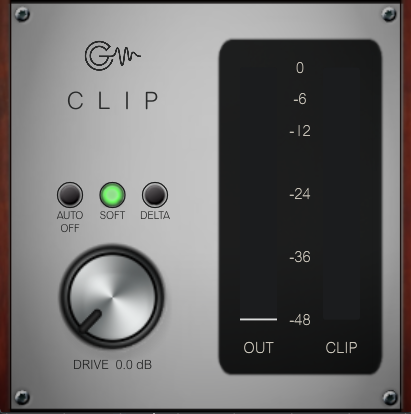
Clip is a clipper with two distinct personalities. SOFT mode (ClipSoftly) goes beyond peak cutting: it reshapes the entire signal, rounding it and making it bigger, denser, and warmer. It's saturation as much as clipping. HARD mode (ClipOnly3) is more surgical: everything below the threshold passes through untouched, and only the samples that exceed it get clipped, with softened edges to avoid digital harshness. According to Chris, ClipOnly3 can push volume so far it practically has no ceiling. On top of both engines, Air-G adds a Drive knob (+24 dB), automatic gain compensation (Auto Gain) for honest before/after comparisons without fooling your ears, a Delta mode to hear exactly what's being clipped and nothing else, and two digital dBFS meters for output level and clipping amount.
SOFT shines on vocals, synthesizers, and anything that needs body and warmth without sounding aggressively saturated. HARD is the tool for drums, bass, and mix buses when the goal is peak control and volume gain with minimal coloration, or total maximization when that's what the moment calls for.
---
Air-G Audio is a collection of plugins built on the open source code of Airwindows. The project is built around adding a graphical interface that makes the experience more comfortable and visual, along with a few features that expand the possible uses without straying from the original sound. The simplicity and lightness of Chris's code are the starting point and the guide.
Thanks to Chris Johnson for making his work public and accessible. Air-G Audio exists because Airwindows exists. The Airwindows code used in this plugin is published under the MIT License.
Air-G Clip is free. You can download it without paying anything, following the same open philosophy that runs through all of Chris's work. If the plugin is useful to you in your music, a contribution is always welcome. Chris Johnson's Patreon is also worth knowing about: it's the most direct way to support the Airwindows project and the work that makes plugins like this one possible. patreon.com/airwindows.
Available for Windows, Linux and macOS.
*New: Windows & Linux — All VST3, no installer download
***Windows note: the installer is not signed with a paid certificate, so SmartScreen may show a "Windows protected your PC" warning. Click "More info", then "Run anyway" to continue. This is expected and not a problem with the plugin.
***macOS note: the plugin is not signed with an Apple developer certificate, so Gatekeeper may block it on first use. The "Open Anyway" option in System Settings does not work reliably for audio plugins. The correct fix requires Terminal:
1. Open Terminal (Applications > Utilities > Terminal).
2. Type: sudo xattr -rd com.apple.quarantine (leave a space at the end, do not press Enter yet).
3. Open Finder and navigate to your plug-in folder: VST3 plugins are in /Library/Audio/Plug-Ins/VST3/, and AU plugins (for Logic and GarageBand) are in /Library/Audio/Plug-Ins/Components/. Drag the plugin file (the .vst3 or the .component) into the Terminal window. The path fills in automatically.
4. Press Enter and type your admin password when prompted (it will not be visible). Press Enter again.
5. Rescan your plugins in your DAW. The plugin should now appear. If you installed both the VST3 and the AU versions, repeat the process for each file.

Please log in to join the discussion
Submit: News, Plugins, Hosts & Apps | Advertise @ KVR | Developer Account | About KVR / Contact Us | Privacy Statement | Sell @ KVR | KVR Marketplace Terms & Conditions
© KVR Audio, Inc. 2000-2026

