
14 KVR members have added Air-G Mods to 14 MyKVR groups 15 times.
Download KVR Studio Manager (FREE)
Air-G Mods is part of Air-G Audio, a collection of plugins built on the open source work of Airwindows, Chris Johnson's long-running project known for some of the most distinctive free DSP code in the audio world.
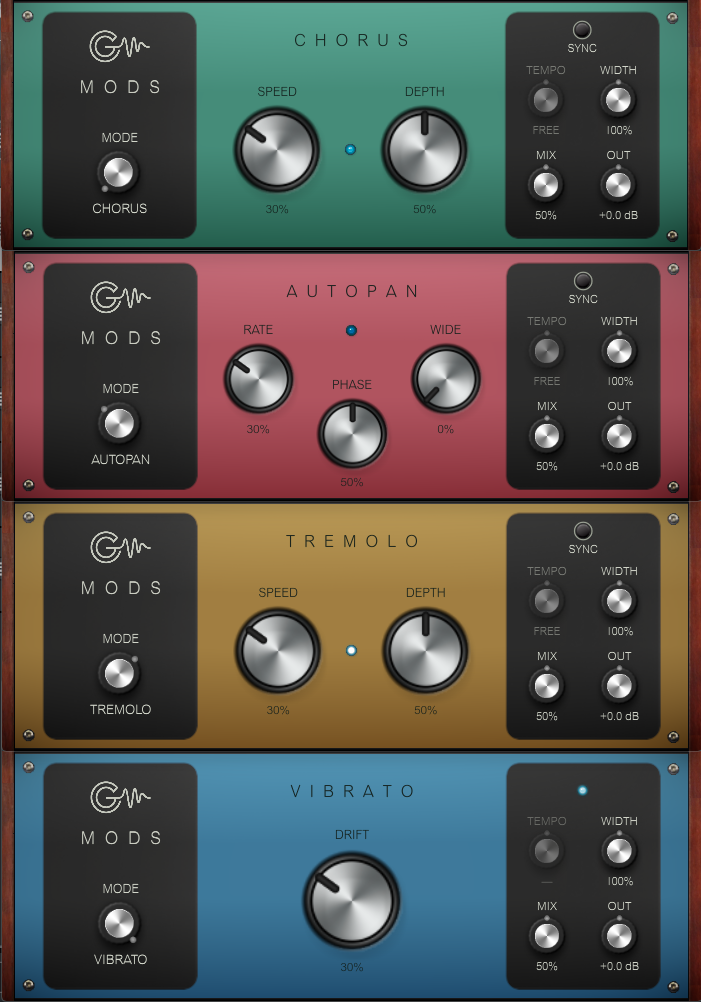
Mods brings four classic modulation effects into a single plugin: Chorus, AutoPan, Tremolo, and Vibrato. A selector chooses which is active; the others wait in the background with their settings saved, so switching between them is instant and nothing is lost. All four share the same controls: speed syncable to DAW tempo in musical note values, dry/wet mix, output volume, and stereo width. A blue LED pulses at the rate of the active effect as a visual reference.
Each effect is built on a different Airwindows algorithm. Chorus (StereoChorus) thickens and widens the signal by simulating slightly detuned, time-shifted copies, ideal for mono synths and guitars that need a stereo image. AutoPan (AutoPan) moves the signal from side to side with a slightly irregular LFO; the PHASE control shifts the behavior from tremolo to circular sweep to full left-right pan. Tremolo (Tremolo) modulates volume rhythmically, but not in a conventional way: it alternates between saturated and anti-saturated zones for a vintage character, with a distinctive double pulse when pushed to the limit. Vibrato (GalacticVibe, taken from Airwindows' Galactic reverb) applies a quadrature pitch variation between channels, producing a widening effect with movement reminiscent of a Leslie. It has no speed control: its character is defined entirely by the DRIFT amount.
Mods works as an enrichment tool at any stage of production. Chorus and Vibrato widen mono signals and add movement to pads and keys. AutoPan brings textures and arpeggios to life. Tremolo adds rhythmic pulse with vintage character. With SYNC active, all four lock to the project tempo.
---
Air-G Audio is a collection of plugins built on the open source code of Airwindows. The project is built around adding a graphical interface that makes the experience more comfortable and visual, along with a few features that expand the possible uses without straying from the original sound. The simplicity and lightness of Chris's code are the starting point and the guide.
Thanks to Chris Johnson for making his work public and accessible. Air-G Audio exists because Airwindows exists. The Airwindows code used in this plugin is published under the MIT License.
Air-G Mods is free. You can download it without paying anything, following the same open philosophy that runs through all of Chris's work. If the plugin is useful to you in your music, a contribution is always welcome. Chris Johnson's Patreon is also worth knowing about: it's the most direct way to support the Airwindows project and the work that makes plugins like this one possible. patreon.com/airwindows.
Available for Windows, Linux and macOS.
*New: Windows & Linux — All VST3, no installer download
***Windows note: the installer is not signed with a paid certificate, so SmartScreen may show a "Windows protected your PC" warning. Click "More info", then "Run anyway" to continue. This is expected and not a problem with the plugin.
***macOS note: the plugin is not signed with an Apple developer certificate, so Gatekeeper may block it on first use. The "Open Anyway" option in System Settings does not work reliably for audio plugins. The correct fix requires Terminal:
1. Open Terminal (Applications > Utilities > Terminal).
2. Type: sudo xattr -rd com.apple.quarantine (leave a space at the end, do not press Enter yet).
3. Open Finder and navigate to your plug-in folder: VST3 plugins are in /Library/Audio/Plug-Ins/VST3/, and AU plugins (for Logic and GarageBand) are in /Library/Audio/Plug-Ins/Components/. Drag the plugin file (the .vst3 or the .component) into the Terminal window. The path fills in automatically.
4. Press Enter and type your admin password when prompted (it will not be visible). Press Enter again.
5. Rescan your plugins in your DAW. The plugin should now appear. If you installed both the VST3 and the AU versions, repeat the process for each file.
 $49.00Rotary CLS-222
Please log in to join the discussion
Submit: News, Plugins, Hosts & Apps | Advertise @ KVR | Developer Account | About KVR / Contact Us | Privacy Statement | Sell @ KVR | KVR Marketplace Terms & Conditions
© KVR Audio, Inc. 2000-2026

