
27 KVR members have added Air-G Plugin Collection to 4 MyKVR groups 33 times.
Download KVR Studio Manager (FREE)
Air-G Plugins Collection is a collection of VST3 audio plugins built on the open source work of Airwindows, Chris Johnson's ongoing project that has been releasing some of the most respected free DSP algorithms in the audio world.
The collection started from a simple idea: take some of those algorithms and present them with a custom graphical interface that makes daily work more comfortable and visual. Not to replace or improve on Chris's code, but to build on it: adding meters, displays, presets, and complementary controls that expand the possible uses without changing the underlying sound. The simplicity and lightness that characterize Airwindows are the starting point and the guide behind every design decision.
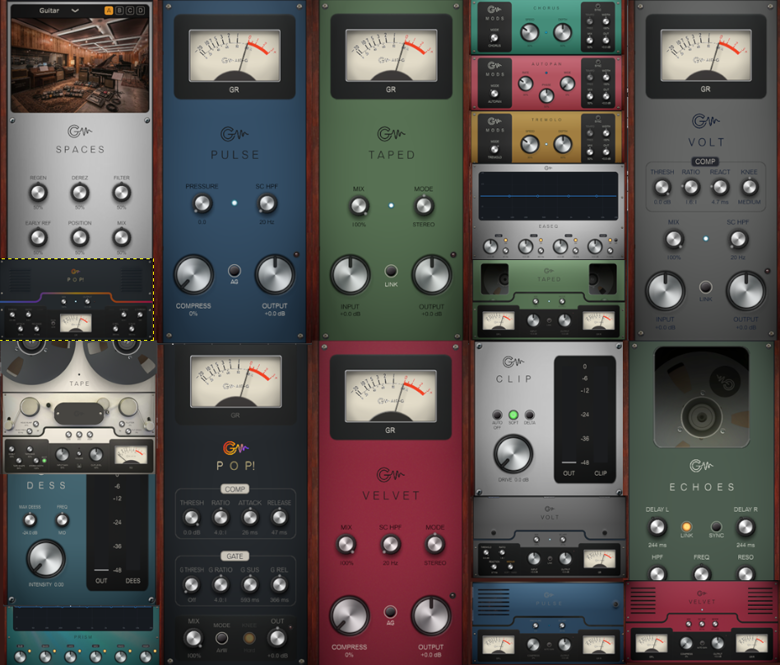
Depending on the tool, each plugin adds some combination of real-time level and gain reduction meters, interactive displays showing the actual frequency response, presets organized by instrument and use case, M/S processing, parallel compression controls, DAW tempo sync, sidechain filters, animations that reflect the state of the processing, and A/B comparison controls. All designed to make the Airwindows sound easier to explore and integrate into a real workflow.
The collection covers five areas:
Compression and dynamics: four compressors with distinct personalities — Pop! for transients and punch, Pulse for gluing buses and full mixes, Velvet for soft cohesion and spatial depth, Volt for the bus with a range that goes from transparency to envelope distortion. All four have a Mini version: same engine, compact 500-series rack module-style interface.
Clipper and de-esser: Clip combines two clipping modes in a single plugin with Delta monitoring. Dess detects sibilance by waveform shape rather than frequency targeting, with unusual precision on vocals and bright material.
Equalization: EaseQ is a four-band EQ with wide, musical Bezier curves, an interactive display, and an AIR button. Prism is a six-band graphic EQ with fixed frequencies, strong inter-band isolation, and draggable nodes.
Tape saturation and time effects: Tape is the full tape emulation, with head bump, flutter, three-band EQ, and 48 presets. Taped is the focused saturator, warmth and high-frequency compression with M/S processing. Taped Mini is its compact version. Echoes is the varispeed tape delay with DAW tempo sync and an HPF in the feedback loop. Mods brings four modulators (Chorus, AutoPan, Tremolo, Vibrato) into a single selector.
Reverb: Spaces brings together 16 reverbs from Airwindows' k-series in a single plugin: rooms, halls, plates, chambers, and imaginary spaces, with Pre Delay and HPF always available and four memory slots for instant comparison.
Every plugin comes with a manual in both Spanish and English, written in musical language without technical jargon.
---
Thanks to Chris Johnson for making his work public and accessible. Air-G Audio exists because Airwindows exists. The Airwindows code used in this collection is published under the MIT License.
Air-G Plugins Collection is free. You can download it without paying anything, following the same open philosophy that runs through all of Chris's work. If the collection is useful to you in your music, a contribution is always welcome. Chris Johnson's Patreon is also worth knowing about: it's the most direct way to support the Airwindows project and the work that makes plugins like this one possible. patreon.com/airwindows
The complete bundle is available for Windows, Linux and macOS.
*New: Windows & Linux — All VST3, no installer download
***Windows note: the installer is not signed with a paid certificate, so SmartScreen may show a "Windows protected your PC" warning. Click "More info", then "Run anyway" to continue. This is expected and not a problem with the plugin.
***macOS note: the plugin is not signed with an Apple developer certificate, so Gatekeeper may block it on first use. The "Open Anyway" option in System Settings does not work reliably for audio plugins. The correct fix requires Terminal:
1. Open Terminal (Applications > Utilities > Terminal).
2. Type: sudo xattr -rd com.apple.quarantine (leave a space at the end, do not press Enter yet).
3. Open Finder and navigate to your plug-in folder: VST3 plugins are in /Library/Audio/Plug-Ins/VST3/, and AU plugins (for Logic and GarageBand) are in /Library/Audio/Plug-Ins/Components/. Drag the plugin file (the .vst3 or the .component) into the Terminal window. The path fills in automatically.
4. Press Enter and type your admin password when prompted (it will not be visible). Press Enter again.
5. Rescan your plugins in your DAW. The plugin should now appear. If you installed both the VST3 and the AU versions, repeat the process for each file.
Reviewed By Uchmania [all]
July 6th, 2026
Version reviewed: 1.0 on Windows
Fantastic implementation. The rating would have been 5 stars but experienced a bug with the GUI resetting to original size anytime plugin window is closed and reopened (resizing the GUI is not persistent). I believe this can be fixed in a future update, asides from this, this is a lovely implementation.
And yes it is specific to Reaper.
Response from Air-G Audio from Air-G Audio on July 6th, 2026
Thanks a lot for the feedback!.
I just noticed that the GUI resetting to its original size happens in Reaper, at least. Is that the case for you as well?
Definitely noted for a future revision.
Reviewed By wesleymarien [all]
July 6th, 2026
Version reviewed: 1.0 on Windows
Finally someone has gotten the nerv to tackle chris's code and slammed a gui on them, and they look rather nice i must say... all sound good and run stable on first impression, i just had some difficulties linking knobs with multiple functions to midicontrollers... in Mods, and Spaces is this the case, for example in spaces there's an issue when switching algoritms and there comes 2 pre delay knobs wich makes the connection fail as it refers to the original link setup. i know when it comes to making knobs with multiple actions it's not that easy since not all knobs are alike :)) great work, even with this minor glitch i give them 5 stars!!! Curious for future releases.
Response from Air-G Audio from Air-G Audio on July 6th, 2026
Thank you so much for the feedback! And thanks especially for the detailed report.
Noted for future revisions.
Really glad the plugins are running well for you otherwise, and thanks for the 5 stars.
Reviewed By ttlly_ [all]
July 4th, 2026
Version reviewed: 1.0 on Windows
I had the chance to try out some of these beforehand and must say I'm very content with them! Easy to use and very lightweight.
Response from Air-G Audio from Air-G Audio on July 6th, 2026
Thank you so much for the review, this really means a lot.

Please log in to join the discussion
Submit: News, Plugins, Hosts & Apps | Advertise @ KVR | Developer Account | About KVR / Contact Us | Privacy Statement | Sell @ KVR | KVR Marketplace Terms & Conditions
© KVR Audio, Inc. 2000-2026

