
17 KVR members have added Air-G Pop! to 14 MyKVR groups 18 times.
Download KVR Studio Manager (FREE)
Air-G Pop! is part of Air-G Audio, a collection of plugins built on the open source work of Airwindows, Chris Johnson's project that has been releasing some of the most carefully crafted free DSP algorithms in the audio world.
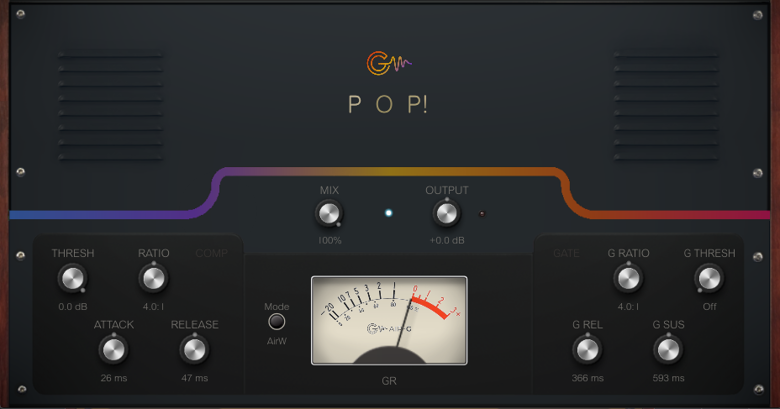
Pop! is a compressor and gate in a single plugin, designed for punch, presence, and articulation on percussive signals and transients. The engine is Airwindows' Pop3, part of Chris's ConsoleX system, and what makes it unusual is how it makes compression decisions: per sample, in a binary way, without the inertia of analog circuits. The result is an extremely fast, precise response in transient tracking. Two modes define the character. AirW mode replicates the original Pop3 behavior: stereo coupling acts continuously, even between transients, producing a density and glue with unmistakable vintage character. AirG limits coupling to moments when the signal exceeds the threshold, delivering a cleaner, more predictable release with selectable knee control. Air-G adds a parallel mix control (MIX), a Hard/Soft Knee selector available in AirG mode, and a sustain control in the gate to prevent premature cutoff on sounds with a natural decay.
Pop! is at its best where attack articulation matters: drums, percussion, punchy bass. In AirW mode it becomes a glue tool for the 2-bus and group buses, dense and characterful. In AirG mode it's more transparent, useful for vocals and solo instruments where precise control matters more than color. MIX makes parallel compression available from within the plugin itself, without auxiliary routing. There is also Air-G Pop! Mini, a version with the same audio engine in a compact rack module-style interface.
---
Air-G Audio is a collection of plugins built on the open source code of Airwindows. The project is built around adding a graphical interface that makes the experience more comfortable and visual, along with a few features that expand the possible uses without straying from the original sound. The simplicity and lightness of Chris's code are the starting point and the guide.
Thanks to Chris Johnson for making his work public and accessible. Air-G Audio exists because Airwindows exists. The Airwindows code used in this plugin is published under the MIT License.
Air-G Pop! is free. You can download it without paying anything, following the same open philosophy that runs through all of Chris's work. If the plugin is useful to you in your music, a contribution is always welcome. Chris Johnson's Patreon is also worth knowing about: it's the most direct way to support the Airwindows project and the work that makes plugins like this one possible. patreon.com/airwindows.
Available for Windows, Linux and macOS.
*New: Windows & Linux — All VST3, no installer download
***Windows note: the installer is not signed with a paid certificate, so SmartScreen may show a "Windows protected your PC" warning. Click "More info", then "Run anyway" to continue. This is expected and not a problem with the plugin.
***macOS note: the plugin is not signed with an Apple developer certificate, so Gatekeeper may block it on first use. The "Open Anyway" option in System Settings does not work reliably for audio plugins. The correct fix requires Terminal:
1. Open Terminal (Applications > Utilities > Terminal).
2. Type: sudo xattr -rd com.apple.quarantine (leave a space at the end, do not press Enter yet).
3. Open Finder and navigate to your plug-in folder: VST3 plugins are in /Library/Audio/Plug-Ins/VST3/, and AU plugins (for Logic and GarageBand) are in /Library/Audio/Plug-Ins/Components/. Drag the plugin file (the .vst3 or the .component) into the Terminal window. The path fills in automatically.
4. Press Enter and type your admin password when prompted (it will not be visible). Press Enter again.
5. Rescan your plugins in your DAW. The plugin should now appear. If you installed both the VST3 and the AU versions, repeat the process for each file.
 $79.00Comp VCA-65
Please log in to join the discussion
Submit: News, Plugins, Hosts & Apps | Advertise @ KVR | Developer Account | About KVR / Contact Us | Privacy Statement | Sell @ KVR | KVR Marketplace Terms & Conditions
© KVR Audio, Inc. 2000-2026

