
13 KVR members have added Air-G Volt to 12 MyKVR groups 14 times.
Download KVR Studio Manager (FREE)
Air-G Volt is part of Air-G Audio, a collection of plugins built on the open source work of Airwindows, Chris Johnson's project that has been releasing some of the most carefully crafted free DSP algorithms in the audio world.
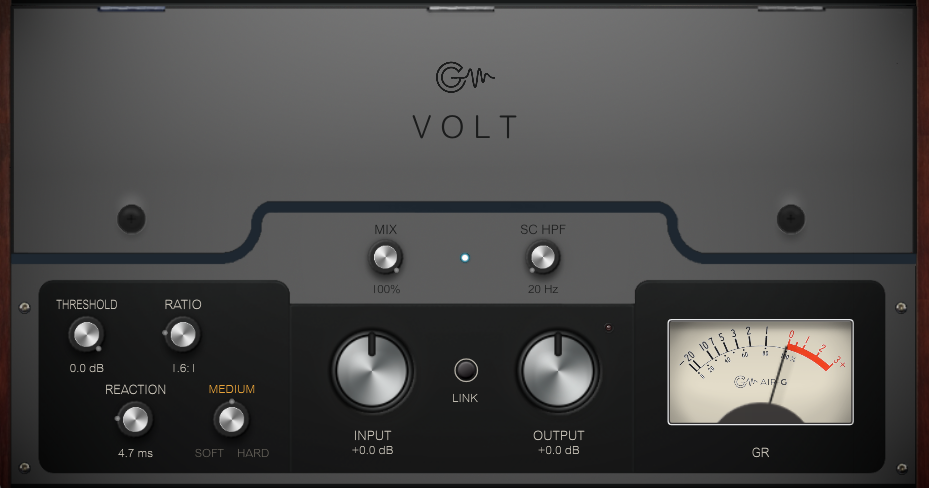
Volt is a bus compressor with an unusually wide behavioral range. Internally it's a cascade of up to three ButterComp-style compressors chained together, with Power Sag stages between them: a simulation of the voltage drop in an analog power supply that contributes glue and fluidity. Its character shifts dramatically depending on how hard it's pushed. At low ratios it sounds clean and cohesive, in the territory of an SSL-style bus compressor. As the ratio rises and reaction becomes faster, it leaves that territory and enters envelope distortion, where transients invert and the plugin expands instead of compresses. Chris presents this as a desirable feature, not a flaw. Air-G adds a Knee selector (Soft/Medium/Hard), an Input/Output mirror link (LINK), integrated parallel compression (MIX), a sidechain filter (SC HPF), and a visual bar that signals when the plugin enters envelope inversion mode.
The engine is Airwindows' Logical4, which Chris has described as the best compressor he has made to date. RATIO is the central control: below 2:1, a single stage acts and the sound is transparent. As it rises, additional stages enter the cascade and compression becomes denser. At maximum with fast REACTION, drum transients turn into inverted peaks and the compressor begins expanding. REACTION controls attack speed and overall character: slow for smooth, grain-free compression; fast for grit and envelope effects. INPUT acts as drive: more signal at the input means more compression for the same THRESHOLD.
Volt is the most versatile compressor in the Air-G line. At conservative settings it's ideal for the 2-bus and group buses: analog cohesion, glue, fluidity. At more aggressive settings it becomes a character tool for drums and percussion. Pushed to the extreme it works as a special effects processor for electronic music and sound design. MIX allows any of those modes to run in parallel with the original signal. There is also Air-G Volt Mini, a version with the same audio engine in a compact rack module-style interface.
---
Air-G Audio is a collection of plugins built on the open source code of Airwindows. The project is built around adding a graphical interface that makes the experience more comfortable and visual, along with a few features that expand the possible uses without straying from the original sound. The simplicity and lightness of Chris's code are the starting point and the guide.
Thanks to Chris Johnson for making his work public and accessible. Air-G Audio exists because Airwindows exists. The Airwindows code used in this plugin is published under the MIT License.
Air-G Volt is free. You can download it without paying anything, following the same open philosophy that runs through all of Chris's work. If the plugin is useful to you in your music, a contribution is always welcome. Chris Johnson's Patreon is also worth knowing about: it's the most direct way to support the Airwindows project and the work that makes plugins like this one possible. patreon.com/airwindows
Available for Windows, Linux and macOS.
*New: Windows & Linux — All VST3, no installer download
***Windows note: the installer is not signed with a paid certificate, so SmartScreen may show a "Windows protected your PC" warning. Click "More info", then "Run anyway" to continue. This is expected and not a problem with the plugin.
***macOS users, please note: there are currently known installation issues. We're actively working on them, but it may take some time. There's a post explaining this in more detail. Thanks for your patience!
***macOS note: the plugin is not signed with an Apple developer certificate, so Gatekeeper may block it on first use. The "Open Anyway" option in System Settings does not work reliably for audio plugins. The correct fix requires Terminal:
1. Open Terminal (Applications > Utilities > Terminal).
2. Type: sudo xattr -rd com.apple.quarantine (leave a space at the end, do not press Enter yet).
3. Open Finder and navigate to your plug-in folder: VST3 plugins are in /Library/Audio/Plug-Ins/VST3/, and AU plugins (for Logic and GarageBand) are in /Library/Audio/Plug-Ins/Components/. Drag the plugin file (the .vst3 or the .component) into the Terminal window. The path fills in automatically.
4. Press Enter and type your admin password when prompted (it will not be visible). Press Enter again.
5. Rescan your plugins in your DAW. The plugin should now appear. If you installed both the VST3 and the AU versions, repeat the process for each file.
 $79.00Comp VCA-65
Please log in to join the discussion
Submit: News, Plugins, Hosts & Apps | Advertise @ KVR | Developer Account | About KVR / Contact Us | Privacy Statement | Sell @ KVR | KVR Marketplace Terms & Conditions
© KVR Audio, Inc. 2000-2026

