37 KVR members have added Bus Clipper to 38 MyKVR groups 39 times.
Download KVR Studio Manager (FREE)
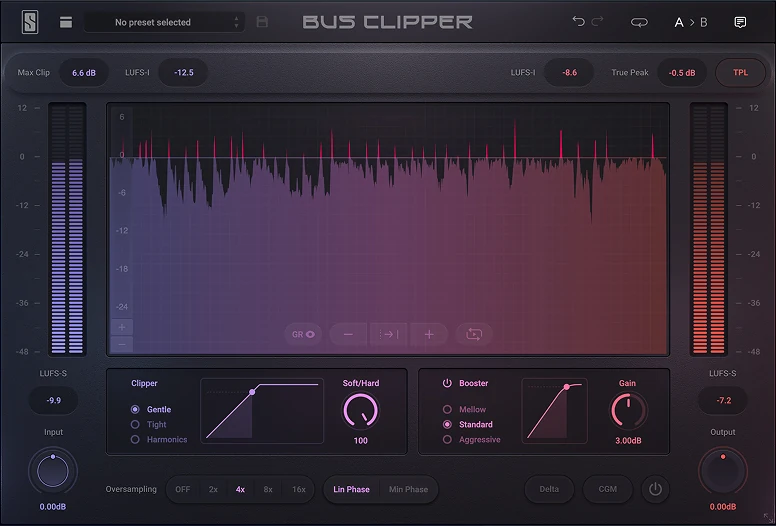
Bus Clipper is a two-stage clipping plugin built for the mastering chain. Shave transient peaks to reclaim headroom, then push loudness with wave-shaping. More level, less compromise.
The Clipper stage works sample-by-sample. If the signal is too high, it gets turned down instantly while everything else passes through untouched. No attack knob, no release, no lookahead.
Three clipping modes, each customizable with the Shape/Harmonics knob, let you move between hard clipping, gentle saturation, and precision harmonic generation.
The Booster stage uses waveshaping to increase perceived loudness without raising the peak level. Quieter parts of the signal get lifted while louder parts stay put. The master sounds louder and more present without the intermodulation artifacts that come from time-based limiting.
Featuring three booster modes (Mellow, Standard, and Aggressive) with a Gain knob and real-time transfer function display, you can see the exact curve you're applying.
Clipping generates supersonic harmonics that fold back into the audible range as artifacts if they're not filtered out. Some clippers need 256x oversampling to handle this. Bus Clipper's alias-reduction algorithm generates fewer of those harmonics in the first place, so 16x gets you the same quality at a fraction of the CPU cost.
Pick your rate (2x, 4x, 8x, 16x), choose linear-phase or minimum-phase downsampling filtering, and the True Peak Limiter at the end of the plugin can catch any remaining overshoots.
Bus Clipper was built for the mastering chain, with precision metering and true peak limiting to get your master across the finish line. But it sounds just as good on a drum bus, a snare track, or anywhere else you need to control transients and push level.
Pair it with Infinity EQ 2 for tonal work, FG-X 2 for final limiting, and Virtual Tape Machines for analog character. Or build your own chain. Bus Clipper will ensure you've used all of the available headroom to achieve maximum level.
{See video at top of page}

Please log in to join the discussion
Submit: News, Plugins, Hosts & Apps | Advertise @ KVR | Developer Account | About KVR / Contact Us | Privacy Statement | Sell @ KVR | KVR Marketplace Terms & Conditions
© KVR Audio, Inc. 2000-2026