Log InCreate An Account
  1. Plugins
  2. »
  3. unevens
  4. »
  5. Curvessor
  6. »
  7. Details

Curvessor

Compressor Plugin by unevens
MyKVRFAVORITE8WANT11
Curvessor
Curvessor by unevens is a Virtual Effect Audio Plugin for Windows and Linux. It functions as a VST Plugin and a VST 3 Plugin.
Product
Version
2.1
Product
Version
2.1
Effect
Formats

MyKVR: Groups, Versions, ...

23 KVR members have added Curvessor to 14 MyKVR groups 31 times.

Download KVR Studio Manager (FREE)

Not In Your MY KVR Groups
(or group limitation prevents versioning)
+14 in private groups

KVR Rank

Overall: 23443   18559   1304

30-Day: 26875; 7-Day: 29568; Yesterday: 19904

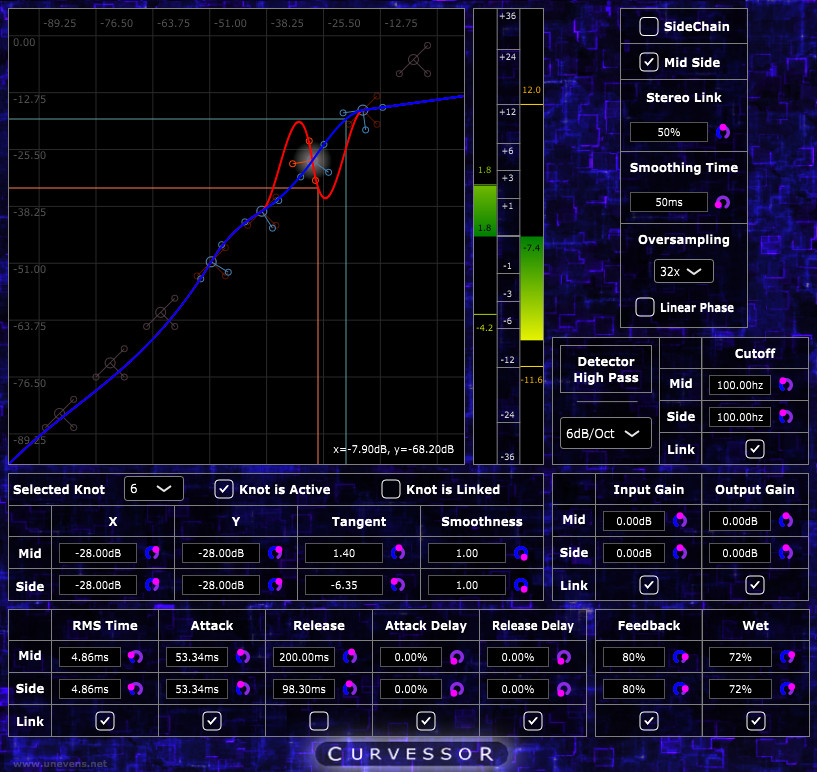
Curvessor is a free and open source VST/VST3 audio plug-in that implements a dynamic range processor in which the response curve of each channel is an automatable spline.

Curvessor can be used as a classic compressor/expander, enjoying the freedom and precision that comes with spline editing.

But more specifically, as it allows the authoring of response curves that are not increasing, Curvessor can be used for creative dynamic range processing in sound design.

Features:

  • The response curves are smoothly automatable splines.
  • Optional Mid/Side Stereo processing.
  • The amount of feedback can be smoothly changed, going from pure forward topology to pure feedback topology and everything in between. (New in version 2).
  • Optional RMS and high-pass filtering on the level detector (New in version 2).
  • All the parameters, including the knots of the spline, can have different values on the Left channel and on the Right channel - or on the Mid channel and on the Side channel, when in Mid/Side Stereo Mode.
  • Dry-Wet.
  • Up to 32x Oversampling with either Minimum Phase or Linear Phase Antialiasing.
  • VU meter showing the difference between the input level and the output level.
  • Customizable smoothing time, used to avoid zips when automating the knots of the splines, the stereo link percentage, the wet amount, or the input and output gains.

Spline Editing:

  • The splines can be edited either by dragging the knots with the mouse, or by entering numeric values for the selected knot.
  • To enable or disable a knot, double click on it.
  • When the knots of two different channel are overlapping, the mouse will interact with the control point of the Left/Mid channel.
  • To interact with the knot of the Right/Side channel, use the right button of your mouse, or press the ALT key while clicking.
  • To zoom in or out, use the mouse scroll wheel.

Latest User Reviews

Average user rating of 0.00 from 0 reviews

Products similar to Curvessor...

Comments & Discussion for unevens Curvessor

Discussion
Discussion: Active

Please log in to join the discussion

Log In To KVR Audio

