
0 KVR members have added Dr splitter CMT1(Beta) to 0 MyKVR groups 0 times.
Download KVR Studio Manager (FREE)
Dr splitter CMT1 (Beta)
AI-Powered Drum Stem Separation Software
"I want to extract only the kick drum from a full stereo drum track."
"I want to fine-tune a 2-mix stereo drum take recorded on an electronic drum kit."
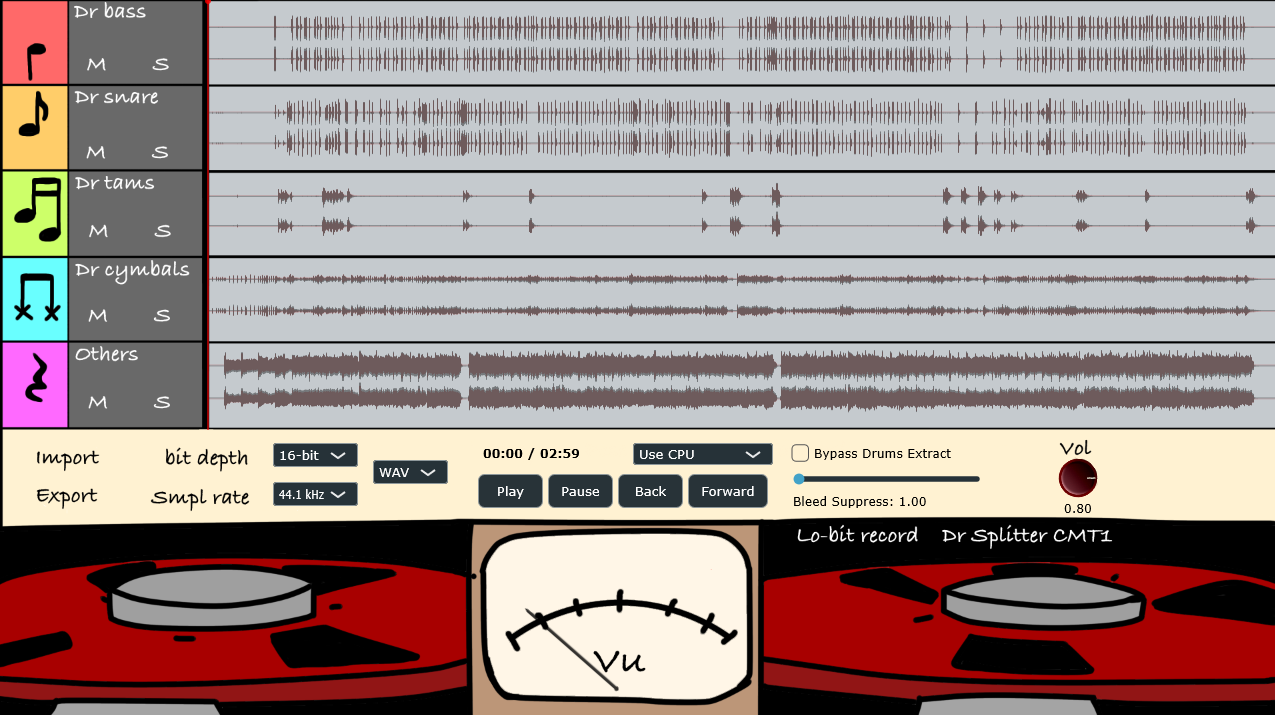
Dr splitter CMT1 is a local AI-driven drum stem separation software developed to turn these exact dreams of creators and drummers into reality.
By utilizing advanced AI models, it disassembles complex, mixed drum tracks into the following 5 independent stems:
Dr bass (Bass drum / Kick).
Dr snare (Snare drum).
Dr tams (Toms).
Dr cymbals (Cymbals & Hi-hats).
Others (Non-drum instruments & full backing track).
Key Use Cases
For Drummers: Learning, Practicing, and Transcribing
You can solo or mute specific parts of the drum kit from your favorite songs. This makes it incredibly easy to listen to and practice hidden details, such as subtle ghost notes on the snare or complex cymbal combinations.
For Producers: Re-mixing "2-Mix" Stereo Electronic Drum Tracks
If you have a drum take that was recorded as a single stereo track (2-mix) from an electronic drum kit, you can now separate it back into individual components. This allows you to perform tasks that previously required multitrack recording—like EQing only the low-end of the kick or adding reverb exclusively to the snare—directly inside your DAW.
Important Notice Regarding the Beta Release
Please note that this software is currently under active development and is being released as a "Beta" version.
About Audio Separation Accuracy:
Due to the inherent characteristics of the AI models used, the separation quality heavily depends on the mix status of the input source (e.g., the intensity of effects, bleed between instruments, and audio degradation). In some cases, significant errors or unnatural sound coloration (such as artifacts, phase issues, or a "thin" sound) may occur.
We cannot guarantee 100% perfect separation for every audio source. We highly appreciate your understanding of these limitations as you use this tool for testing and feedback.
Required Files
For the application to run, the bundled onnxruntime.dll and the AI model files must reside in the same folder as the .exe file.
[Folder Structure]
Your Install Directory/
├── Dr Splitter CMT1.exe (Application executable)
├── onnxruntime.dll (Required runtime library)
├── onnxruntime_providers_shared.dll (Required provider library)
├── demucs.onnx (AI Model file)
└── drum_separator.onnx (AI Model file).
※Please make sure to read the user manuals (available in both English and Japanese) enclosed in the package before running the software.
Windows Security Warning (SmartScreen)
When launching the software for the first time, you may see a blue warning screen saying, "Windows protected your PC." This is a standard Windows warning for newly released, independent software, and our program is completely safe.
To run the application, simply click "More info" on the warning screen, and then click the "Run anyway" button.

Please log in to join the discussion
Submit: News, Plugins, Hosts & Apps | Advertise @ KVR | Developer Account | About KVR / Contact Us | Privacy Statement | Sell @ KVR | KVR Marketplace Terms & Conditions
© KVR Audio, Inc. 2000-2026

