
1 KVR member has added E-DelayFX700 (JSFX) to 1 MyKVR group 1 time.
Download KVR Studio Manager (FREE)
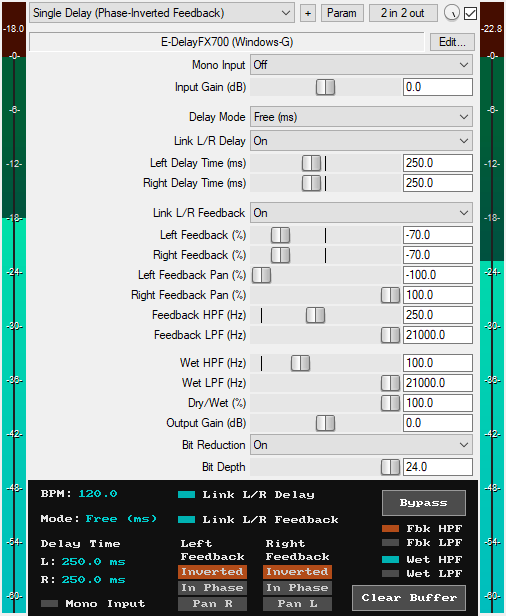
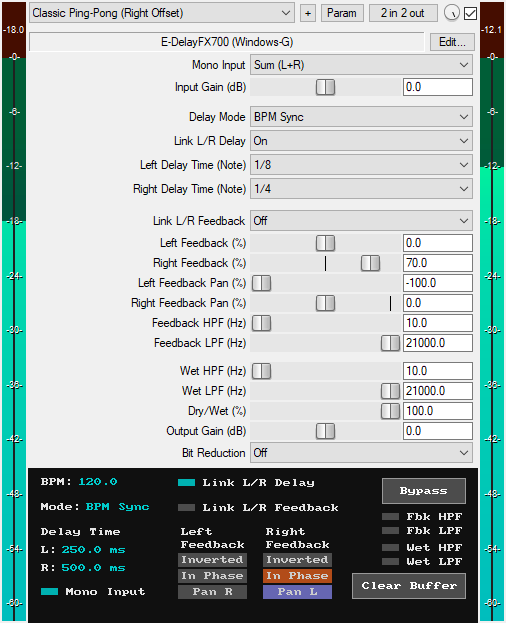
A JSFX digital dual delay plugin for REAPER that offers:
* Two Delay Modes:
1. Free (ms): Manually set the left and right delay times independently from 0 ms to 10,000 ms (10 seconds).
2. BPM Sync (2/1 to 1/128): Synchronize the independent delay times to the host's tempo with 25 musical note values, from the slow double whole note (2/1) to the fast one hundred and twenty-eighth note (1/128), including dotted and triplet variations.
* Mono Input: Convert the input signal to mono before it reaches the delay lines using one of four modes: Sum (L+R), Left only (L), Right only (R), or Difference (L-R). This is particularly useful for replicating classic ping-pong delays. When set to "Off", the plugin processes the input signal in its original form without any mono conversion.
* Input Gain (-30 dB to +30 dB): Boost or attenuate the input level before the delay processing. This can be useful for compensating for volume changes that may occur when mono conversion is enabled.
* Left/Right Delay Times: Set delay times for each channel from 0 ms to 10,000 ms (10 seconds) in Free mode, or choose from 25 musical note values in BPM Sync mode. Independent control over each channel allows the creation of anything from offset doubling effects to wide, rhythmic stereo patterns. In Free mode, setting one channel to 0 ms and the other to a value above 0 ms creates a stereo widening or Haas effect.
* Link L/R Delay: When enabled, adjusting one channel's delay time automatically adjusts the other. Offset is supported, so one can remain higher than the other while maintaining the link.
* Left/Right Feedback (-100% to +100%): Controls the amount of the delayed signal that loops back into each channel's delay buffer, creating repeating echoes. Positive values (1% to 100%) create in-phase feedback, while negative values (-100% to -1%) create inverted-phase feedback.
* Link L/R Feedback: When enabled, adjusting one channel's feedback amount automatically adjusts the other. Offset is supported, so one can remain higher than the other while maintaining the link.
* Left/Right Feedback Pan (-100% to +100%): Uses true stereo panning (not balance) to position the feedback signals anywhere in the stereo field. True stereo panning enables a wide range of creatively placed echoes, including centered echoes, cross-feedback echoes, and ping-pong or bouncing echoes that alternate between the left and right channels. When the Left Feedback Pan is at -100%, the left channel's feedback stays fully in the left speaker; at 0%, it's centered equally between both speakers; at +100%, the left channel's feedback is sent entirely to the right speaker. When the Right Feedback Pan is at -100%, the right channel's feedback is sent entirely to the left speaker; at 0%, it's centered equally between both speakers; at +100%, it stays fully in the right speaker. The stereo pan utilizes a -3dB sine-taper pan law, which ensures that loudness remains consistent across the stereo field when panning.
* Feedback HPF (10 Hz – 20 kHz): Applies a 12dB/oct high-pass filter to the signals being fed back into the delay buffers. It can be used to remove low frequencies from each successive delay repeat, preventing bass buildup or muddiness in the feedback trail. The filter becomes active only when the frequency is set above 10 Hz.
* Feedback LPF (20 Hz – 21 kHz): Applies a 12dB/oct low-pass filter to the signals being fed back into the delay buffers. It can be used to remove high frequencies from each successive delay repeat, creating darker echoes that simulate the behavior of analog delay units. The filter becomes active only when the frequency is set below 21 kHz.
* Wet HPF (10 Hz – 20 kHz): Applies a 12dB/oct high-pass filter to the wet signal, affecting both the delayed signal and the feedback repeats. This is useful for removing low-frequency content from the entire delay effect. The filter becomes active only when the frequency is set above 10 Hz.
* Wet LPF (20 Hz – 21 kHz): Applies a 12dB/oct low-pass filter to the wet signal, affecting both the delayed signal and the feedback repeats. This is useful for removing high-frequency content from the entire delay effect. The filter becomes active only when the frequency is set below 21 kHz.
* Dry/Wet Mix (0% to 100%): Blend between the original signal and the delayed signal, from 0% (fully dry, no delay audible) to 100% (fully wet, only delayed signal audible).
* Output Gain (-30 dB to +30 dB): Sets the final output level of the plugin to compensate for volume changes.
* Bit Reduction (Off/On): Enables or disables the bit reduction stage. When enabled, the Bit Depth control becomes active.
* Bit Depth (4-bit to 24-bit): Controls the bit resolution of the wet/delayed signal from 4 to 24-bits. The Bit Depth slider is only visible when Bit Reduction is active.
* GUI Clear Buffer Button: A dedicated GUI button that instantly clears all audio stored in the delay buffers, removing any lingering echoes or feedback. This is particularly useful when experimenting with extreme feedback settings and wanting to start fresh without stopping playback. The buffers also automatically clear on each playback start to prevent interference from old audio in the buffer.
* GUI Bypass Button: A smooth bypass button for toggling the delay effect on or off without audio clicks or pops. It is available for automation as "Bypass (Smooth)" in the plugin's parameter list.
* GUI BPM, Delay Mode & Time Display: The GUI displays the current BPM, delay mode (Free or BPM Sync), and the delay times for the left and right channels. The delay times are displayed in milliseconds regardless of the delay mode. This means even in BPM Sync mode, the exact millisecond equivalent of the selected note value is displayed. This is useful when switching from BPM Sync mode to Free mode to dial in similar delay times manually.
* GUI Mono Input & L/R Link Indicators: Visual indicators show when mono input conversion is active and whether the L/R delay times and feedback amounts are linked or unlinked.
* GUI Feedback Phase & Pan Indicators: Visual indicators display each channel's feedback phase (in phase or inverted) and pan direction (left or right) for quick visual confirmation.
* Filter Status Indicators: Visual indicators show the active/inactive status of the Feedback and Wet high-pass and low-pass filters for quick visual reference.
* Zipper-Noise-Free Operation: Advanced interpolation ensures no zipper noise during slider automation or real-time adjustments.
* Minimal CPU Usage.
* 15 Factory Presets: The plugin comes with 15 factory presets that can be imported via the included RPL file. Instructions for importing the presets are provided in the "Installation & Preset Library Import" file included in the Gumroad plugin download.
You can grab it for $10. All future updates are free, just make sure to use a valid email so I can send future updates to you.
Listen to the audio demos here or on the Gumroad product page to hear what the plugin can do.
Email Support: info.windowsg@gmail.com
==================================================
Using This JSFX Plugin in Other DAWs:
If you want to use this JSFX plugin in other DAWs, you can do so using the open-source YSFX plugin.
YSFX is available in VST3, AU, and CLAP formats for Windows, macOS, and Linux.
Download your preferred version of YSFX from here (Click on "Assets" for the downloads to appear):
https://github.com/JoepVanlier/ysfx/releases
YSFX comes in two versions:
* ysfx-s FX (for JSFX effects).
* ysfx-s instrument (for JSFX instruments).
1. Open ysfx-s FX in your DAW,
2. Then click "Load", find your "E-DelayFX700_Windows-G" file, and click "Open."
The JSFX plugin will now run inside the YSFX host, working perfectly in any DAW that supports VST3, AU, or CLAP plugins.

Please log in to join the discussion
Submit: News, Plugins, Hosts & Apps | Advertise @ KVR | Developer Account | About KVR / Contact Us | Privacy Statement | Sell @ KVR | KVR Marketplace Terms & Conditions
© KVR Audio, Inc. 2000-2026

