
3 KVR members have added E-TremoloFX700 to 1 MyKVR group 3 times.
Download KVR Studio Manager (FREE)
A JSFX tremolo plugin for REAPER that offers:
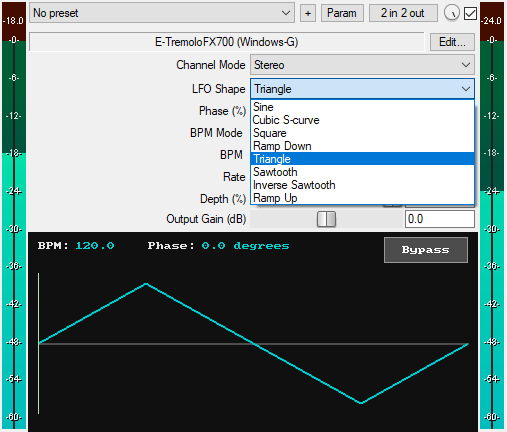
* Eight LFO Waveforms:
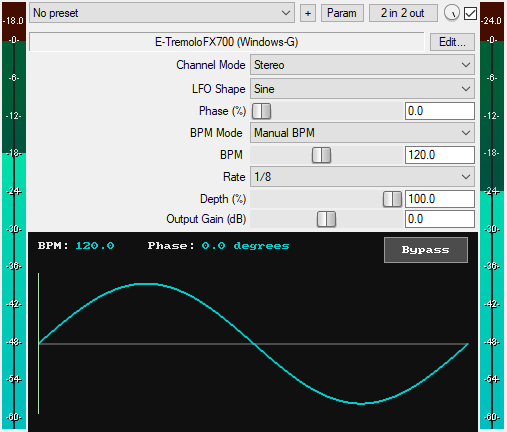
1. Sine: Produces modulation with curved ascent and descent, resulting in a rounded tremolo sound.
2. Cubic S-curve: Uses cubic polynomials to create an S-shaped waveform which captures more of the signal's body compared to a sine wave, resulting in a rounded tremolo sound with more presence. (Special thanks to Justin Frankel of Cockos for providing the cubic polynomial equations used to create the Cubic S-curve waveform.)
3. Square: Produces modulation with instant transitions between high and low levels, creating a hard on/off rhythmic gating effect.
4. Ramp Down: Produces a linear descending modulation, where the sound fades out before jumping up instantly, resulting in a fade-out-and-jump cycle.
5. Triangle: Produces modulation with linear ascent and descent, resulting in a fade-in and fade-out cycle.
6. Sawtooth: Produces a linear build-up followed by an instantaneous drop, creating a swell-and-drop cycle.
7. Inverse Sawtooth: Produces a linear descent followed by an instantaneous jump, creating a drop-and-jump cycle.
8. Ramp Up: Produces a linear ascending modulation, where the sound fades in from the lowest level and builds up before dropping instantly, creating a faded swell-and-drop cycle.
* Stereo/Mid/Side Modes: Apply the effect equally to the left and right channels (Stereo), to the mono component only (Mid), or to the stereo width component only (Side).
* Phase Control (0–100%): Adjusts the starting position of the LFO waveform. The slider value is in percentage, but it is displayed in degrees (0–360°) on the GUI for a more meaningful reference. Setting the Phase slider to 50% (180°) on symmetrical waveforms (Sine, Cubic S-curve, Square, Triangle) gives you the inverse of these waveforms. For asymmetrical waveforms (Ramp Down, Ramp Up), when Ramp Down is selected and the Phase slider is set to 50% (180°), it produces an Inverse Sawtooth wave; and when Ramp Up is selected and the Phase slider is set to 50% (180°), it produces a Sawtooth wave.
* BPM Mode: Use host BPM or set a custom BPM from 1 to 960.
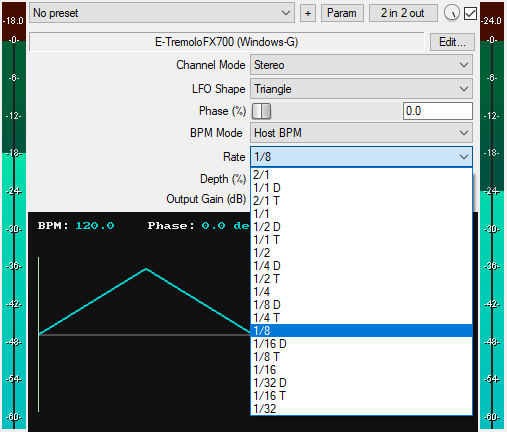
* Rate: Provides 19 rate divisions, from 2/1 (slowest) to 1/32 (fastest), including dotted and triplet options, covering all musically relevant tremolo rates. The rates are arranged in order of speed: 2/1, 1/1 D, 2/1 T, 1/1, 1/2 D, 1/1 T, 1/2, 1/4 D, 1/2 T, 1/4, 1/8 D, 1/4 T, 1/8, 1/16 D, 1/8 T, 1/16, 1/32 D, 1/16 T, and 1/32.
* Depth (0–100%): Controls the intensity of amplitude modulation. At 0%, no modulation occurs (just the dry signal); at 100%, full amplitude modulation is applied. Lower depth values produce subtle amplitude pulsing, while higher values produce pronounced pulsing.
* Advanced Host Sync: The LFO phase is synced to the DAW timeline, and the plugin automatically re-syncs on playback start, stop, or when jumping along the timeline, eliminating any sync drift issues.
* Output Gain (dB): Sets the final output level of the plugin from -30dB to +30dB to compensate for volume changes.
* GUI Waveform Display: See the exact LFO shape you are using as a visual reference.
* GUI Phase Indicator: Shows the LFO's current phase position as a moving vertical line.
* GUI Phase Readout: Displays the current phase position in degrees (0–360°).
* GUI BPM Readout: Shows the current DAW tempo for quick reference.
* GUI Bypass Button: A dedicated bypass button for toggling the tremolo effect on or off without audio clicks. Available for automation as "Bypass (Smooth)" in the parameter list.
* Zipper-Noise-Free Operation: Advanced interpolation ensures no zipper noise during slider automation or real-time adjustments.
* Minimal CPU Usage
You can grab it for $8. All future updates are free, just make sure to use a valid email so I can send future updates to you.
Listen to the audio demos here or on the Gumroad product page to hear what the plugin can do.
Email Support: info.windowsg@gmail.com
==================================================
Using This JSFX Plugin in Other DAWs:
If you want to use this JSFX plugin in other DAWs, you can do so using the open-source YSFX plugin.
YSFX is available in VST3, AU, and CLAP formats for Windows, macOS, and Linux.
Download your preferred version of YSFX from here (Click on "Assets" for the downloads to appear):
https://github.com/JoepVanlier/ysfx/releases
YSFX comes in two versions:
* ysfx-s FX (for JSFX effects).
* ysfx-s instrument (for JSFX instruments).
1. Open ysfx-s FX in your DAW,
2. Then click "Load", find your "E-TremoloFX700_Windows-G" file, and click "Open."
The JSFX plugin will now run inside the YSFX host, working perfectly in any DAW that supports VST3, AU, or CLAP plugins.
 $49.00Rotary CLS-222
Please log in to join the discussion
Submit: News, Plugins, Hosts & Apps | Advertise @ KVR | Developer Account | About KVR / Contact Us | Privacy Statement | Sell @ KVR | KVR Marketplace Terms & Conditions
© KVR Audio, Inc. 2000-2026

