Log InCreate An Account
  1. Plugins
  2. »
  3. Mastering The Mix
  4. »
  5. Expose
  6. »
  7. Details
Expose
Expose by Mastering The Mix is a Software Application for macOS and Windows. It functions as a Standalone Application.
Product
Version
2.0.8
Product
Version
2.0.8
Other
Stand-Alone Utility / Application
Copy Protection
Online Activation

MyKVR: Groups, Versions, ...

72 KVR members have added Expose to 7 MyKVR groups 89 times.

Download KVR Studio Manager (FREE)

Not In Your MY KVR Groups
(or group limitation prevents versioning)
+7 in private groups

KVR Rank

Overall: 6265   4976   5521

30-Day: 7886; 7-Day: 6853; Yesterday: 14099

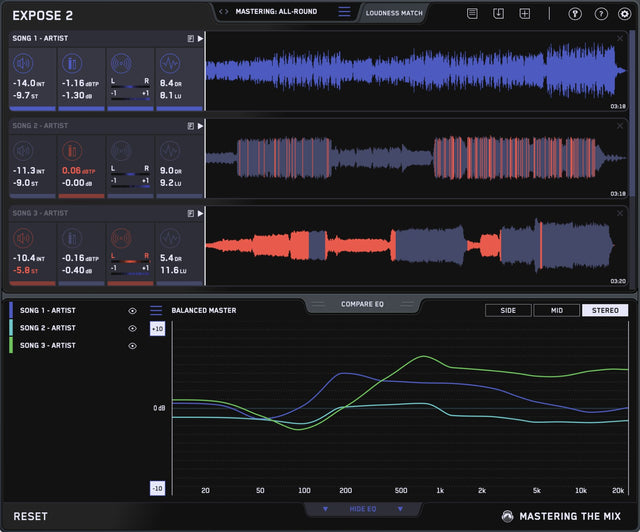
Expose 2 is an audio quality control application that helps you identify issues with your music.

From poor EQ balance and true peak clipping to over-compression and phase problems, too many tracks are released with preventable flaws.

Expose 2 ensures you identify and fix these issues early, so you can deliver the best listening experience and release your music with confidence.

New in Version 2:

  • Analysis Feedback gives you specific guidance on how to adjust your audio to get the sound you're looking for. This helps you hit your technical goals, whether you're aiming for a super-loud club master, or trying to optimize your music to sound great on streaming sites.
  • Compare EQ shows how your average tonal balance compares to your imported reference track. Or you can select a genre-specific preset, all of which were created using sonic profiles from commercially successful tracks. This will allow you to check that your music aligns with your sonic goals and isn't too muddy, dull, thin, or harsh before releasing.
  • Loudness Match normalizes the playback of all tracks in Expose using a LUFS algorithm. The human ear perceives louder music to have a fuller bass and more clarity in the high frequencies. Loudness matching removes this bias and enables you to make more informed decisions for your music.
  • A new approach to triggering warnings. in Expose 1, you would get a warning if your music was clipping or too loud for the selected preset. With Expose 2, each preset has a range of accepted readings depending on the selected preset (i.e. -14 LUFS for Spotify ±2dB). This means you'll hit the loudness sweet spot relating to where your music will be heard (club, vinyl, Spotify, etc.) and you'll avoid releasing a track that's too loud or too quiet.
  • Brand new user interface.

Measurements Include:

  • Integrated LUFS.
  • Short Term LUFS.
  • Decibels True Peak (16X Oversampling).
  • Sample Peak.
  • Left / Right heat map.
  • Correlation heat map.
  • Short Term Dynamic Range.
  • Loudness Range.

How To Use Expose in 6 Easy Steps:

  1. Load A Track: Open the application and drag your audio onto the dashboard.
  2. Presets: In the bottom left corner you'll see the presets. Click on the text and select where your audio will be heard (i.e 'Apple Music', 'Club', 'Spotify' etc).
  3. Readings: The four sections give you detailed information about the loudness, peaks, stereo/phase information, and dynamic range of your audio.
  4. Identify Issues: If Expose detects that issues would arise, the section icon and problematic readout will turn red. The waveform will also show you the exact location of the issues.
  5. Isolate Issues: Click on one of the numerical readouts to isolate those specific issues on the waveform.
  6. Preview Audio: You can click on the waveform to preview that part of the audio. Once you've identified what and where the technical issues are you can efficiently resolve them in your DAW.

{See video at top of page}

Latest User Reviews

Average user rating of 0.00 from 0 reviews

Products similar to Expose...

Comments & Discussion for Mastering The Mix Expose

Discussion
Discussion: Active

THIS POST HAS BEEN REMOVED

THIS POST HAS BEEN REMOVED

Please log in to join the discussion

Log In To KVR Audio