32 KVR members have added Focus Time to 17 MyKVR groups 37 times.
Download KVR Studio Manager (FREE)
Focus Time is a free experimental sample-based instrument built for evolving textures, rhythmic glitches, stretched pads, and animated sound design.
Download the factory bank here from google drive and use the import bank feature. There are nearly 500 MB of samples and 500 presets. If you want to roll your own and save the space, you can skip this step.
Load a sample, draw movement directly onto the timeline, and let Focus Time reshape the sound through multiple time-based engines. It can be played from MIDI like an instrument, or triggered from its own standalone Play mode for instant looping and auditioning.
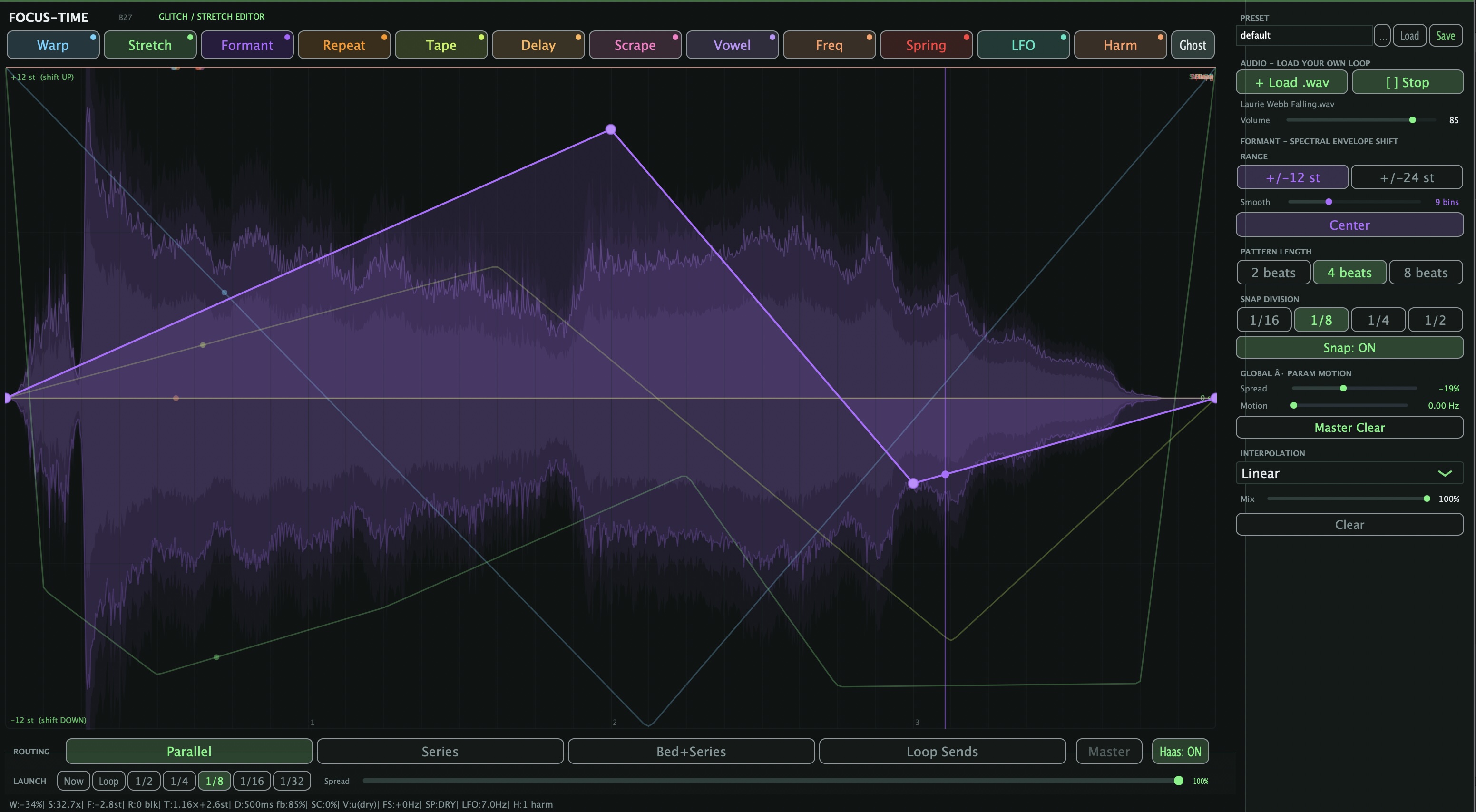
Focus Time is designed around a visual workflow: each tab gives you a different way to bend, repeat, smear, stretch, or color the sample while a moving playhead shows how the modulation unfolds over time.
Main Features:
What It's For.
Focus Time is especially useful for:
Concept
Most samplers play a sound back. Focus Time is built around the idea of drawing time into the sound.
Instead of only turning knobs, you shape motion visually: curves, repeat regions, playhead movement, waveform context, and per-tab modulation all work together to create something that feels alive.
Focus Time is not meant to be a polished "safe" rompler. It is a creative instrument for exploring strange, beautiful, unstable, and evolving sounds.
Format
VST3.
Free release for the KVR Developer Challenge.
Experimental / sound-design focused.
{See video at top of page}
Temporary macOS install workaround
Until I can get a properly signed/notarized Mac installer, macOS may block the plugin because I do not currently have an Apple Developer account.
After downloading and unzipping Focus Time, you may need to remove Apple's quarantine flag manually.
For VST3, run this in Terminal:
sudo xattr -cr "/Library/Audio/Plug-Ins/VST3/Focus Time.vst3"
Then restart your DAW or rescan plugins.
Please only do this if you trust the download. This does not sign or notarize the plugin; it only removes the quarantine flag macOS adds to downloaded files.
MORE INFO
FOCUS·TIME — a curve-drawn time/pitch/texture mangler (GrossBeat-style workflow, way more engines).
If you've used GrossBeat, the workflow will click instantly: draw a curve on a tempo-synced timeline, the audio follows it in real time, loop it to the beat. FOCUS·TIME keeps that exact "draw a shape, audio obeys" gesture but routes it through twelve genuinely different DSP engines plus two master output lines, so the same drawing motion produces wildly different results depending on the tab.
The core idea.
Every tab shares one curve editor: a horizontal timeline synced to host tempo (1/2/4/8-bar patterns, snap-to-grid), and a vertical axis whose meaning changes per engine. Click to add nodes, drag curves between them (linear or eased). A ghost overlay shows every other tab's curve faded behind the active one.
The twelve tabs.
Warp — classic GrossBeat-style time-stretch/pitch curve: speed up, freeze, reverse-glitch sections live.
Stretch — this is literally Paulstretch, ported in full. 2x to 500x slowdown (default 50x), skewed so the useful 20-100x range sits in the middle of the knob. Turn any loop into an ambient drone/pad with the signature Paulstretch smear.
Formant — pitch-shift with independent formant correction — shift pitch without the chipmunk/Munchkin effect, or push it deliberately for robotic vocal effects.
Repeat — draw custom stutter/retrigger blocks directly on the timeline, each with its own length and position. Beat-repeat, but per-step custom.
Tape — varispeed emulation. Curve = playback speed (center=1x, top=4x, bottom=full stop) with an Inertia knob that simulates flywheel weight so speed changes glide like a real reel slowing down rather than snapping instantly.
Delay — curve-controlled delay time, 1ms–500ms, with feedback — draw delay-time automation synced to the pattern.
Scrape — additive friction/texture generator. Low curve values add tremolo modulation; high values sweep a tone from 80Hz to 4kHz — mechanical, metallic textures and risers.
Vowel — 5-formant vocal filter bank (Chamberlin SVFs) morphing through u-o-a-e-i across the curve, with a unison/stack knob for choir thickness.
Freq Shift — true Hilbert-transform frequency shifter (not pitch-shift) — ±5000Hz of inharmonic, bell-like detuning, classic Doppler/ring-mod-adjacent textures.
Spring — this is a black-hole-style reverb: an input diffuser feeding 4 modulated, size-morphing dispersive feedback lines. The curve controls tank size (0.2x–4x), so you can sweep from a tight spring-reverb ping into an infinite, smeared cathedral/black-hole tail and back.
LFO — curve draws the LFO rate (7Hz–22Hz), modulating either a Chamberlin lowpass cutoff or pitch vibrato (±3 semitones), with sine/tri/saw/square shapes.
Harmonic — additive resonator: curve controls how many of 16 partials are active (1 at top, 8 center, 16 at bottom). Transient mode strikes the resonator bank on every hit in your audio like a mallet on a bell; Free mode is a continuous additive drone. Spread knob (or its own bipolar curve via right-click) warps the partial series from compressed clusters through harmonic to stretched/inharmonic. Full stereo width via micro-detuned L/R phase.
Master output lines (new in B27) — two additional always-on curves sitting after all twelve tab engines: a Master Filter line (top = transparent bypass, bottom sweeps to a dark lowpass) and a Master Volume line (gain/gating). These act as a final shaping pass over whatever combination of tabs is active.
Global Spread/Motion macro — a single bipolar knob (with optional LFO via Motion) that simultaneously bends every active tab's parameters AND shifts curve read-position by up to ±25%, giving one-knob "more extreme" or "more subtle" control across the whole stacked chain.
Workflow.
Tempo-synced, loop-locked curves on every tab
Stackable: run multiple engines in series/parallel, or "Loop Sends" mode where tabs act as effect sends off one master loop.
Full preset save/load (.ftp) with sample-path recall and missing-file warnings
Normalize button for clean gain-staging before transient-sensitive engines (Harmonic, Vowel).
The elevator pitch: GrossBeat's curve-driven automation workflow, but the effects chain underneath includes a full Paulstretch, a black-hole reverb, a Hilbert frequency shifter, a 5-formant vocal filter, and a transient-triggered additive resonator — twelve engines plus two master lines, all controlled by the same simple "draw a curve" gesture.
Routing modes.
Three engines stack in Series (output of one tab feeds the next), Parallel (all active tabs process the same source independently and sum together), or Bed+Series — a hybrid where one tab acts as a static "bed" layer underneath a series chain on top of it.
The fourth mode, Loop Sends, is built specifically for drum loops: instead of each tab being an independent processed copy of the loop (which doubles up the dry signal and stacks reverb tails awkwardly), Loop Sends treats the whole rig as one shared loop with a single read-head, and each active tab becomes an effect send off that loop. The master dry bed is subtracted from each tab's output afterward, so opening a send only adds its wet delta rather than another full copy of the loop — exactly the behavior you want when you're trying to glitch a drum loop without smearing the transients into mush.
Auto Haas de-phasing in Parallel mode.
This is the detail most people miss until they A/B it: in Parallel mode, running 2-3 tabs on the same source simultaneously means their outputs are highly correlated — comb-filtering and phase cancellation show up fast, especially on anything with strong transients. FOCUS·TIME automatically applies a small per-tab Haas delay (sub-40ms, opposite-channel) the moment more than one tab is active in Parallel — each engine gets nudged to a slightly different stereo position (Warp left, Stretch center, Formant right, etc., with the exact spread depending on which combination is active). The result reads as width rather than phase mush. There's a Haas: ON/OFF toggle plus a Haas Amount knob (0-100%) if you want to dial the spread back for mono-sensitive material or push it further for a wider stack. Series, Bed+Series, and Loop Sends modes bypass Haas entirely since they don't have the same-source correlation problem.
Reviewed By sych0 [all]
July 18th, 2026
Version reviewed: 1.0 on Mac
I want to try this out, saw it on a YouTube video but im a logic user and no au. hoping for an update soon.
Reviewed By 2inchesofpleasure [all]
July 17th, 2026
Version reviewed: 1 on Windows
prettty cool VST from what i've watched, however your link routes to.
<a href="https://www.kvraudio.com/product/focus-time-by-touch-the-universe-productions">here</a>
theres no google drive link anywhere when inspecting the elements just google manager and google analaytics, googled it and still a no go, but presets or not you can do all kinda of wonky shit with the VST cant wait to test it out.
Reviewed By Sideshowmico [all]
July 15th, 2026
Version reviewed: 1.01 on Windows
Hello. The link to google drive does not work so I can't download factory library? Is there any way for me to get it?
Reviewed By bitterlemondays [all]
July 15th, 2026
Version reviewed: 1 on Windows
Too much going on since the challenge started to be calling this a ready submission (like the others are) when the challenge started. Cool idea though. Best of luck with the further journey, I appreciate your enthusiasm about improving your product.
 $79.00Twangström

There seems to be something amiss with your link to the Mac version, as well as the link to the factory bank.
Please log in to join the discussion
Submit: News, Plugins, Hosts & Apps | Advertise @ KVR | Developer Account | About KVR / Contact Us | Privacy Statement | Sell @ KVR | KVR Marketplace Terms & Conditions
© KVR Audio, Inc. 2000-2026