Log InCreate An Account
  1. Plugins
  2. »
  3. GetGood Drums
  4. »
  5. GGD Studio Cabs: Zilla Edition
  6. »
  7. Details

GGD Studio Cabs: Zilla Edition

Cabinet Simulation Plugin by GetGood Drums
MyKVRFAVORITE0WANT2
GGD Studio Cabs: Zilla Edition
GGD Studio Cabs: Zilla Edition by GetGood Drums is a Virtual Effect Audio Plugin for macOS and Windows. It functions as an Audio Units Plugin, a VST 3 Plugin and an AAX Plugin.

MyKVR: Groups, Versions, ...

22 KVR members have added GGD Studio Cabs: Zilla Edition to 22 MyKVR groups 23 times.

Download KVR Studio Manager (FREE)

Not In Your MY KVR Groups
(or group limitation prevents versioning)
+22 in private groups

KVR Rank

Overall: 13752   10403   11722

30-Day: 11370; 7-Day: 8433; Yesterday: 20915

The journey to find your sonic identity as a musician and producer is one full of technical and engineering challenges. These obstacles ultimately disrupt your creative headspace and workflow.

In collaboration with Zilla cabs we created a tool aimed to solve one of these issues. Introducing GGD Studio Cabs: Zilla Edition.

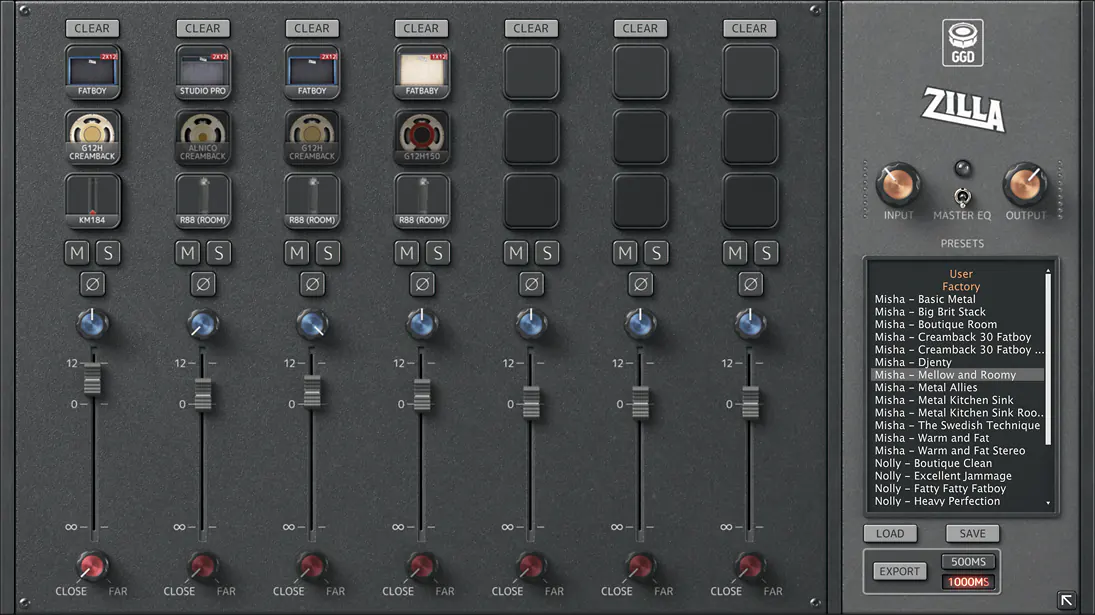
All IRs captured and engineered by Adam Getgood alongside the Zilla team at Middle Farm Studios, the home of both Invasion and Modern & Massive. This amazing live room isn't just great for drums, but just about any instrument you can throw at it:

  • A selection of nine Zilla cabs, including a custom build for this plug-in.
  • Seven independent channels to craft your perfect sound.
  • All IRs phase-coherent allowing you to combine microphones without the stress.
  • A choice of seven microphones with blendable close and far positions.
  • Export your unique blend of cabs and mics to use in other software and hardware.

Stop scrolling endlessly through lists of files, and focus on your creativity. Let us handle the engineering.

{See video at top of page}

Latest User Reviews

Average user rating of 0.00 from 0 reviews

Products similar to GGD Studio Cabs: Zilla Edition...

Comments & Discussion for GetGood Drums GGD Studio Cabs: Zilla Edition

Discussion
Discussion: Active

Please log in to join the discussion

Log In To KVR Audio