Log InCreate An Account
  1. Plugins
  2. »
  3. ADSR
  4. »
  5. MIDIGRiD
  6. »
  7. Details

MIDIGRiD

MIDI FX / Utility Plugin by ADSR
MyKVRFAVORITE1WANT4
MIDIGRiD
MIDIGRiD by ADSR is a Virtual Instrument Audio Plugin for macOS and Windows. It functions as an Audio Units Plugin and a VST 3 Plugin.
Product
Version
1.0
Product
Version
1.0
Instrument
Formats

MyKVR: Groups, Versions, ...

85 KVR members have added MIDIGRiD to 90 MyKVR groups 99 times.

Download KVR Studio Manager (FREE)

Not In Your MY KVR Groups
(or group limitation prevents versioning)
+90 in private groups

KVR Rank

Overall: 17556   13010   14966

30-Day: 20046; 7-Day: 9056; Yesterday: 33023

MIDIGRiD is a generative MIDI sequencer featuring an intuitive workflow and powerful generative controls. Your creative input is the key to unlocking boundless compositional potential.

MIDIGRiD can work in any DAW and with any synth that accepts MIDI input. Deceptively fun to use, MIDIGRiD is a creative powerhouse that can generate complex, creative and dynamic melodic patterns that evolve in real-time.

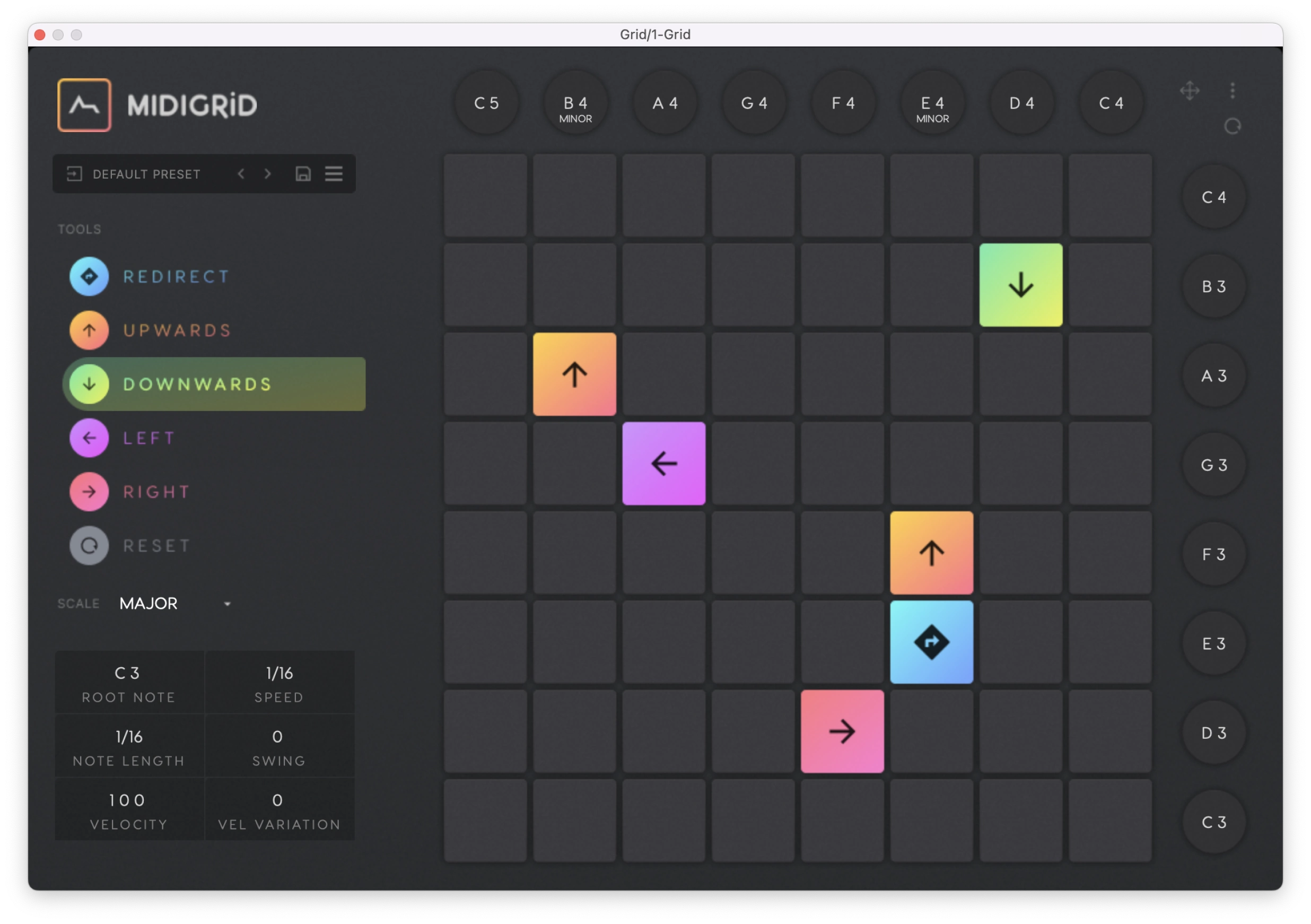
MIDIGRiD composes evolving MIDI patterns using semi-random routing and an easy, fun and interactive 8x8 grid layout. Getting started is as easy as choosing a key & tempo and placing some blocks on the grid.

How it works:

  • The Grid: MIDIGRiD features an 8x8 grid that allows you to visually input and manipulate MIDI notes in real time. Each row of the grid represents a specific note, and each column represents a step in the sequence. The grid allows for intuitive and creative sequencing, enabling you to quickly create complex melodies, rhythms, and chord progressions.
  • Redirect Blocks: Unlike Direct Blocks, Redirect Blocks do not move or trigger notes, instead they stay put and change the direction of any Direct Blocks that collide with them. Redirect Blocks enhance the element of randomness giving your patterns dimension and movement.
  • Notes / Chords: When a Direct Block hits the edge of the Grid it triggers a note. There are controls at the right and above the grid that allow you to select whether a note or chord is triggered when this happens. Notes and chords are displayed according to your chosen scale.
  • MIDI Parameters: To the left of the grid, there are controls for the key and scale, the speed of the sequencer, the length of the generated notes, and velocity. When changing key and scale, the changes made will be harmonically informed – you will always change to a key or scale that is harmonically adjacent to the one you just left.
  • Direct Blocks: There are four direct blocks Upwards, Downwards, Left and Right. Click on the squares to assign them to the grid, then watch as they move, interact and trigger MIDI notes. The interaction of blocks is the key to spontaneous and evolving melodic patterns.

As a MIDI generator, MIDIGRiD does not create any sound on its own. You must route the MIDI data to the synth of your choice.

{See video at top of page}

Latest User Reviews

Average user rating of 0.00 from 0 reviews

Products similar to MIDIGRiD...

Comments & Discussion for ADSR MIDIGRiD

Discussion
Discussion: Active

Please log in to join the discussion

Log In To KVR Audio