
3 KVR members have added MixBass 2 to 2 MyKVR groups 4 times.
Download KVR Studio Manager (FREE)
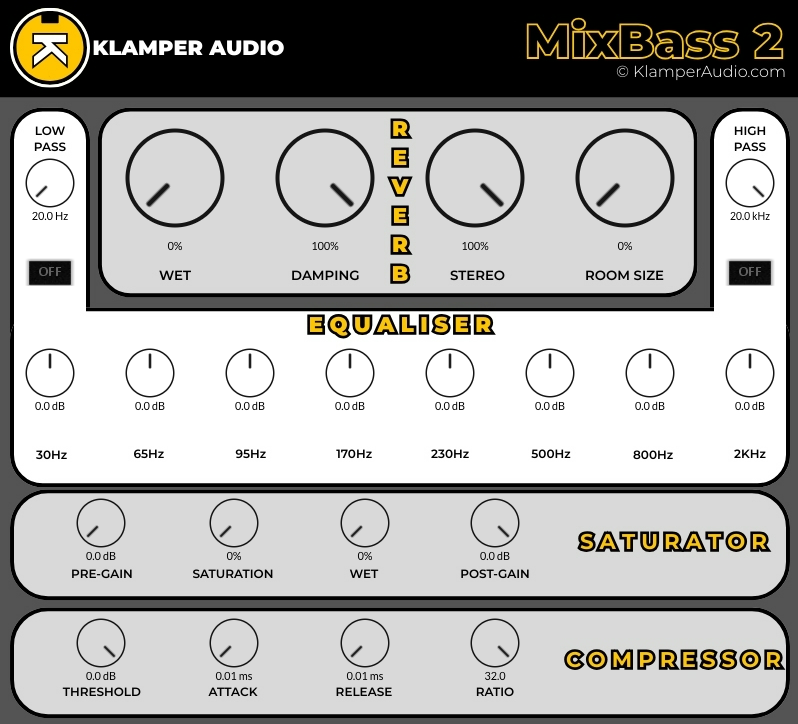
MixBass 2 by Klamper Audio is a bass processing plugin designed to shape and enhance bass sounds through multiple effect modules, including Reverb, Equalizer, Saturator, and Compressor. The interface follows a structured layout with a clean and professional design, using a color scheme of black, white, and yellow accents.
Low Pass Filter (Left Side): A rotary knob allows adjustment of the low-pass cutoff frequency (default: 20 Hz). A switch labeled OFF can disable the filter.
High Pass Filter (Right Side): A rotary knob to set the high-pass cutoff frequency (default: 20 kHz), with an ON/OFF switch.
WET: Controls the amount of reverb applied to the signal (0% - 100%).
DAMPING: Adjusts high-frequency absorption in the reverb tail (0% - 100%).
STEREO: Controls the stereo width of the reverb effect.
ROOM SIZE: Adjusts the size of the virtual reverb space (0% - 100%).
Features eight frequency bands (30Hz, 65Hz, 95Hz, 170Hz, 230Hz, 500Hz, 800Hz, and 2KHz).
Each band has a gain control knob (ranging from -12 dB to +12 dB).
PRE-GAIN: Adjusts the input signal level before saturation.
SATURATION: Controls the amount of harmonic distortion applied to the signal.
WET: Mix control for blending the saturated signal with the original.
POST-GAIN: Adjusts the output level after saturation.
THRESHOLD: Determines the signal level at which compression starts.
ATTACK: Controls how fast compression engages (0.01ms - higher values).
RELEASE: Adjusts how quickly the compression effect fades out (0.01ms - higher values).
RATIO: Defines the intensity of compression (default: 32:1).
MixBass 2 appears to be a versatile and intuitive plugin tailored for drum processing, offering comprehensive tonal shaping with filters, reverb, equalization, saturation, and compression. The interface is clear, making it accessible for both beginners and advanced users.
Reviewed By blazon@inbox.lv [all]
April 1st, 2025
Version reviewed: 1.0 on Windows
I'm not sure I understand the need for a LOW PASS filter with a default frequency of 20 Hz and a HIGH PASS filter with a default frequency of 20 kHz in multiple Klamper Audio plugins.
Enabling both would create a band-stop filter from 20 Hz to 20 kHz, effectively filtering out the entire range of human hearing.
Or maybe—just maybe—in this "clean and professional" interface, the filter labels are swapped? Of course, that seems highly unlikely, because if that were the case, it would seriously make me question the developer's professionalism and avoid these plugins entirely.
 $79.00Bus FORCE
Please log in to join the discussion
Submit: News, Plugins, Hosts & Apps | Advertise @ KVR | Developer Account | About KVR / Contact Us | Privacy Statement | Sell @ KVR | KVR Marketplace Terms & Conditions
© KVR Audio, Inc. 2000-2026

