Log InCreate An Account
  1. Plugins
  2. »
  3. Attila M. Magyar
  4. »
  5. MPE Emulator
  6. »
  7. Details
MPE Emulator MPE Emulator
MPE Emulator by Attila M. Magyar is a Virtual Effect Audio Plugin for macOS, Windows and Linux. It functions as a VST Plugin and a VST 3 Plugin.
Product
Version
1.2.4
Operating System: Windows 7 or newer
CPU: SSE2 support, 64-bit (X64) or 32-bit (X86)
RAM: around 30 MB per instance
Product
Version
1.2.4
Operating System:
- Apple Silicon (M1, M2, etc.): macOS 11 Big Sur or newer,
- Intel: macOS 10.12 Sierra or newer.
RAM: around 30 MB per instance
Product
Version
1.2.4
Operating System: Linux (e.g. Ubuntu 22.04 or newer)
CPU: SSE2 support, 64-bit (x86-64) or 32-bit (i686)
RAM: around 30 MB per instance
Effect
Formats
Copy Protection
None
Open Source
GPL 3
Important Note
Known issues: Versions before 1.2.4 failed to presist settings correctly on systems which used a non-English locale. / REAPER 7.18 (and below) lets raw MIDI control data pass through the VST 3 version. The bug was fixed in 7.19. / Ardour 8.6 (and below) ignores Channel Pressure (Aftertouch) events emitted by any VST 2 or VST 3 plugin. The bug was fixed in 8.7.

MyKVR: Groups, Versions, ...

51 KVR members have added MPE Emulator to 38 MyKVR groups 67 times.

Download KVR Studio Manager (FREE)

Not In Your MY KVR Groups
(or group limitation prevents versioning)
+38 in private groups

KVR Rank

Overall: 5534   4410   4885   506

30-Day: 8826; 7-Day: 11340; Yesterday: 18657

{See video at top of page}

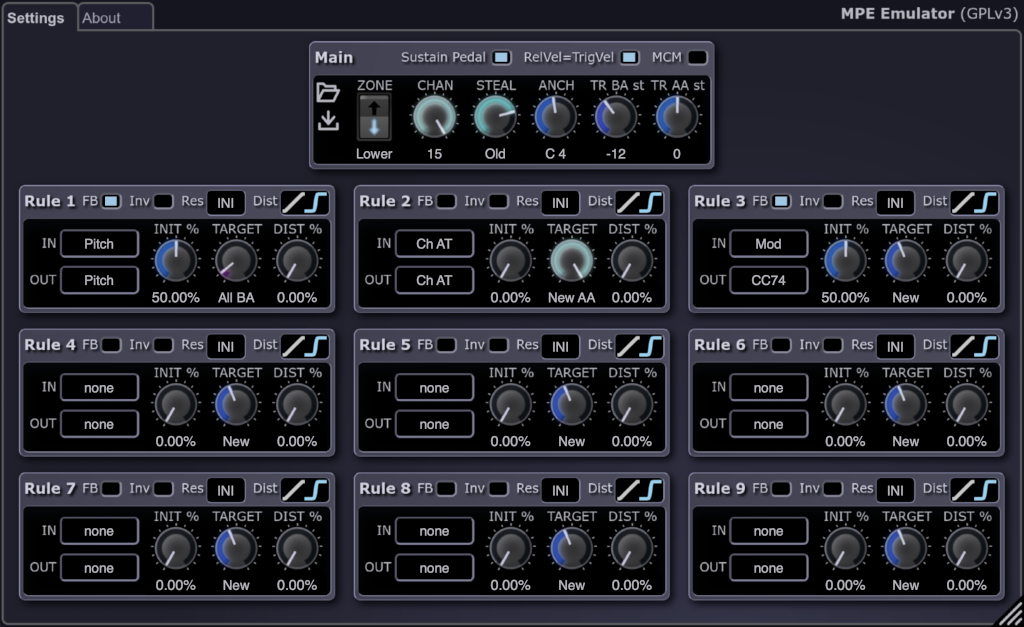
MPE Emulator is a VST plugin for enhancing ordinary MIDI controllers with MPE (MIDI Polyphonic Expression) capabilities based on configurable mappings and rules.

MPE Emulator is a MIDI proxy: an intermediary plugin which turns non-polyphonic, single channel aftertouch (channel pressure), pitch bend, or any MIDI control change (CC) message into polyphonic by applying them selectively to the lowest, highest, oldest, or newest note, either across the whole keyboard or restricted to a range of keys based on a configurable keyboard split point. It can also remap and reshape controller data, and do various other tricks to increase the expressiveness of a musical performance.

Note: VST is a registered trademark of Steinberg Media Technologies GmbH.

MPE Emulator Lite

MPE Emulator Lite is a platform-independent plugin (written in JSFX) for REAPER v6.74 and above which provides the most fundamental features of MPE Emulator.

Changes

What's New in v1.2.4

  • Bugfix: resolved an issue that broke state persistence and saving settings in certain DAWs (including Ardour, FL Studio, etc.) when the plugin was used on a system with a non-English locale.

What's New in v1.2.3

  • Bugfix: a name collision problem has been resolved which occurred on macOS when different plugin types of MPE Emulator or MPE Emulator and JS80P were simultaneously loaded into the same process.

What's New in v1.2.2

  • Bugfix: when the VST 3 plugin received a Note On and a subsequent Note Off event with the exact same timestamp (e.g. while editing MIDI in a piano roll UI), the note could get stuck until a plugin reset or an All Notes Off event occurred. This is now fixed.

What's New in v1.2.1

  • The VST 3 plugin now handles FL Studio's out-of-range pitch bend events better.
  • The documentation now explains how to get the VST 3 plugin working in FL Studio.

What's New in v1.2.0

  • The plugin now runs on macOS as well.
  • The GUI is now resizable which should also fix various font sizing problems.
  • Improved VST 3 event processing order consistency.
  • Bugfix: VST 3 bundles now follow the correct structure.

What's New in v1.1.0

  • Added ability to handle the sustain pedal, making it possible to send expression events to sustained notes as well.
  • Added ability for expression rules to fallback to the global channel (manager channel) when all notes have been released, allowing expressions to affect e.g. long note release tails as well.
  • Documentation additions and improvements.

What's New in v1.0.3

  • Bugfix: the VST 3 plugin used to ignore certain requests by the host to clear its state.

What's New in v1.0.2

  • Bugfix: CC 89 was displayed on the user interface as CC 90, this is now fixed.

What's New in v1.0.1

  • Correct documentation about FL Studio usage and quirks.
  • Update documentation about REAPER quirks to reflect the fixes in 7.19.
  • Bugfix: MPE Emulator Lite will now use the correct reset value for rules with Global, All Below Anchor, or All Above Anchor target after plugin reinitialization.
  • FST (VST 2.4): Initialize the MIDI helper parameters for CC 74 and Pitch Bend to 50%.
  • VST 3: Initialize the MIDI helper parameters for CC 74 and Pitch Bend to 50%.
  • VST 3: turn off MPE to VST 3 Note Expression conversion in hosts which do it by default.
  • VST 3: update SDK to 3.7.12 build 20.

What's New in v1.0.0

  • Transpose the two sides of the split keyboard independently from each other. (E.g. extend the range of small keyboards, or play the same note with different expression settings.).
  • The user interface has been revised in order to make it easier to select controllers.
  • MPE Emulator Lite is a JS plugin for REAPER which implements most of MPE Emulator's features, and it runs on any platform where REAPER runs (including various Mac configurations).
  • Bugfix: the FST (VST 2) plugin will now export all its parameters.
  • Bugfix: the VST 3 plugin will now initialize and update its exported parameters correctly.

What's New in v0.0.2

  • When notes are released and new notes are triggered, channel allocation will avoid reusing the released channels for as long as possible so that longer envelope releases have a chance to ring down.
  • Bugfix: when no notes were being played, and there were rules with Low, High, Old, or New target, and their matching control events were received, then MPE Emulator could emit MIDI System Reset (0xFF) messages followed by garbage data bytes. Now MPE Emulator will only emit MIDI messages that it is supposed to produce. (Issue on GitHub: #1).

Known Issues and Quirks

REAPER 7.18 (and below) lets raw MIDI control data pass through the VST 3 version

When a VST 3 plugin outputs MIDI controller messages in REAPER 7.18 and below versions, they get merged with the raw MIDI input regardless of whether the "Replaces MIDI bus" or the "Merges with MIDI bus" setting is selected. This makes the VST 3 version of MPE Emulator unusable in the affected REAPER versions. The bug was fixed in 7.19.

The FST (VST 2.4) version of MPE Emulator works fine in all versions of REAPER.

Ardour 8.6 (and below) ignores Channel Pressure (Aftertouch) events emitted by plugins

There's a bug in both the VST 2 and the VST 3 implementation in Ardour 8.6 and below versions which makes it drop Channel Pressure (Aftertouch) events (and Program Change events in case of VST 2). The bug was fixed in 8.7.

FL Studio quirks

FL Studio v2024.1.1 build 4239 (and below) seems to have a few quirks:

  • Control messages emitted by the VST 3 version of MPE Emulator are lost when the synthesizer is a VST 2 plugin.
  • Setting up plugins that output MIDI requires a few steps.

VST 3 Note On and CC event ordering issues

A VST 3 plugin has no way to know the exact order of MIDI note events and controller events on its input, and has no way to communicate it on its output, because MIDI support is fundamentally broken in the VST 3 protocol.

MPE Emulator does what can be done to work around this, but since the protocol's design makes it impossible to ensure the sequentiality between note events and controller events which need to occur at the same moment, there might be cases where the VST 3 version of MPE Emulator cannot fully satisfy the requirements of a synthesizer which expects CC and note events that belong together to come in a particular well defined order.

The reason for this is that the VST 3 protocol separates the continuous and consistent MIDI stream that comes out of MIDI input devices into separate streams of note-related events and controller events, and passes the latter to plugins masqueraded as parameter automation. On the output side, a VST 3 plugin needs to emit its outgoing MIDI CC messages wrapped into a special event type (LegacyMIDICCOutEvent), also separated from note events, and these then get converted to the expected input format of the next plugin in the chain by the host application.

Note that the FST (VST 2.4) version does not suffer from these problems (as long as the host implements MIDI properly), since the VST 2 standard has full support for MIDI and its extensions like MPE.

The mod wheel or a CC event is not handled with polyphony despite matching one of the rules

This can occur in the scenarios explained below. Most DAW applications have a plugin or a special MIDI inspection tool which lets you peek into the log of raw MIDI messages that are sent and received by each plugin, bus, and MIDI track. You can use that tool to confirm what is going on in your specific case. If you see something there that is clearly wrong on MPE Emulator's side, and it's not a known quirk with a particular host and plugin type combination then please report it as a bug:

  • The synth supports MPE only for pitch bend, channel pressure, and CC 74 (a.k.a. Brightness, Timbre, Sound 5, etc.).
    Though the MPE specification allows basically any controller event to be sent on the polyphonic channels (member channels) and to be handled individually for each note, many commercial synthesizers use only the pitch wheel, the channel pressure, and CC 74 with polyphony, because these are the ones that are mandated by the standard. If you set up a rule in MPE Emulator to make e.g. the mod wheel polyphonic and the synthesizer ignores it or still applies it globally, then MPE Emulator has no influence on it, and the synthesizer is doing nothing wrong with respect to the standard either.
  • The DAW merges the raw single channel MIDI messages with MPE Emulator's output.
    In some cases, this is a bug in the DAW application (e.g. REAPER 7.18 and below), in other cases, the DAW application should have an option somewhere to turn this off.
    If all else fails, a workaround might be to sacrifice a channel in order to separate the MPE stream from the raw single channel MIDI stream:
    1. Set both your synthesizer and MPE Emulator to use the lower zone with 14 channels.
    2. Set your MIDI keyboard to use channel 16.
    Alternatively, you can use channel 1 on your keyboard, and configure the upper zone with 14 channels in your synthesizer and in MPE Emulator. What's important is to have the keyboard use a MIDI channel which is outside the MPE zone that is used by the synthesizer and MPE Emulator.

Latest User Reviews

Average user rating of 0.00 from 0 reviews

Products similar to MPE Emulator...

Comments & Discussion for Attila M. Magyar MPE Emulator

Discussion
Discussion: Active

Please log in to join the discussion

Log In To KVR Audio