


2 KVR members have added OnStage to 1 MyKVR group 2 times.
Download KVR Studio Manager (FREE)
Your Personal Live Performance Studio. Built for Singers Who Command the Stage
OnStage is a dedicated live vocal performance application that puts media playback, and plugin hosting in one streamlined interface. No complex DAW workflows, no cluttered menus, no distractions. Just you, your voice, your backing tracks, and a toolkit designed for the spotlight. OnStage runs as a native desktop application with rock-solid ASIO support on Windows and CoreAudio on macOS. It's designed for karaoke nights, live gigs, rehearsals, streaming, and anyone who wants studio-quality vocal processing without the studio.
The Media Player - Your Backing Track Engine
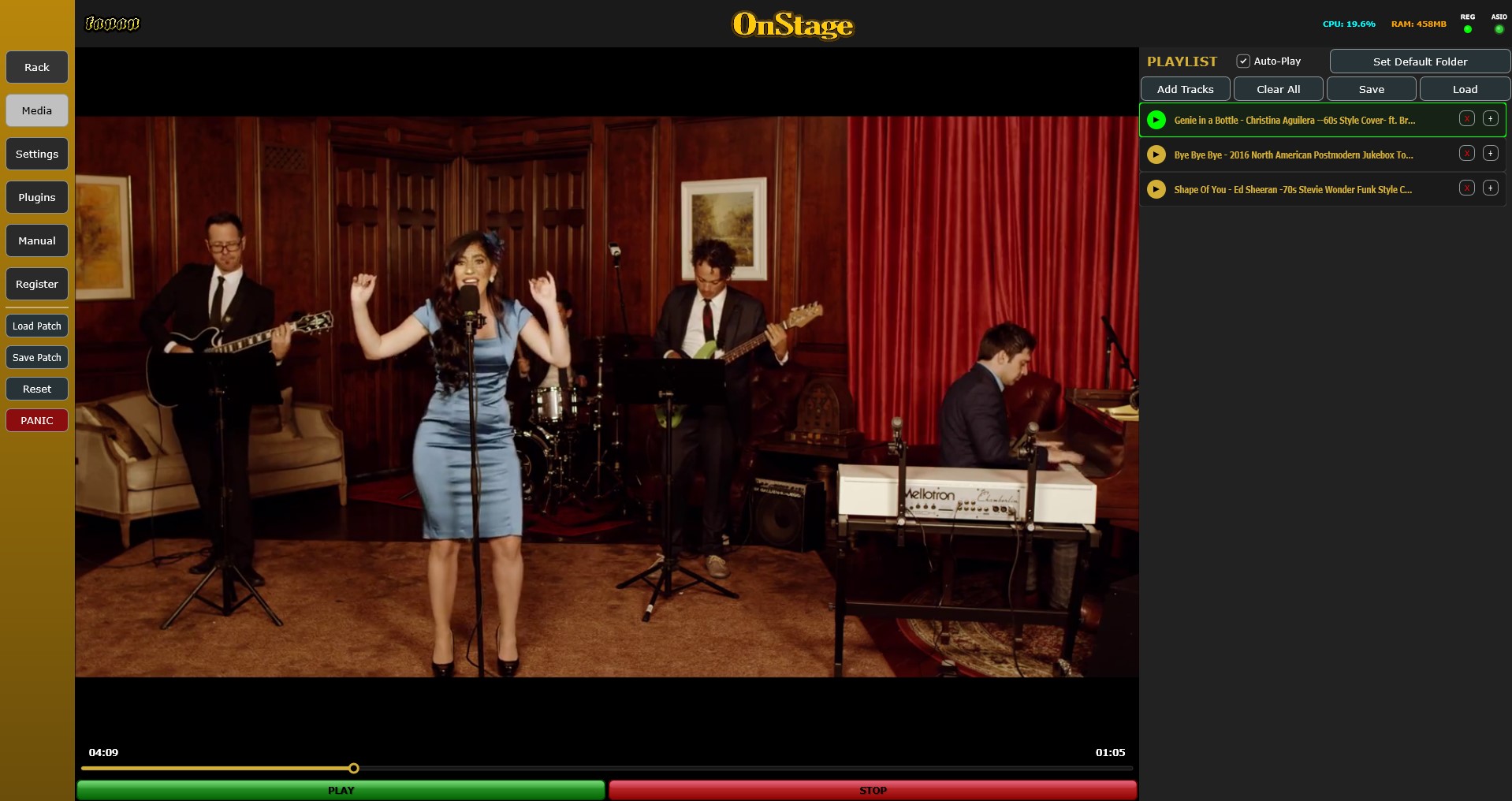
At the heart of OnStage is a full-featured media player built for live use. Load any audio or video file and it plays back through battle-tested engine. Full transport controls and instant cueing. Video output renders to a dedicated window you can throw onto a second screen for your audience. Karaoke files, concert backing tracks, DJ sets - OnStage handles them all with zero configuration.
Plugin Hosting - Extend Your Sound
Need that one special plugin? OnStage hosts VST3 effects on Windows and both VST3 and Audio Unit on macOS. A built-in plugin scanner discovers your installed effects with background metadata collection. The Plugin Browser sits ready in the sidebar. drag any effect onto your chain and it's live. Every hosted plugin gets the same metering, bypass control, and crash isolation as the built-in effects.
Sidechaining For Singers? Never Been Easier!
Sidechain-capable plugins are automatically detected and their sidechain inputs are exposed as dedicated pins on the graph. Just drag a cable to the sidechain input and it activates. No menu diving, no bus configuration dialogs. Duck your backing track when you sing, trigger pumping compression effects, or create dynamic ducking between any signals in your chain. Most users never need to touch it. the default vocal chain handles everything. But when you want to go deeper and achieve that studio grade performance on a live stage, the power is there.
Playlist Management — Your Setlist, Organized
Build automatic playlists for entire shows. Drag and drop tracks into order, save setlists for recurring gigs, and navigate your performance with dedicated previous/next controls. Each track remembers its own settings. Load a ballad and your reverb opens up; switch to an uptempo number and your processing tightens automatically. The playlist panel shows track titles, durations, and playback status at a glance.
The Graph Canvas; Advanced Routing When You Need It
For users who want deeper control, OnStage includes a node-based routing canvas inherited from Colosseum's DNA. Wire your microphone input through custom effect chains, split signals to multiple destinations, and build processing networks that match exactly how you think about sound.
Live Performance Ready
OnStage is built with the stage in mind:
Built-In Manual
Need to know anything about OnStage? Switch to the Manual tab and find everything explained. No PDFs, no external documentation. It's all right there, always accessible.
Main Features:
OnStage. Step up. Plug in. Perform.

Please log in to join the discussion
Submit: News, Plugins, Hosts & Apps | Advertise @ KVR | Developer Account | About KVR / Contact Us | Privacy Statement | Sell @ KVR | KVR Marketplace Terms & Conditions
© KVR Audio, Inc. 2000-2026

