Log InCreate An Account
  1. Plugins
  2. »
  3. Pulsar Audio
  4. »
  5. Poseidon
  6. »
  7. Details
Poseidon
Poseidon by Pulsar Audio is a Virtual Effect Audio Plugin for macOS and Windows. It functions as a VST Plugin, an Audio Units Plugin, a VST 3 Plugin and an AAX Plugin.
Product
Version
1.1.11
Product
Version
1.1.11
Effect
Formats

MyKVR: Groups, Versions, ...

165 KVR members have added Poseidon to 160 MyKVR groups 178 times.

Download KVR Studio Manager (FREE)

Not In Your MY KVR Groups
(or group limitation prevents versioning)
+160 in private groups

KVR Rank

Overall: 3707   2921   3237

30-Day: 2248; 7-Day: 1414; Yesterday: 5438

Control the Beast

Ask an engineer for a shortlist of EQs that make their eyes and ears sparkle, and they'll probably mention an inductor-based design with a nautical name that conjures up images of the god Poseidon. The EQ section of this rare and legendary console made the sound of records you might have grown up with: Queen, The Beatles, David Bowie, The Rolling Stones... Let's just say it's "tried and tested".

Present in very few studios, this console is renowned for being highly musical. One key component behind its mojo is its unique band interactions – pushing the gain of one band can lead to EQ curves that would need three or four bands on a parametric EQ.

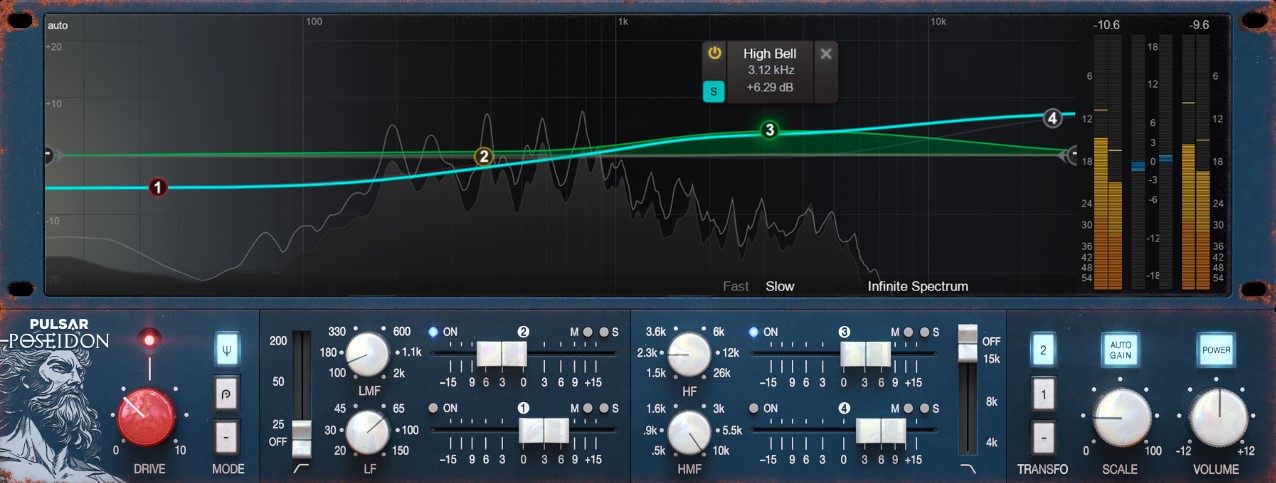
With such an idiosyncratic EQ, there's a learning curve. The interactions between its bands are so unique that we've never seen a digital reproduction that makes them simple to use. So we decided to nail it ourselves with an on-screen EQ curve that reacts faithfully to the quirks of the original hardware, making Pulsar Poseidon easy to master.

With all its additional features (Mid/Side bands, Gain Scale, Auto-Gain, multiple saturation colors), this plugin (VST/VST3/AU/AAX) faithfully resurrects the rare and iconic qualities of this console EQ into the digital realm.

Main Features

  • Topology Preservation Technology - Our modelling technology guarantees a perfect emulation of the original device's behavior. From the saturation of diodes, transistors or tubes, to the slight internal filterings, to the tiny calibration defects, everything is perfectly reproduced. What's more, we can reproduce all these behaviors without going through a complete simulation of the circuit, thus saving CPU power.
  • Saturation stage - Push the signal further with one of two saturation circuits and adjust the processing strength using the Drive knob. The first mode faithfully emulates the analog circuitry of the console that inspired this plugin, while the second is a Pulsar Audio creation featuring a slightly more modern and aggressive character.
  • Modern EQ Edition - Manipulate a peculiarly shaped analog EQ curve in an intuitive way. The curve editor is extremely easy to use, with a clear and concise overall frequency response display. You can edit all properties of any filter without touching the lower panel.
  • Output Transformer - The analog circuit of the original console channel had no output transformer. Pulsar Poseidon offers two additional options: an output transformer inspired by the Marinair models used in old Neve preamplifiers, and an original transformer algorithm optimized for the enhancement of low-end harmonics.
  • Mid-Side processing - Each band can be used on the entire stereo signal, or switched into operating with a single focus: the Mid only, to process monophonic, centered audio or the Side only, to process stereo, non-centered audio.
  • Auto-gain - This control compensates for volume changes introduced by equalization, keeping output level consistent with input. It uses a C-Weighting-based algorithm to introduce a level compensation based on EQ curve analysis. The compensation gain applied only depends on your EQ settings and won't change during playback.
  • Metering & Spectrum analyser The on-screen analyzer displays the audio spectrum in real-time (fast and slow window settings) or over the long-term with the Infinite Spectrum setting. In addition, peak metering provides insight into overall dynamics, and RMS meters let you monitor loudness and level matching. An overall gain meter is also available.
  • Gain scale - For wholesale reduction or increases in gain, the Gain Scale control lets you accentuate or reduce an entire EQ curve, acting like a multiplier for all bands' gain settings.
  • Oversampling - A selectable oversampling mode is available for computers that can handle it, with processing at rates up to 384 kHz. You can choose for higher oversampling settings to be applied at export than at playback.
  • Smart GUI - Pulsar Poseidon comes all wrapped up in a responsive and resizable interface. A resize handle enables you to choose the perfect size for each use case, from nice and compact to highly visible.

{See video at top of page}

Latest User Reviews

Average user rating of 5.00 from 2 reviews
Poseidon

Reviewed By electroBRAT [all]
April 16th, 2025
Version reviewed: 1.0 on Mac

Don't sleep on this plugin- too many "engineers" out there are passing this one by, and they really shouldn't. This has curves you're never going to get with other digital plugins. It's amazing how this "pushes" on other plugins behind it and really can make your sound so much better. It's not as difficult as other options out there in the wild either, and it's quite simple to get what you're looking for very quickly! TRY THIS.

Read Review
Poseidon

Reviewed By zisser [all]
September 12th, 2024
Version reviewed: 1 on Windows

Pulsar Audio's Poseidon EQ is an impressive plugin that brings the iconic character of the Trident console's EQ section into the digital realm. Renowned for its musical warmth and distinctive tonal shaping, the Trident EQ has been a go-to tool for producers and engineers in the analog world, and Poseidon does an excellent job of recreating that signature sound with modern useability.

https://youtu.be/KO6Wl6q7XOU

Get this plugins here.

https://udiaudio.com/products/pulsar-poseidon-eq

Read Review

Products similar to Poseidon...

Comments & Discussion for Pulsar Audio Poseidon

Discussion
Discussion: Active

Please log in to join the discussion

Log In To KVR Audio