4 KVR members have added PURGE Plus to 6 MyKVR groups 9 times.
Download KVR Studio Manager (FREE)
{See video at top of page}
What is PURGE Plus?
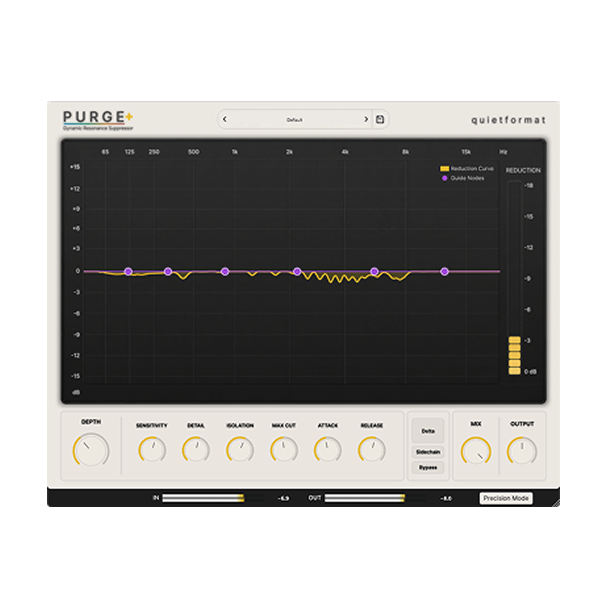
PURGE Plus is a dynamic resonance suppressor for harsh peaks, sibilance, ringing, fizz, and boxy buildup.
It analyzes the incoming signal in real time, detects resonances that stand out unnaturally within the source, and reduces them only when they need to be reduced.
Unlike a standard EQ that cuts fixed frequencies, PURGE Plus follows the surrounding frequency balance and spectral movement of the source:
Core Concept
The problem is not a loud frequency. It is a resonance that sticks out.
A frequency is not automatically a problem just because it is loud. A strong 5 kHz area can be the presence of a vocal. A strong 200 Hz area can be the body of an instrument.
What matters is whether that frequency belongs to the musical tone, or whether it sticks out from the surrounding spectrum.
PURGE Plus compares the signal against the surrounding spectrum and reduces resonance candidates that stand out unnaturally.
Tone Preservation
Heavy resonance suppression or aggressive dynamic EQ settings can sometimes make a source feel thin or pushed back.
PURGE Plus is designed around separating problem resonances from the original musical tone.
Delta Monitoring lets you hear exactly what is being removed, so you can keep the useful tone while reducing the parts that feel sharp, boxy, fizzy, or tiring.
Real Mixing Problems
Clean up the problems that slow down a mix.
When a vocal feels sharp, cymbals become tiring, a piano note rings too much, a guitar amp gets fizzy, or a bass note blooms out of control, PURGE Plus helps you clean it up without manually chasing every frequency.
Use it gently on a single track, or place it on a bus to smooth out harshness and resonant buildup across a wider part of the mix.
Factory Presets
72 presets to get you moving fast.
PURGE Plus includes 72 factory presets designed to help you start quickly in real mixing situations.
The presets cover vocals, drums, bass, guitar, keys, synths, mix bus, mastering, utility, and sound design.
They are not meant to lock you into one fixed sound. They are practical starting points that help you get close faster.
Delta Monitoring
Hear what is being removed.
Delta Monitoring lets you listen only to the signal PURGE Plus is reducing.
This makes it easy to check whether the plugin is focusing on the harshness, sibilance, ringing, fizz, or boxy buildup you actually want to control.
Guide Nodes
Focus the detector where it matters.
Guide Nodes do not boost or cut the sound like a normal EQ. They guide the detector toward the frequency areas that need more attention.
For example, if a vocal becomes harsh around 5 kHz, placing a Guide Node in that area helps PURGE Plus react more actively when resonances appear there.
Processing Modes
From detailed mixing to live monitoring.
Precision Mode is designed for mixing and mastering. It uses lookahead processing to help the detector track resonances more steadily.
Live Mode is made for recording, monitoring, and live performance. It runs without lookahead and prioritizes real-time response when low latency matters.
Sidechain Detection
Control clashes without simple volume ducking.
Sidechain Detection lets PURGE Plus react to another source.
Instead of pulling down the whole signal, PURGE Plus focuses on the resonant areas that conflict with the sidechain source.
Key Features
- Real-Time Resonance Detection
Analyzes the input signal in real time and detects resonances that stand out from the musical context.
- Dynamic Suppression
Reduces resonance only when it appears, instead of applying a fixed cut all the time.
- Guide Nodes
Guide the detector toward the frequency areas that need more attention.
- Delta Monitoring
Listen only to the removed signal and confirm what PURGE Plus is actually reducing.
- Sidechain Detection
Use another source to help control frequency clashes between instruments like kick and bass.
- Precision / Live Mode
Choose Precision Mode for mixing and mastering, or Live Mode for recording and monitoring.
System Requirements:

Please log in to join the discussion
Submit: News, Plugins, Hosts & Apps | Advertise @ KVR | Developer Account | About KVR / Contact Us | Privacy Statement | Sell @ KVR | KVR Marketplace Terms & Conditions
© KVR Audio, Inc. 2000-2026