
6 KVR members have added semedoEQ to 3 MyKVR groups 7 times.
Download KVR Studio Manager (FREE)
SemedoEQ v3.1.
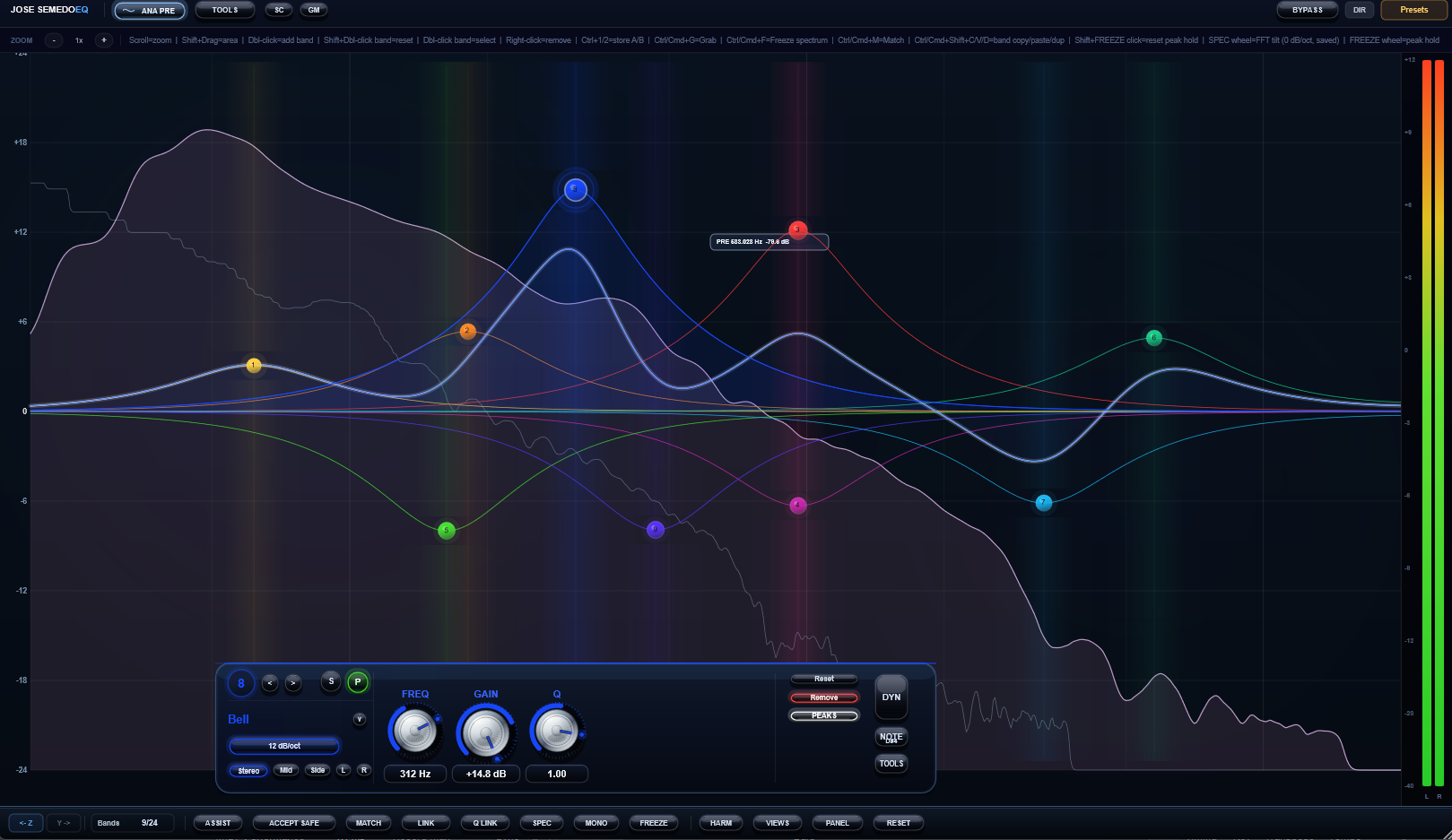
SemedoEQ v3.1 is a modern 24-band equalizer for mixing, mastering and advanced tonal control.
It combines precision EQ, dynamic EQ, spectrum matching, mid/side processing, saturation, compression, analyzer tools and a unique multi-instance Link View workflow in one plugin.
SemedoEQ is designed for producers, mixing engineers and mastering engineers who want more than a standard parametric EQ. It gives you surgical control for detailed correction, musical shaping for creative tone work, and advanced analysis tools for working across full mixes, buses and reference material.
Key Features.
24-band parametric EQ engine.
Multiple filter types, including bell, shelves, high-pass, low-pass, notch, band-pass, tilt shelf and all-pass.
Wide slope options, including steep filter curves.
Stereo, Mid, Side, Left and Right band domains.
Dynamic EQ control for frequency-dependent movement.
Temporal shaping modes for attack/sustain-style EQ behavior.
Linear Phase, Minimum Phase, Matched Phase, Mixed Phase and Zero Phase style options.
Spectrum Match / EQ Match tools for tonal comparison and correction.
LUFS Match and Auto Gain options for level-aware decisions.
Mono Low control to tighten the low end.
Output Width control for stereo image adjustment.
Built-in compressor section.
Built-in saturation section for harmonic color.
Analyzer modes including Pre, Post, Pre+Post, Delta, Sidechain and Mid/Side views.
Sidechain-aware workflow.
Link View for seeing and controlling multiple SemedoEQ instances across your mixer.
Windows VST3 support.
macOS Apple Silicon AU for Logic Pro and VST3 for other supported Mac DAWs.
Link View.
Link View is one of the most unique parts of SemedoEQ v3.1.
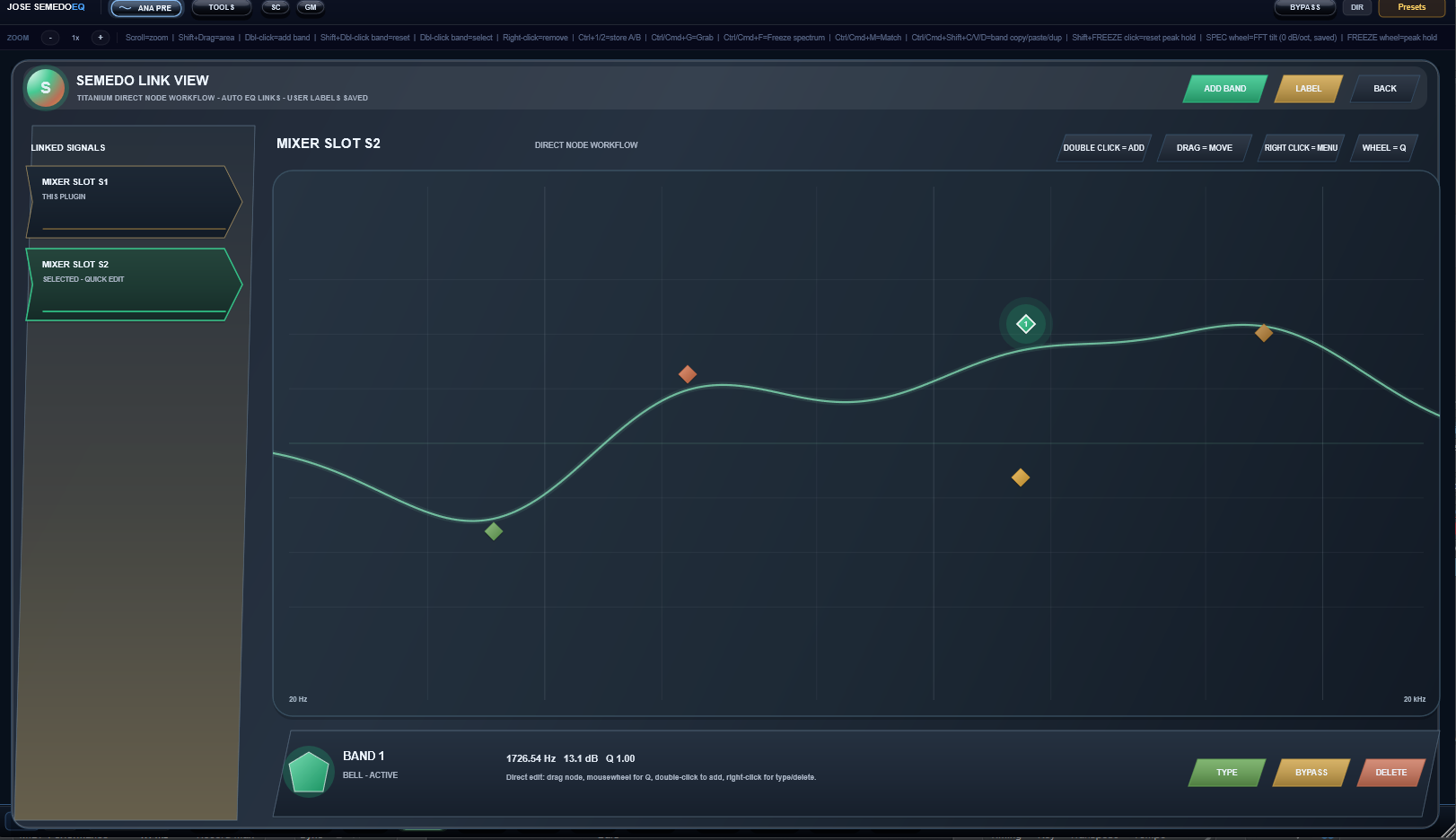
When you place SemedoEQ on multiple mixer channels, Link View can show those active SemedoEQ instances together in one dedicated view. Instead of opening every EQ separately, you can look at the linked mixer slots from one place, select another SemedoEQ instance, inspect its EQ shape and make quick adjustments.
This makes SemedoEQ useful not only as a single-channel EQ, but also as a mixer-wide tonal workflow tool.
What Link View can do.
Show multiple active SemedoEQ instances from your mixer in one view.
Display linked mixer slots with clear slot names.
Let you label SemedoEQ instances, for example Kick, Bass, Vocal or Drum Bus.
Select a linked SemedoEQ instance from the list.
View the selected EQ's active bands on a dedicated graph.
Add a new bell band directly from Link View.
Drag EQ nodes to adjust frequency and gain.
Use the mouse wheel to adjust Q.
Change filter type from the Link View controls.
Bypass or delete selected bands.
Compare tonal movement between different mixer channels faster.
Work across a mix without constantly opening and closing multiple plugin windows.
Why Link View matters.
In a normal mix, you often have EQs on vocals, drums, bass, instruments, buses and the master channel. Usually, you have to open each EQ separately to check what is happening. Link View gives you a faster way to manage that situation.
For example, you can place SemedoEQ on your kick, bass, vocal and drum bus, then use Link View to move between those EQs from one interface. This helps you make better tonal decisions because you can think about the mix as a whole instead of only one isolated channel.
Link View is especially useful for:
Balancing kick and bass.
Checking vocal against instrumental tone.
Managing bus EQ moves.
Comparing EQ decisions across multiple mixer channels.
Cleaning frequency conflicts.
Speeding up mix revisions.
Working with several SemedoEQ instances without losing overview.
Note: Link View is designed for linked SemedoEQ instances. Host support for cross-instance communication can vary depending on the DAW and plugin format. For multi-instance Link View workflows, VST3 is recommended where available.
What's New in SemedoEQ v3.1.
SemedoEQ v3.1 is a major step forward compared to older SemedoEQ builds.
Earlier versions focused more on the core EQ engine, analyzer work, saturation, visual development and basic workflow improvements. SemedoEQ v3.1 brings the plugin closer to a complete professional mixing and mastering environment.
Compared to older versions, v3.1 improves:
Multi-instance workflow
SemedoEQ v3.1 includes the Link View workflow, allowing multiple SemedoEQ instances on different mixer channels to be viewed and controlled from one dedicated interface.
More complete mastering workflow
Spectrum Match, LUFS Match, Dynamic EQ, Mono Low, Output Width, Mid/Side processing and analyzer views make v3.1 much more useful for mastering and final tonal correction.
Stronger analyzer options
v3.1 includes analyzer modes such as Pre, Post, Pre+Post, Delta, Sidechain and Mid/Side views, giving you more context while making EQ decisions.
Better tonal control
With 24 bands, dynamic EQ controls, temporal shaping, multiple phase modes and several filter types, v3.1 gives more detailed control than earlier builds.
Built-in tone shaping
The compressor and saturation sections allow SemedoEQ to go beyond clean EQ correction and into musical tone shaping.
Cleaner installation packages
v3.1 includes clearer user installation packages for Windows and macOS, including AU for Logic Pro and VST3 for other supported DAWs.
Improved validation and stability focus
The v3.1 release has been checked with stricter validation around plugin identity, AU validation, parameter behavior, package structure and host compatibility.
What You Can Use SemedoEQ v3.1 For.
SemedoEQ v3.1 can be used for:
Corrective EQ.
Vocal shaping.
Drum bus EQ.
Kick and bass balancing.
Instrument tone shaping.
Mix bus correction.
Mastering EQ.
Dynamic resonance control.
Low-end tightening.
Mid/Side mastering moves.
Stereo image adjustment.
Reference tone matching.
Adding subtle saturation and harmonic color.
Combining EQ, compression and tone-shaping in one workflow.
Managing several SemedoEQ instances across a full mix using Link View.
For Mixing.
In mixing, SemedoEQ v3.1 can help clean up problem frequencies, shape vocals, tighten drums, balance kick and bass, control harshness and give instruments their own space.
With Link View, you can also work faster across multiple mixer channels. Instead of opening each SemedoEQ separately, you can use one view to check and adjust linked SemedoEQ instances across the session.
For Mastering.
In mastering, SemedoEQ v3.1 can be used for subtle tonal balance, reference matching, stereo control, low-end mono management and final corrective EQ moves.
The combination of Spectrum Match, LUFS Match, Dynamic EQ, Mono Low, Output Width, Mid/Side processing and analyzer views makes SemedoEQ v3.1 suitable for detailed mastering decisions.
Formats.
Windows: VST3
macOS Apple Silicon: AU for Logic Pro and VST3 for other supported Mac DAWs.
Short Description.
SemedoEQ v3.1 is a modern 24-band EQ for mixing and mastering, combining surgical equalization, dynamic EQ, Link View, spectrum matching, mid/side control, saturation, compression and advanced analyzer tools in one workflow.
Feature Line.
24-band EQ • Dynamic EQ • Link View • Multi-Instance Mixer Workflow • Spectrum Match • Mid/Side • LUFS Match • Saturation • Compression • Logic AU • VST3.
Installation Notice.
SemedoEQ is provided as a user-installable audio plugin package. Installation is at your own risk. Always test the plugin in your own DAW and system before using it in important sessions.

Please log in to join the discussion
Submit: News, Plugins, Hosts & Apps | Advertise @ KVR | Developer Account | About KVR / Contact Us | Privacy Statement | Sell @ KVR | KVR Marketplace Terms & Conditions
© KVR Audio, Inc. 2000-2026

