
20 KVR members have added semedoEQ to 12 MyKVR groups 23 times.
Download KVR Studio Manager (FREE)
updated.
Compressor, Saturation, and Perc modules removed for maximum CPU efficiency.
Semedo EQ Pro.
Semedo EQ Pro is a modern, precise and musical equalizer designed for producers, mixing engineers and mastering engineers who want full control over their sound. It combines clean EQ shaping, dynamic control, resonance reduction, Mid/Side processing, sidechain tools, reference matching and a fast visual workflow in one plugin.
The goal is simple: shape your sound quickly, clearly and safely — without making the workflow complicated.
Main Features.
Professional EQ Bands.
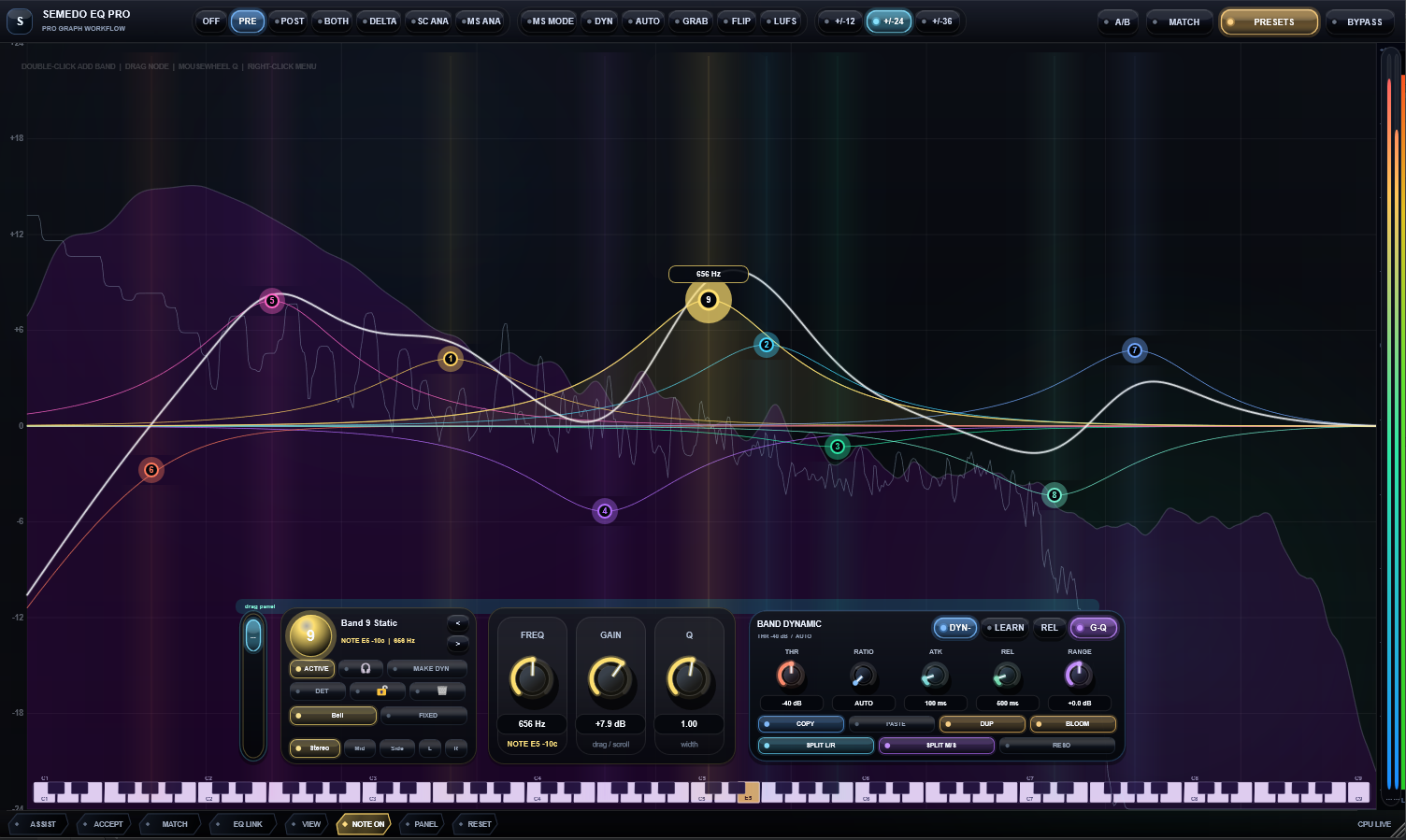
Semedo EQ Pro gives you multiple EQ bands that can be used for detailed tone shaping, correction and mastering work. Each band can be adjusted directly from the graph or from the control panel.
You can change:
Frequency.
Gain.
Q / width.
Filter type.
Stereo / Mid / Side / Left / Right processing.
Dynamic behavior.
Curve character.
This makes it easy to make broad musical moves, precise cuts, stereo corrections or detailed problem-frequency fixes.
Stereo, Mid, Side, Left and Right Control.
Each band can work in a different processing mode:
Stereo affects the full left and right signal.
Mid affects the center of the mix, such as vocals, kick, bass and snare.
Side affects the stereo width and side information.
Left affects only the left channel.
Right affects only the right channel.
This gives you strong control for mixing and mastering. For example, you can clean harshness from the sides, tighten the center, or fix a problem that only appears on one side of the stereo image.
Curve Modes.
Every EQ band can have its own curve character.
Standard
A clean and precise digital EQ response. Best for normal EQ moves and predictable shaping.
Musical
A smoother, warmer curve. When you boost or cut more, the band becomes slightly broader and more natural. Good for tone shaping, vocals, instruments and mastering.
Surgical
A tighter and more precise curve. Useful for removing resonances, harsh frequencies and problem areas without affecting too much of the surrounding sound.
Ear
A perceptual mode designed to feel more natural to the human ear. It adjusts the effective response depending on the frequency area, making EQ decisions feel more balanced.
Dynamic EQ.
Semedo EQ Pro includes dynamic EQ behavior, so bands can react to the incoming audio instead of staying static all the time.
This is useful for:
Controlling harsh vocals only when they become sharp.
Reducing muddy low-mids only when they build up.
Taming resonances without over-cutting the whole signal.
Making EQ moves more transparent and natural.
Dynamic controls allow you to shape how strongly and how quickly the EQ reacts.
Sidechain Tools.
The plugin includes sidechain support for more advanced mixing workflows.
You can use sidechain control to make EQ movement react to another signal, such as:
Ducking certain frequencies when a vocal enters.
Making space for the kick in the bass.
Controlling masking between two instruments.
Comparing internal and external signal behavior.
Sidechain tools are placed in a clear panel so they stay organized and easy to reach.
RESO Resonance Control.
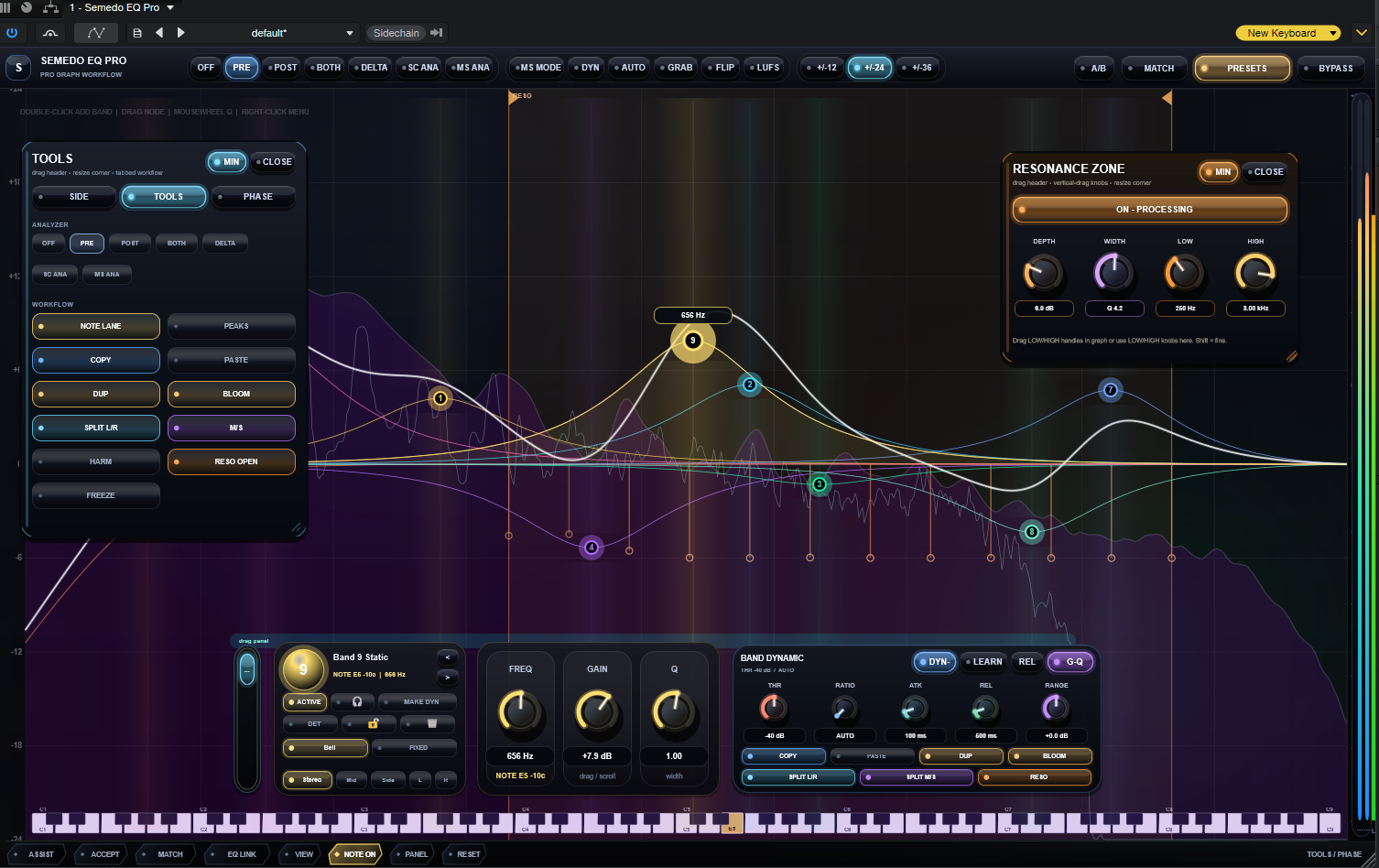
Semedo EQ Pro includes a resonance control section called RESO. This helps detect and reduce problem resonances in the sound.
The RESO section includes colored nodes that can be moved manually:
Move a node left or right to choose the frequency.
Move a node up or down to control the reduction amount.
Each node has its own color.
Each node can be adjusted independently.
Node positions can be saved with the preset or project.
Reset Nodes returns the RESO nodes back to automatic mode.
This is useful for smoothing harshness, ringing frequencies, boxiness and sharp resonances while keeping the sound natural.
Linear Phase / Phase Tools.
Semedo EQ Pro includes phase-related tools for more advanced EQ work.
This can help when you want cleaner phase behavior for mastering or precise correction. You can use the phase tools when you need more transparent EQ moves, especially on full mixes, buses or mastering chains.
Match / FIT Workflow.
The Match / FIT section is designed to help compare and shape your sound toward a reference.
It can be used for:
Matching tonal balance.
Comparing source and target material.
Helping your mix move closer to a reference track.
Creating a better starting point for mastering EQ.
This is not meant to replace your ears, but it gives you a useful visual and tonal guide.
Analyzer and Visual Feedback.
Semedo EQ Pro includes a visual analyzer and response display so you can see what is happening while you work.
You can view:
The EQ curve.
Active band positions.
Frequency movement.
Mid/Side and domain behavior.
RESO nodes.
Dynamic and tonal changes.
The display is designed to help you understand the sound faster without guessing.
Link View.
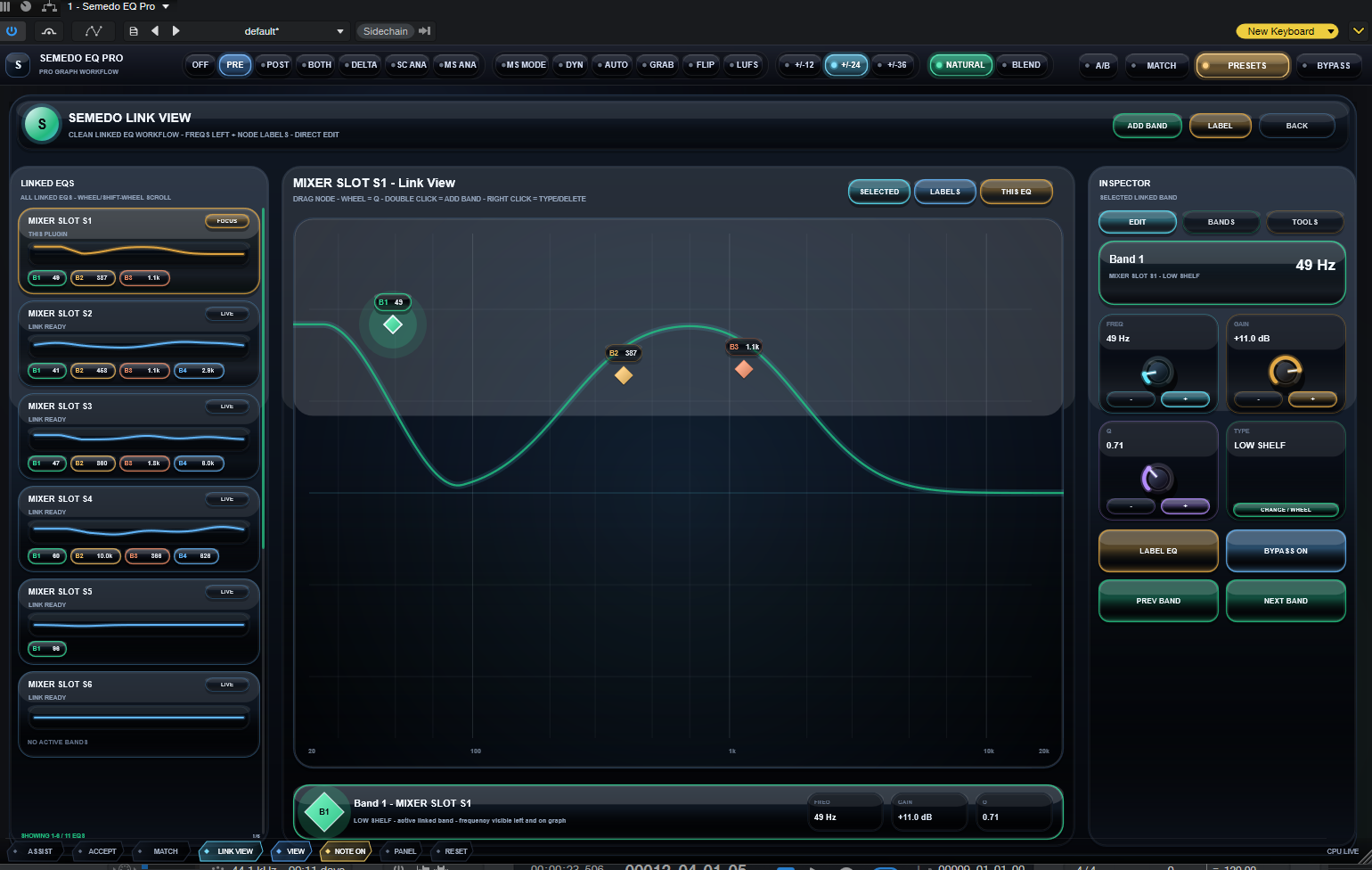
Link View is made for larger sessions where you may use multiple Semedo EQ Pro instances.
It helps you organize and inspect several EQ instances more clearly, making it easier to manage complex projects and mastering chains.
Presets.
Semedo EQ Pro includes preset support so you can save and recall your favorite settings.
You can use presets for:
Vocals.
Drums.
Bass.
Mastering.
Resonance control.
Reference matching.
Creative tone shaping.
Your EQ bands, Curve Modes, RESO node positions and important settings can be saved and recalled.
What You Can Use It For.
Semedo EQ Pro can be used for:
Mixing vocals.
Cleaning harsh frequencies.
Removing mud and boxiness.
Mastering full tracks.
Controlling resonances.
Stereo shaping.
Mid/Side EQ work.
Sidechain EQ control.
Dynamic frequency control.
Matching a track closer to a reference.
Creating wider, cleaner and more balanced mixes.
Why Semedo EQ Pro Is Different.
Semedo EQ Pro is built to combine precision, musical control and modern workflow in one EQ.
Instead of only giving you basic EQ bands, it gives you:
Per-band Curve Modes.
Dynamic EQ.
RESO resonance control.
Mid/Side/Left/Right processing.
Sidechain tools.
Match/FIT reference workflow.
Visual analyzer feedback.
Manual resonance nodes.
A modern workflow for mixing and mastering.
It is made for users who want an EQ that can be simple when needed, but powerful when the mix requires deeper control.
Simple Workflow Example.
Add a band and choose the frequency you want to adjust.
Choose the band mode: Stereo, Mid, Side, Left or Right.
Pick the Curve Mode: Standard, Musical, Surgical or Ear.
Adjust Gain and Q until the sound feels right.
Use Dynamic EQ if the problem only happens sometimes.
Use RESO if you need to smooth harsh resonances.
Use Match/FIT if you want help moving closer to a reference.
Save your settings as a preset.
Designed For.
Semedo EQ Pro is designed for:
Producers.
Mixing engineers.
Mastering engineers.
Beat makers.
Vocal mixers.
Home studio users.
Advanced audio users who want more control.
Whether you are doing small corrections or full mastering EQ work, Semedo EQ Pro gives you the tools to work clearly, musically and with confidence.
Please note that the macOS version is currently unsigned and not notarized, so macOS Gatekeeper may show a security warning on some systems. Installation and use are fully at the user's own risk.
By downloading, installing, or using the macOS version, the user accepts full responsibility for any system issues, DAW crashes, plugin conflicts, data loss, or other problems that may occu.
Installation Notice.
SemedoEQ is provided as a user-installable audio plugin package. Installation is at your own risk. Always test the plugin in your own DAW and system before using it in important sessions.

Please log in to join the discussion
Submit: News, Plugins, Hosts & Apps | Advertise @ KVR | Developer Account | About KVR / Contact Us | Privacy Statement | Sell @ KVR | KVR Marketplace Terms & Conditions
© KVR Audio, Inc. 2000-2026

