
30 KVR members have added SF2 Player to 27 MyKVR groups 37 times.
Download KVR Studio Manager (FREE)
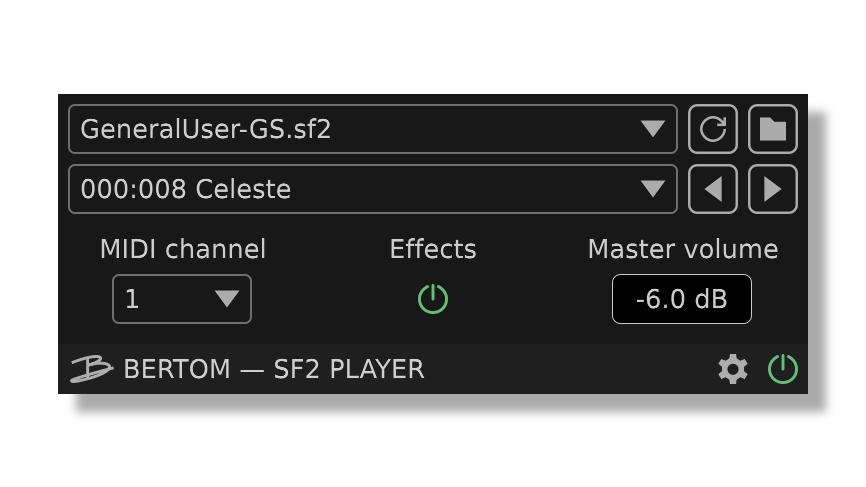
SF2 Player is a simple SoundFont player plug-in instrument designed to load a single preset per instance efficiently. The synth engine was written from scratch with real-time use and low CPU usage in mind. It is almost fully compliant with the SoundFont 2.04 specification, including modulators, envelopes, LFOs, chorus and reverb.
Reviewed By amano111 [all]
January 2nd, 2026
Version reviewed: 1 on Mac
Phenomenal stuff. Ableton has removed all sf2 soundfont support from ableton on apple silicon. The usual options people recommend like sforzando are extremely buggy, feel like abandonware or close to it. From what I tested this plugin is WAY more solid. I'd like to control ADSR but more than that I'm happy I can finally use my soundfonts in ableton again without worrying it will be a buggy mess the next time I open a project. Well done and I appreciate the clean interface.


In Kubuntu 25.10, using Reaper, the folder icon only brings up a blank grey box - I'm unable to browse and tell the player where the soundfont files are located. Is there a setting that I can add manually in the .xml file in my user directory?

Thanks for reporting. Clicking the "+" button normally opens a native file explorer window so what happens depends on the desktop environment. Can you confirm this window is not just hidden behind the window of Reaper itself? Feel free to send an email if you need further assistance.
Howdy. Thanks for your speedy reply. :).
I'm using Kubuntu 25.10, which means it's the KDE Plasma DE. I don't see a "+". — I only see a little folder icon. All that is displayed when I click on it, is a small, blank light-grey box. Obviously, this box should be populated with a browse button, a path field, and whatnot. As regards anything being hidden behind other windows: no, I don't think so, but I will double check just to make sure. :).
How do I ascertain your email address? Is it listed on your web site?
Blessings,
Bro. Charles.
The "+" button should appear after clicking the folder icon, at the right of the light-grey box. If it is not there for you then we should continue this by email with screenshots. You can find my email address in the footer of bertomaudio.com.
Yay! The Plus and minus buttons are now showing. Weird. .. I don't know why they weren't being displayed before. Oh well, I'm thankful that it's working now as expected. Thanks much. :).
Please log in to join the discussion
Submit: News, Plugins, Hosts & Apps | Advertise @ KVR | Developer Account | About KVR / Contact Us | Privacy Statement | Sell @ KVR | KVR Marketplace Terms & Conditions
© KVR Audio, Inc. 2000-2026

