
38 KVR members have added T-Imager to 40 MyKVR groups 42 times.
Download KVR Studio Manager (FREE)
You want control over your stereo imaging and the depth of your sound. You want to quickly produce the sound you're after whilst still allowing yourself room to flow with new ideas. We offer you the T-Imager: the ultimate musical stereo imaging solution, for enhancing a sound's wideness, depth, and width. Boost the stereo imaging, with no artifacts.
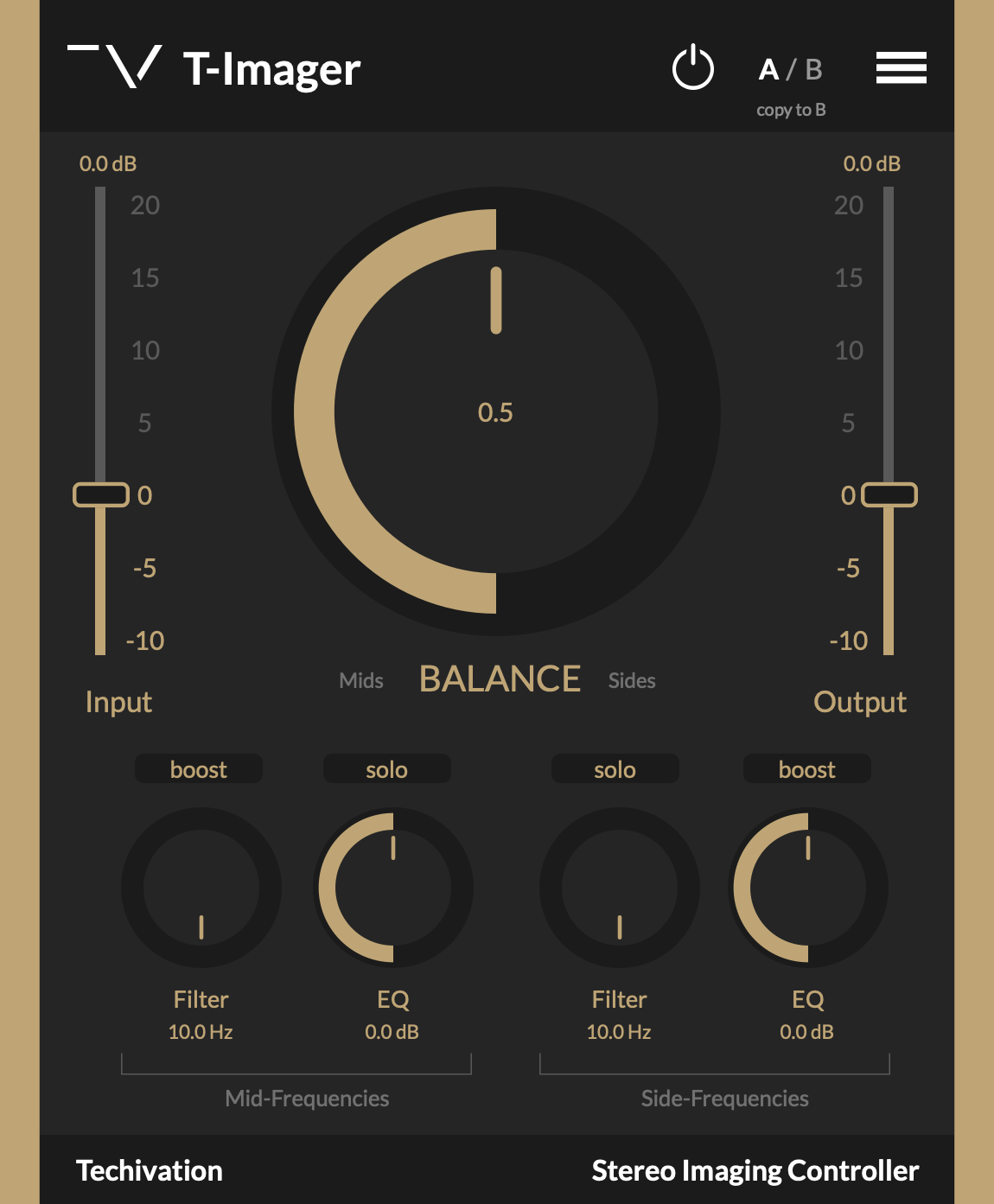
T-Imager has all the essential controls right at your fingertip to immediately give you your desired sound.
Stereo imaging is very important in a production, and it's very easy to have it ruined if you pick the wrong tools or settings. We developed the T-Imager plug-in with this in mind.
T-Imager helps you avoid getting lost in unnecessary settings or confused by endless dials, only featuring what our research identified as the most essential and impactful controls. Stay focused on your aim, without the clutter.
Beauty is about finding a great combination of different aspects. T-Imager lets you control the stereo field by balancing the mid and side frequencies of a stereo track.
We want you to have full control over the stereo imaging of your sound. Strike the perfect balance between the mid and side frequencies' levels on a stereo track, or apply the special built-in EQ curves and filters to create a perfect stereo sound that'd fit nicely in any mix.
T-Imager is not only a perfect tool for audio mastering, but also gives you a lot of possibilities in the audio mixing stage. Bring certain sounds to the front of a mix, make elements deeper, wider, or more narrow in certain situations.
T-Imager uses fundamental mixing techniques to control the balance of stereo images, without causing any artifacts.
Instead of generating artificial stereo-ness on a mono or stereo track, the T-Imager carefully affects the original information from mid and side frequencies using the Gain, Tilt EQ filter, Smiley Curve, and High Pass filter, resulting in a musical sound.
T-Imager doesn't turn a mono track to stereo, as there's no stereo information in that kind of source. So you can control the width in sounds that already have both mid and side frequency information, resulting in a natural sound.
Reviewed By MattAtPlaton [all]
January 6th, 2023
Version reviewed: 1.0.2 on Mac
One of those "great plugins you didn't know you needed," T-Imager allows you to balance the ratio between the mid signal and the side signal in a very intuitive way.
Much like a tilt EQ, you just sort of rotate the dial until you like what you hear. There aren't a lot of variables to consider, which is a good thing.
When you mess with the mid/side image of your mix, it's easier to get it wrong than right. T-Imager solves that issue with a very simple interface and very low latency.
In most cases, when your mix sounds kind of lackluster and drowned in fx, tilt the dial more towards the mid side to clear it up.
You can also tilt more towards the side image to bring out reverbs and ambience.
Definitely worth trying out.

Please log in to join the discussion
Submit: News, Plugins, Hosts & Apps | Advertise @ KVR | Developer Account | About KVR / Contact Us | Privacy Statement | Sell @ KVR | KVR Marketplace Terms & Conditions
© KVR Audio, Inc. 2000-2026

