
44 KVR members have added TurboAlexis to 18 MyKVR groups 49 times.
Download KVR Studio Manager (FREE)
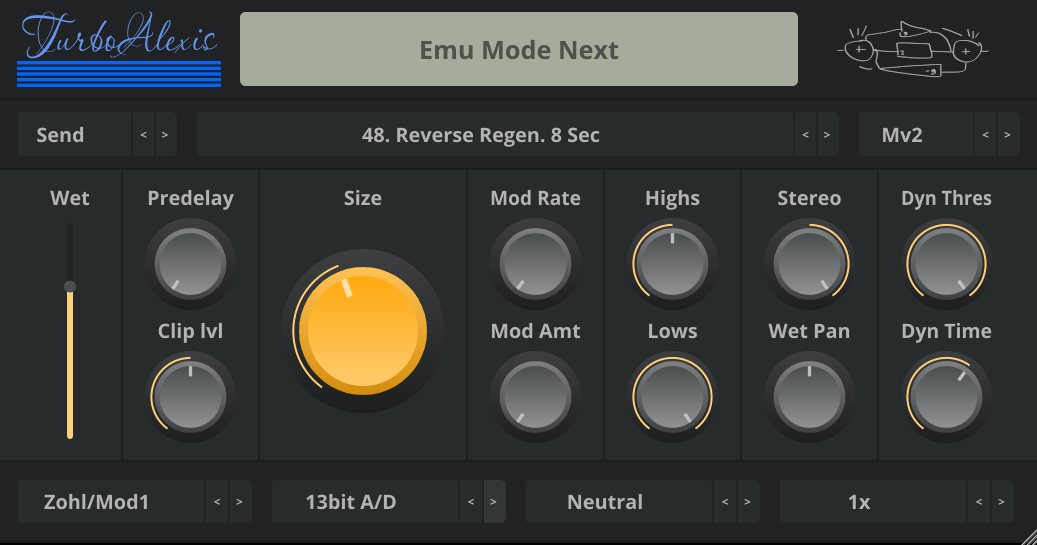
A JUCE-based audio plugin that emulates three classic MidiVerb/MidiVerb2/MidiFex reverb effects. Based on the code by https://github.com/thement/midiverb_emulator, where most of the legwork is done.
It inherits the TurboPaco (my other reverb) philosophy (and UI). Few controls, fun to program and if something doesn't work then change program.
Modulating the delay lines is possible-
The approach taken is that I haven't tuned each algorithm/program individually
to find what works best, it's a lot of work.
What is done instead is to provide 8 different combinations of modulation. What
they do is to modulate delay lines based on their index and size. Each of the 8
alternatives has different combinations, so it's up to the user to choose if there
is one they like.
4 interpolation modes are provided: Allpass, Catmull-rom spline, Linear
interpolation (lerp) and Zero Order Hold (ZOH, no interpolation). All of them
sound different.
I have never owned it or use it, but based on what I know:
All the LFO based programs (choruses, flangeres) don't support the triggered
flanges, as the parent emulation project doesn't support it either.
The LFO amount is configurable using the size knob (it uses the internal
emulated LFOs). The program's original is the parameter default: 100%.
The LFO rate can also be changed. The program's original is the parameter
default: 50%.
There is an added feedback control for the LFO based programs not present
on the original device.
It's not an exact match. The Mv1 and Mfx use 23.4Hz (vs ~23.44 on the device) and the Mv2 uses 31.5kHz (vs 31.25 on the device).
The reason is simple, many fractional resamplers have a fixed set of shifted windowed sinc tables at different offsets, (e.g. 256 tables) and use interpolation to get the in-between values. Those tables have non-contiguous (but predictable) memory access patterns.
The resampler I use instead calculates the period of the resampling cycle and uses a single table for each stage in ascending order. This gets rid of the need for interpolation, allows an ascending prefetcher-friendly access pattern and can have most of the time less tables than the conventional approach for common samplerates.
It has the drawback that for very "unfriendly-to-48-or-44k" rates there are more tables generated. The frequencies chosen to run the device at where chosen for being near enough and require a very low amout of tables.
Contact me. All information is welcome. E.g. about the triggered flanges, MV2 input/output filters, etc.
Reviewed By HAL76 [all]
March 26th, 2026
Version reviewed: 1.1 on Windows
A very useful tool, especially when it comes to the sound of the 90s and other reverbs sound too sterile. I am very grateful.
Reviewed By gustavokoshikumo [all]
March 22nd, 2026
Version reviewed: 1 on Windows
Just tested it, sounds great.
Took a while to figure that I should choose a preset to change the decay time (Maybe if I had read the description :P). But it's based on the hardware presets, so it's cool.
Worked 100% on Reaper.
Thanks.
 $79.00Rev INTENSITY
Please log in to join the discussion
Submit: News, Plugins, Hosts & Apps | Advertise @ KVR | Developer Account | About KVR / Contact Us | Privacy Statement | Sell @ KVR | KVR Marketplace Terms & Conditions
© KVR Audio, Inc. 2000-2026

