

Hi
I spent about an hour last night trying to make the multiple outs work in ChineeKong in both Sonar and P5, with no success. Maybe someone here could enlighten me.
In Sonar I added CK in the DX synth rack, then added a couple of tracks pointing at different midi channels for CK.
In CK, I loaded two of the instrument files, cliked on multi out, and tried to point them at two different midi channels.
Trouble is, I can't tell which instrument is going to which channel. Is the part number supposed to light up or something to tell you that you are assigning the channel to this part? I just don't understand, since when you click on the button on top to display the channel assingment, it doesn't seem to relate to anything on the parts in the window below.
Certainly I know as soon as I cliked on multi out, the midi light lit up, but no sound came out at all.
This is what happens in Project 5 too.
Any help would be greatly appreciated.
thx

Latest News: Kong Audio Holiday Sales
ChineeKong mulit outs - I must be missing something here
-
- KVRist
- 42 posts since 28 Aug, 2004
-
- KVRist
- 80 posts since 24 May, 2004
hi woodamand,
in the Sonar DX synth rack's option, choose the "All synth outputs" , then test it again,hope it works .
Cheers
in the Sonar DX synth rack's option, choose the "All synth outputs" , then test it again,hope it works .
Cheers
-
- KVRian
- 799 posts since 25 Feb, 2005
Hi Dana,
As Shan said, you should enable multiout for the plugin from Sonar.
Also, each part(10 in total) is pre-assigned to each output accordingly.
Hope this helps.
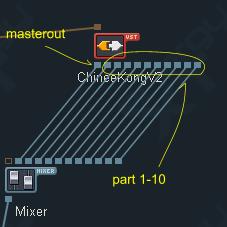
As Shan said, you should enable multiout for the plugin from Sonar.
Also, each part(10 in total) is pre-assigned to each output accordingly.
Hope this helps.
-
- KVRist
- Topic Starter
- 42 posts since 28 Aug, 2004
Oh DUH! I'm sure that will work, I got used to other plugins where I didn't need to do this all output thing. I will try it tonight and ping you back on it.
thanks much
thanks much
-
- KVRist
- Topic Starter
- 42 posts since 28 Aug, 2004
OK, that works fine as indicated, thanks for the help.