KnobMan/SkinMan Examples

DSP, Plugin and Host development discussion.
Post Reply New Topic
RELATED
PRODUCTS

Post

Here's one for the people that have requested faders in knobman. The file is not exclusively faders but I try to include a few extra. There are seven styles of faders and a few that have different aspects to the same fader design.

They are on my blog (sorry for not having a direct link but its easier then having dead links to the file if I change things around in the future).

Image
Last edited by Hlis93 on Tue Jun 23, 2009 8:36 pm, edited 1 time in total.
GUI designers a resource list of artists: http://sukaudio.blogspot.com/

Post

Excellent. Thank you. I grab all of your work as soon as you post it for further study later. It's helped me level up in my graphics work.

Post

Graphic-designers, I really appreciate your work!
Many very fine things here!
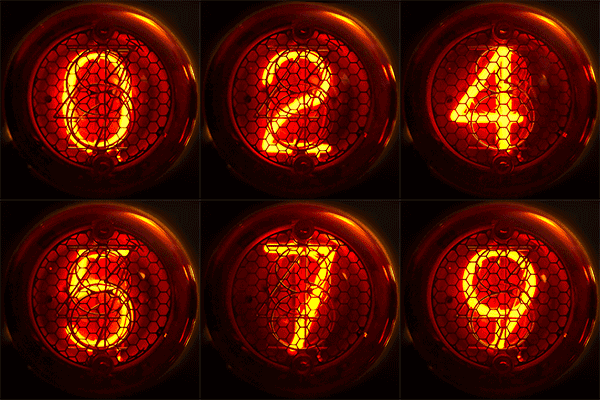
And now comes the challenge: someone thinks, he could do something like this?
Image Image
Image
http://www.electricstuff.co.uk/nixiegallery.html

Post

I can but I have to find the graphic, assuming I still have it, if i can I'll post it up.

the number on this are not very realistic but it could be a start
http://www.box.net/shared/j490pc63zz
Last edited by Hlis93 on Tue Jun 23, 2009 10:22 pm, edited 1 time in total.
GUI designers a resource list of artists: http://sukaudio.blogspot.com/

Post

I found this in Wikipedia (CC licence) Image
so I got this: Nixie Round Knob
Last edited by WOK on Wed Jun 24, 2009 7:22 am, edited 1 time in total.

Post

WOK wrote:I found this in Wikipedia (CC licence)
Wow that is an AWESOME image!!!!! hehe looks like fun

Post

ouroboros wrote:simple question, I think:
I have two boxes - a rectangle and a box. They are just borders, no fill. I would like to "conenct them so the perimeter is one large "T" shape. I forget how, though. I believe it has to do with the shape+/- etc., but I couldn't find it in the helpfile on the site. any tips?
hello,
the border (without FILL) dont work in Operation.
but this may be you want?
Set alpha of FILL color of parent to 0.
Image

Post

WOK wrote:I found this in Wikipedia (CC licence) Image
so I got this: Nixie Round
well if that look works you can try this one here: see post below for updated link

I had to use Photoshop to make the .png's but I included the .psd file as well as the .knob animation. The number could still use some work to make them stand out more. I did want to make the wires that would hint at the numbers that are not active but it just didn't work. Perhaps someone else has a clever trick for that, I don't.

Image
Last edited by Hlis93 on Wed Jun 24, 2009 1:23 pm, edited 2 times in total.
GUI designers a resource list of artists: http://sukaudio.blogspot.com/

Post

g200kg wrote:...the border (without FILL) dont work in Operation.
but this may be you want?
Set alpha of FILL color of parent to 0.
Image
didn't think of that. just tried that out cool.
GUI designers a resource list of artists: http://sukaudio.blogspot.com/

Post

just a thought (i'll try myself tonight) has anyone tried making tape...like masking tape stuck on a synth body part...maybe for writing labels etc...know what i mean?

Post

Kriminal wrote:just a thought (i'll try myself tonight) has anyone tried making tape...like masking tape stuck on a synth body part...maybe for writing labels etc...know what i mean?
I do it all the time, images from my R5 ensembles on the blog and some older stuff I forgot about...

Image

I don't know if you could do it in Skinman. For myself I tend to use the unique tool and paint brush in photoshop to make the tape look, for area where the tape is lifting off the surface either by contact failure of other I will use the marquee to copy part and layer them with 0% opacity playing with the inner and drop shadowing.
GUI designers a resource list of artists: http://sukaudio.blogspot.com/

Post

Hlis93 wrote:
Kriminal wrote:just a thought (i'll try myself tonight) has anyone tried making tape...like masking tape stuck on a synth body part...maybe for writing labels etc...know what i mean?
I do it all the time, images from my R5 ensembles on the blog and some older stuff I forgot about...

Image

I don't know if you could do it in Skinman. For myself I tend to use the unique tool and paint brush in photoshop to make the tape look, for area where the tape is lifting off the surface either by contact failure of other I will use the marquee to copy part and layer them with 0% opacity playing with the inner and drop shadowing.
you're as bad (good#) as Scot Solida..whenever i mention a synth, usually o really old rare one, he says "yeah, i know it, i have 2 in my cellar..." :hihi:

i dunno why i didnt think of just drawing it in PSP :dog:

thansk tho, i'll grab that R5 stuff and have a gander 8)

Post

I gave WOK request another try. I still dont like it appears rather...uhm, cartoonish...proving to be rather hard for me to do, cant beat a photo of the real thing I guess, but at least the numbers are more visiable. Anyway, heres the updated file with the second attempt at it.

http://sukaudio.blogspot.com/

Image
Last edited by Hlis93 on Thu Jun 25, 2009 12:56 am, edited 1 time in total.
GUI designers a resource list of artists: http://sukaudio.blogspot.com/

Post

@Hlis93 :
light orange should be on center of the number and
dark orange around, no ?
Image

Post

novaflash wrote:@Hlis93 :
light orange should be on center of the number and
dark orange around, no ?
yes it should. I did try but the numbers became less visible and I didn't have more time to mess with it. I'll have to try again tonight, perhaps with a differnt font or a hand drawn one. Perhaps using the smudge and blur tools would help as well with blending the colors in.
GUI designers a resource list of artists: http://sukaudio.blogspot.com/

Post Reply

Return to “DSP and Plugin Development”