


Yes, i also noticed the issue. Will be fixed.liquidsound wrote:But not this way:
I'm in the Demo session
Right click in the Racks area for Windowed Mode.
Now I'm in the Windowed Floating Mode.
File> Open Session or New Session.
Now I'm in a New or Open existing session
The Floating Racks is Empty
Trying to Add New Racks do not produce anything.
Switch to Docked Mode brings everything to normal
M3 Tests
-

- KVRAF
- Topic Starter
- 13863 posts since 24 Jun, 2008 from Europe
-
- KVRAF
- Topic Starter
- 13863 posts since 24 Jun, 2008 from Europe
You were right right-clicking there, as it's logical in the MU.LAB context.pljones wrote:mutools wrote:Oops, i mismessaged before. The context menu is only accessible via the '=' column at the right. I tried deleting an 'unused' sequence using its context menu in the Sequence Manager and it worked fine here. Not there?I've been right-clicking it... (I've been right-clicking everywhere rather a lot...) Yes, left-click works.
I'll add right-clicking there.
-
- KVRian
- 620 posts since 27 Jul, 2001 from france
- I have tried again and have no more AZERTY/QWERTY problem, sorry !
- I have only 12 shortcuts. If I add one, it works if the shortcut is a computer key, but it doesn't work if it is a midi event.
- and if I edit a existing shorcut, it disapears from the list (it's not the 16 shorcuts limit, or maybe this limit is not 16)
- I have only 12 shortcuts. If I add one, it works if the shortcut is a computer key, but it doesn't work if it is a midi event.
- and if I edit a existing shorcut, it disapears from the list (it's not the 16 shorcuts limit, or maybe this limit is not 16)
PQ
free software at : http://pquenin.free.fr/pqnaudio
free music at : http://www.soundclick.com/thepqueninproject
free software at : http://pquenin.free.fr/pqnaudio
free music at : http://www.soundclick.com/thepqueninproject
-
- KVRian
- 620 posts since 27 Jul, 2001 from france
I have also tried again with the event graph editor : when I start to draw the automation, it's fast and responsive but the more I draw, the more it's become slower and slower. When I select all the events and hit "suppr", it works but it is so long to react that I was thinking it was not working...
PQ
free software at : http://pquenin.free.fr/pqnaudio
free music at : http://www.soundclick.com/thepqueninproject
free software at : http://pquenin.free.fr/pqnaudio
free music at : http://www.soundclick.com/thepqueninproject
-
- KVRist
- 52 posts since 13 Jun, 2009 from San Diego
I just checked the 3.06 release and am including a screen shot to demonstrate my question. When I open the default session, click on the rack and open any of the instruments that you have included, it doesn't display the instrument that you are using, until I click on it and choose an instrument??
 The circle at top shows what I expect to see, the circle at bottom shows the default behavior.
The circle at top shows what I expect to see, the circle at bottom shows the default behavior.-
- KVRist
- 357 posts since 5 Aug, 2006 from St. Louis
MuLab 3.0.5 (haven't checked the latest).
When drawing in a note at 1.1.0000 in a sequence on track 2, the note graphically looks like it starts too early and will not be included in the play although the List Editor shows it at 1.1.0000. Track 1 does not allow this to happen. The note does not appear in the part view.
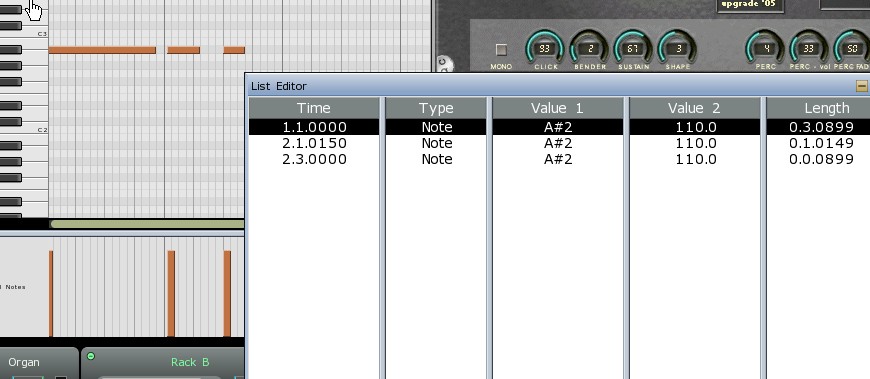
When drawing in a note at 1.1.0000 in a sequence on track 2, the note graphically looks like it starts too early and will not be included in the play although the List Editor shows it at 1.1.0000. Track 1 does not allow this to happen. The note does not appear in the part view.

-
- KVRAF
- 5573 posts since 30 May, 2006 from Hollow Earth
3.06
"Toggle Grid ON/OFF" doesn't work if the Grid is set to "No Grid" option in the context menu. Maybe is intended but I can't see the advantage.
Is it possible to have a Tool-tip showing the name of the Sequencer/Part since is no longer possible to see it in the Part Property Panel?
Tool-tip or Status Bar or something. Zooming in is a little off from MuLab simplicity...
Also "Toggle Process ON/OFF" could have a visible clue.
I know we are looking for Bugs but also to refine a new version... I think
Rewire:
No problem loading Reason as a direct Rewire through the "Choose Plug-in" for a Rack.
But if I first load Reason in the MPA as a Plug-in and then try to load it by double clicking it in the MPA I get the error "Engine no Respondig. Please check your ReWire host".
If I then try to load it from the track (the one in the MPA again) via "Choose Target" I get the same error.
I know this is not the same as the Normal Rewire Protocol, but on the 2.7 it works fine and allows far more control of the individual components in Reason which IMO is a better use of it and the only one for me and, I think, for other Reason's users that are aware of this method.
"Toggle Grid ON/OFF" doesn't work if the Grid is set to "No Grid" option in the context menu. Maybe is intended but I can't see the advantage.
Is it possible to have a Tool-tip showing the name of the Sequencer/Part since is no longer possible to see it in the Part Property Panel?
Tool-tip or Status Bar or something. Zooming in is a little off from MuLab simplicity...
Also "Toggle Process ON/OFF" could have a visible clue.
I know we are looking for Bugs but also to refine a new version... I think
Rewire:
No problem loading Reason as a direct Rewire through the "Choose Plug-in" for a Rack.
But if I first load Reason in the MPA as a Plug-in and then try to load it by double clicking it in the MPA I get the error "Engine no Respondig. Please check your ReWire host".
If I then try to load it from the track (the one in the MPA again) via "Choose Target" I get the same error.
I know this is not the same as the Normal Rewire Protocol, but on the 2.7 it works fine and allows far more control of the individual components in Reason which IMO is a better use of it
and the only one for me and, I think, for other Reason's users that are aware of this method. ABEFLGMOPPRRST 
-

- KVRAF
- 7412 posts since 8 Feb, 2003 from London, UK
Ooh yes, meant to mention that: I really don't like that menu option. Can't the text change to "Turn Process ON" or "Turn Process OFF"?liquidsound wrote:Also "Toggle Process ON/OFF" could have a visible clue.
-
- Hun #3
- 4265 posts since 25 Mar, 2002 from A quaint little village just south of Hamburg, Germany
OSX 10.4.11:
Racks with multiple outputs in Modular window, nice!!
Bugs:
-I can't seem to make a new multisample from scratch (ie I can't insert a new zone)
Graphics:
-Occasional blue frames around elements (like racks or the keyboard window in multisampla etc) that won't go away.
I'll do further testing tonight!
Racks with multiple outputs in Modular window, nice!!
Bugs:
-I can't seem to make a new multisample from scratch (ie I can't insert a new zone)
Graphics:
-Occasional blue frames around elements (like racks or the keyboard window in multisampla etc) that won't go away.
I'll do further testing tonight!
-
- KVRian
- 620 posts since 27 Jul, 2001 from france
A precision about the key shortcut problem I have : I have created a shortcut where the shortcut is a midi event, associated with the "add new track" function -> it works. Now the same midi events associated with "play/stop", "rewind" -> nothing happen ! Is it a "transport panel" problem ?
PQ
free software at : http://pquenin.free.fr/pqnaudio
free music at : http://www.soundclick.com/thepqueninproject
free software at : http://pquenin.free.fr/pqnaudio
free music at : http://www.soundclick.com/thepqueninproject
-
- KVRAF
- Topic Starter
- 13863 posts since 24 Jun, 2008 from Europe
Ok, glad it's solved.pquenin wrote:- I have tried again and have no more AZERTY/QWERTY problem, sorry !
There indeed seems to be a prob with certain MIDI shortcuts, a bug that slipped in somewhere, sorry.I have only 12 shortcuts. If I add one, it works if the shortcut is a computer key, but it doesn't work if it is a midi event.
Should be ok in the next version.
I can't repeat this hereand if I edit a existing shorcut, it disapears from the list (it's not the 16 shorcuts limit, or maybe this limit is not 16)
 Do others have this too? Can someone give me a step-by-step?
-
- KVRAF
- Topic Starter
- 13863 posts since 24 Jun, 2008 from Europe
I also noticed the slowness, will be researched, thanks.pquenin wrote:I have also tried again with the event graph editor : when I start to draw the automation, it's fast and responsive but the more I draw, the more it's become slower and slower. When I select all the events and hit "suppr", it works but it is so long to react that I was thinking it was not working...
-
- KVRAF
- Topic Starter
- 13863 posts since 24 Jun, 2008 from Europe
I see what you mean. Though it's intended (the patch name is in the titlebar, that field shows the last chose library patch) i do understand it causes confusion and will think this thru.paulhart wrote:I just checked the 3.06 release and am including a screen shot to demonstrate my question. When I open the default session, click on the rack and open any of the instruments that you have included, it doesn't display the instrument that you are using, until I click on it and choose an instrument??
-
- KVRAF
- Topic Starter
- 13863 posts since 24 Jun, 2008 from Europe
Based on what i read in your message and see on the picture it looks like the Part Start is just beyond the note start and so that's why it doesn't play.jpumphandle wrote:MuLab 3.0.5 (haven't checked the latest).
When drawing in a note at 1.1.0000 in a sequence on track 2, the note graphically looks like it starts too early and will not be included in the play although the List Editor shows it at 1.1.0000. Track 1 does not allow this to happen. The note does not appear in the part view.
Or am i missing something? If so please give me a step-by-step how to repeat the problem, and/or send me an example session demonstrating the problem. Thanks!
-
- KVRAF
- Topic Starter
- 13863 posts since 24 Jun, 2008 from Europe
I think "Toggle On/Off" does work, but of course it doesn't have much practical effect when the grid is set to no grid.liquidsound wrote:3.06
"Toggle Grid ON/OFF" doesn't work if the Grid is set to "No Grid" option in the context menu. Maybe is intended but I can't see the advantage.
Does that explains what you encountered?
I assume you mean in the Composer?Is it possible to have a Tool-tip showing the name of the Sequencer/Part since is no longer possible to see it in the Part Property Panel?Tool-tip or Status Bar or something. Zooming in is a little off from MuLab simplicity...
Ok, i understand. Euh, i've got something else on paper which shoud resolve your FR, but it's planned for a bit later. Sorry i stay vague at this point. Rest assured there will come a solution for this.
Tuned in the next version.Also "Toggle Process ON/OFF" could have a visible clue.
I know this is not the same as the Normal Rewire Protocol, but on the 2.7 it works fine and allows far more control of the individual components in Reason which IMO is a better use of itRewire:
No problem loading Reason as a direct Rewire through the "Choose Plug-in" for a Rack.
But if I first load Reason in the MPA as a Plug-in and then try to load it by double clicking it in the MPA I get the error "Engine no Respondig. Please check your ReWire host".
If I then try to load it from the track (the one in the MPA again) via "Choose Target" I get the same error.
and the only one for me and, I think, for other Reason's users that are aware of this method. [/quote]Yes, i see what you mean. Will research it deeper.