M3 Tests

Official support for: mutools.com
Post Reply New Topic
RELATED
PRODUCTS

Post

pquenin wrote:When you put your mouse at the beginning of a part the arrow changes into a pen but if you use the pen to extend the part to the left, nothing happen. The same thing for a note is OK : the note is extended to the right. It's OK also in the multisaple editor.
So it must be a bug he he !
What kind of part are you trying to extend to the left? Audio or Sequence part?

Note that the extend-to-the-left feature always tries to keep the current content at the same position.

So if you have an audio part that already plays the audio from the start, extending such audio part to the left doesn't have any effect as the part is already playing from the start. Maybe an timed-auto-hide alert should be given in such case to avoid confusion?

Post

pquenin wrote:Maybe another bug :
You say that when a parent track is muted, it affects all its subtracks too... Well maybe, but the little icon on the subtrack not reflect this..
No, as these tracks are not muted, but they play muted as the parent track is muted.

Same thing with muting parts, if you mute a track, the parts on that track don't play, though the parts themselves may be muted or not, it's the higher-in-hierarchy object that wins. (same as wit targets)

Post

gemada wrote:Gui Bug: Rewind and Forward buttons doesn't change appearence in "down state" (when pressed)
Not a bug, it are 'immediate' actions.

Post

mutools wrote:
gemada wrote:Gui Bug: Rewind and Forward buttons doesn't change appearence in "down state" (when pressed)
Not a bug, it are 'immediate' actions.
yeah, but M2 had a nice little on/off thing going on when pressing rewind buttons. it felt better because even though it is an immediate action, it still is an action. i mean, it's cool when you press a button and it blinks for a moment. :hihi:
Bedroom Producers Blog << Free VST Plugins!

Post

bpblog wrote:
mutools wrote:
gemada wrote:Gui Bug: Rewind and Forward buttons doesn't change appearence in "down state" (when pressed)
Not a bug, it are 'immediate' actions.
yeah, but M2 had a nice little on/off thing going on when pressing rewind buttons. it felt better because even though it is an immediate action, it still is an action. i mean, it's cool when you press a button and it blinks for a moment. :hihi:
I completely agree with bpblog.

Post

gemada wrote:Copy--Paste a sequence, sometimes it does exactly in the cursor position (this is the right thing) but sometimes it pastes somewhere ahead or before the cursor position...
Pasting parts/notes uses a dialog box, so i'm not sure what you mean with: sometimes it pastes somewhere ahead or before the cursor position.
Another thing...Paste sequence: it will always open a "position window" (Paste Part At) and you have to confirm or change position.
It should just paste in cursor position and do not ask that...IMHO it would be more pratical.
We discussed this already some time ago (last year) and we came to the conclusion that this was the best solution: a dialog box with the cursor position as default.

Lets keep it this way in M3.
Jo, MU.LAB 3.0.11 test version has better workflow :) but i confirm all the bugs described in this forum about this latest test version.
Euh, not sure what you mean with "but i confirm all the bugs described in this forum about this latest test version"..?

Post

bpblog wrote:a bug:
make a send from rack b to rack a. now make a send from rack a to rack b. this results in a short freeze followed by a crash.
Confirmed. Will be researched.
another small one:
in the mixer, when you select a new rack output, the gui doesn't update. you have to select another rack and then the first one again to see the updated info.
Confirmed. Will be fixed.
another thing concerning rack outputs. when you select rack b as the output for rack a for example, it is still possible to select rack a as the output for rack b. there's no crash involved until you press F2 to check out the MPA. this is a nasty one, it freezed my pc completely, so have that in mind when reproducing.
Will be researched.
i preferred how M2 had sequence names aligned to top-left. it looked way more neat, especially when you have a bunch of sequences of different length piled up on the screen. i'm not sure though if there is an advantage in having them centered that i'm not aware of. :D
All reactions on this change were positive, you're the first who don't ike it. I'm not saying that your opinion is not ok, at the contrary i understand your argument, but most people, including myself, liked the change.

Post

bpblog wrote:
mutools wrote:
gemada wrote:Gui Bug: Rewind and Forward buttons doesn't change appearence in "down state" (when pressed)
Not a bug, it are 'immediate' actions.
yeah, but M2 had a nice little on/off thing going on when pressing rewind buttons. it felt better because even though it is an immediate action, it still is an action. i mean, it's cool when you press a button and it blinks for a moment. :hihi:
Apologies, you're right, i overlooked; Will be fixed.

Post

mutools wrote:
gemada wrote:Copy--Paste a sequence, sometimes it does exactly in the cursor position (this is the right thing) but sometimes it pastes somewhere ahead or before the cursor position...
Pasting parts/notes uses a dialog box, so i'm not sure what you mean with: sometimes it pastes somewhere ahead or before the cursor position

I mean this:

Image


mutools wrote: Euh, not sure what you mean with "but i confirm all the bugs described in this forum about this latest test version"..?
The bugs described by bpblog and already confirmed by you ;)

Post

mutools wrote:
i preferred how M2 had sequence names aligned to top-left. it looked way more neat, especially when you have a bunch of sequences of different length piled up on the screen. i'm not sure though if there is an advantage in having them centered that i'm not aware of. :D
All reactions on this change were positive, you're the first who don't ike it. I'm not saying that your opinion is not ok, at the contrary i understand your argument, but most people, including myself, liked the change.
hey, of course i know you're not saying that my opinion is not ok. :party:
still, if all you guys like it centered, then centered it should be. perhaps make it editable via mulab.txt though? like menu font size and such? pretty please?

:D
Bedroom Producers Blog << Free VST Plugins!

Post

bpblog wrote:
i preferred how M2 had sequence names aligned to top-left. it looked way more neat, especially when you have a bunch of sequences of different length piled up on the screen. i'm not sure though if there is an advantage in having them centered that i'm not aware of. :D
+1 for the left
Image

Post

Just some thoughts on parts since each seems to have its own properties.

In the drop down (right click) for parts there is no Delete option as there is for a sequence. The only way to delete is to highlight and press delete.

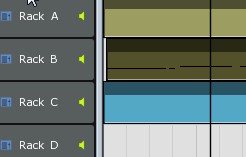
e.g. it may not be obvious where a part begins and ends (precisely) as the properties can only be estimated. I would welcome a Part Properties item in the right click drop down menu. start, end, loop, etc. Can't tell exactly where this example (2nd track on Rack B) starts ....
Image

Helps to identify the position of a sequence within a part. Even the parts that appear to start at 1.1.0000 cannot be relied upon unless it can be confirmed.

Using double-click to initiate a part can sometimes cause the part to move a little, especially with no grid set for the composition.
Image

Post

It's probably easier to find if it's left aligned... but I'm not fussed (I'm too poor at naming them in the first place to worry about whet they're called...). Doesn't look like I'll get much time to play with 3.0.x this weekend, unfortunately. I'd been hoping I could try a few things out...

Post

I recorded a filter sequence named 'Filter' for EXfade Looper VSTi using a knob on my Oxygen 61. It recorded O.K. but a second sequence named 'Filter (2)' appeared and its parametre is the pan knob of some RMIV pad (without doing anything).

The sequence I was meaning to record is titled 'Filter (1)'.

The dummy sequence is looped (as opposed to the proper one).

OSX 10.4.11, MU.LAB 30.0.11

:D

Post

Bug: You can't edit the metronome ('no parameters').

Edit: it's still doable if you go to the deep editor and tinker a little.

Post Reply

Return to “MuTools”