KnobMan/SkinMan Examples

DSP, Plugin and Host development discussion.
Post Reply New Topic
RELATED
PRODUCTS

Post

GUI designers a resource list of artists: http://sukaudio.blogspot.com/

Post

WOK wrote:My latest design of my upcoming dual phaser:

Image
(Took me more than one complete day :? )
Dear Sir,

That GUI is sextastic!

Prey tell, how on earth did you create those lovely bevelled edges on the background???

Any insights would be inspirational.

Yours truly,

Patrick :)

Post

Hlis93 wrote:http://www.box.net/shared/zoymaz57r9

knobman files

Image
Thank you Sir...

8)

Post

Pat2070 wrote: Dear Sir,
That GUI is sextastic!
Prey tell, how on earth did you create those lovely bevelled edges on the background???
Any insights would be inspirational.
Yours truly,
Patrick :)
That is pure Skinman with much experimenting about combining/adding/subtracting objects.
ImageImage

Post

Thanks Wok! 8)

Post

my latest coming soon .... a photos/knobman mashup hybrid :

Image

huge thanks to gaito :D :tu:
whiteLABEL - now set free : whiteLABEL ||

Post

saw your SE utorial in Music Tech mag on saturday, using skinman etc...good work mate :tu:

Post

cheers dave :) - the credit goes to gaito for the app tho 8)
whiteLABEL - now set free : whiteLABEL ||

Post

All right, installed SkinMan 2 hours ago, this is what I could make with my limited skills. Used only SkinMan (and it's default content) and some freebie textures. I think I'll can make decent ones if I'll use PS for the dirty details.

Image


If anybody has pedal/amp knobs and gadgets for skinman, I should be contacted immediately; so please PM me! Thanks! :P
Cheers, David
Just let its Sound do the talking: http://www.synthmaster.com/

Post

Not bad for your first go at it.

2 suggestions…not really suggestion I guess, just some thoughts that I had when looking at the image thinking what I would I say to myself if it was mine, so take it with a grain of salt if it doesn't apply :D .

1. Proportions, it's all about proportions, proportions first. So for a stomp pedal what is more important then a beat up vintage look is getting everything to have the proper size in relation to all its other parts even the parts that are not seen like a battery, cable, or floor board.

2. Is the Lamp on the floor or the ceiling; a spot light or general room lighting? Light is the next most important detail. When doing stomp boxes the temptation is to go straight for beveling to give it dimension but this is really incorrect perhaps in this case as the light is most likely coming straight down to the face of the object, a synth for example might be rack mounted so that would work.
GUI designers a resource list of artists: http://sukaudio.blogspot.com/

Post

F*ck you man! Nay, just kidding :P

I didn't went into this scale thing, just drawed a box from out of the air. I have an image database of stomps so I can apply the needed proportions. I thought about making a really huge render of the base picture (without knobs and dynamic elements like lights etc...). Then when I get the size, I can downscale and apply the proper size of the gadgets. That's cool that I can import my PSDs converted to pngs into skinman, so I can freely use PS to draw things like fonts,textures, and layering stuff.

The lighting is from I'm a bit afraid, but necessarily need to learn. In skinman, I had to fiddle with the lights to make some parts less cartoon-like. This way the light was messed up a bit. I think when I'll have my workflow developed, I can use PS for making the parts themselves real, and Skinman can do the rest of lighting.

One more question: Am I right if I think that the pedal's switch, the LED display, the knobs of course, (and every other things what are 'dynamic' when using it in action) needs to be done as a .knob file? As I'm guessing while a pedal switch and a led light doesn't look like one, but it behaves like a knob. Just with different positions and links. (?)
Just let its Sound do the talking: http://www.synthmaster.com/

Post

That's a decent first effort rectus_dominus! I'd like to add something to Hlis93's comment:
Hlis93 wrote:in this case as the light is most likely coming straight down to the face of the object, a synth for example might be rack mounted so that would work.
While I understand Hlis93's thinking, I have to disagree that you should light your objects based on where they would be in real life, at least if you are designing them to be an actual skin, rather than a exercise in realism.

Personally, I prefer to use the same "lighting" across my skins, so that when they are placed on screen together they look like they are in the same "space".

It irks me a little when I use two VSTs on the same screen and their lighting is totally different, it breaks the illusion that the two items are actually in front of me. I prefer to think of light based on creating an environment on my screen, not where the light would be for a particular situation for the real item.

What I think is the problem here is not so much the direction of the lighting, more the strength! It's the most common problem I see when anyone starts out with any art prog, they overuse of the effects! Lighting is a subtle thing, shadows are rarely black, highlights are rarely white. Look around you and you'll see shadows and highlights take on the hue of what they fall upon. Reducing the density of the highlight and shadow effects will make a big difference to the realism and help you start to lose the "cartoony" effect.

As for the pedal switch and led question, you got it in one. For example, you would need to make a 2 position knob for the pedal, one in the "up" position, one in the "down" position.

Post

rectus_dominus wrote:One more question: Am I right if I think that the pedal's switch, the LED display, the knobs of course, (and every other things what are 'dynamic' when using it in action) needs to be done as a .knob file? As I'm guessing while a pedal switch and a led light doesn't look like one, but it behaves like a knob. Just with different positions and links. (?)
You may do the animated elements with any program, but Knobman is nice. You can insert a new knob directly from skinman or drag an existing one from a directory into skinman. Use groups on the left side in Skinman for the knobs to switch off visibility when exporting the final GUI image.
P.S.: add some shadows to the knobs....
ImageImage

Post

Thanks for the kind replies!
I was thinking about using a PS actionscript for the knob animations, but I'm afraid that it is a mess at first. Now I'll be working on making a template using real-life images of Boss pedals. That'd surely enough for the scale. I want to make a really huge (about 2MP). And I can finally detail everything I want.
But I'm still thinking about the light. After a second look that is clear I overused lighting stuff ;)

EDIT: Hmmm I'm still thinking about how to improve my workflow. At least I got the proper Boss scale now. All I need is to get some cool knobs and that damn pedal switch, I can't make that yet. :P
Just let its Sound do the talking: http://www.synthmaster.com/

Post

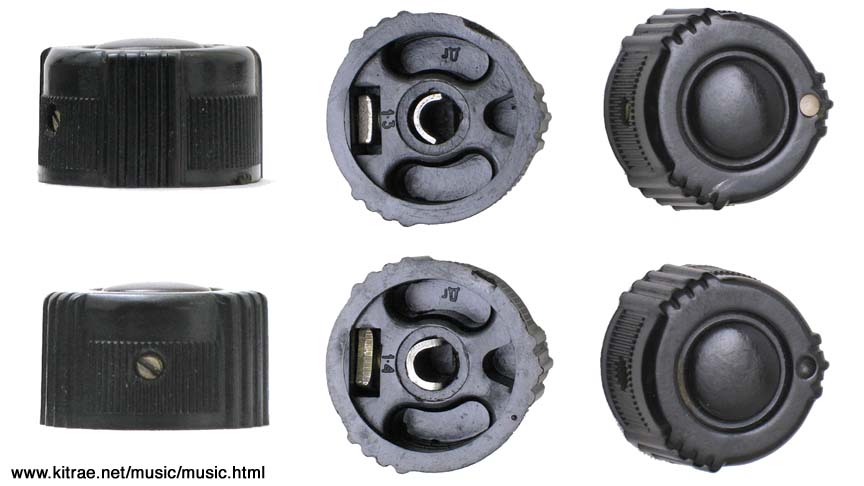
Hey, can someone make this knob for me? I really don't have a clue on how to make this... :S
Thanks!

Image
Just let its Sound do the talking: http://www.synthmaster.com/

Post Reply

Return to “DSP and Plugin Development”