SynthMaster 2.6, 2.7 roadmap, add your feature requests...

Official support for: kv331audio.com
Post Reply New Topic
RELATED
PRODUCTS

Post

My bad for thinking it may be simple to do,

is there any way to make the global lfo's re-trigger?

Swing can be really cool with wobble bass' it works a bit like the current phase setting but it only moves the central crossover point, always keeping the end/start points as a crossover point,

& :dog: for missing the 3 & 1.5 :dog:

thanks for your reply's!

Subz

Post

emotica wrote:
kv331 wrote:You can use mouse wheel as well, doesnt it work?
No. Mouse wheel doesn't work here most of the time. Not for the browser or anything else. :?

Hm, I gave it a go in my 2nd host which is energyXT and mouse wheel does work here, though not good in Cubase.
I tried the AU version inboth Lgoci and Live. In live mousewheel only browses between te basic wavefprms (sine ti, saw etc) whatever waveform we're in previously. in Logic however it works just fine.

I'm for little up/down or L/R arrows option as well to switch waveforms (think Rhino here for example). Depending on the mouse the user have, it's difficult to browse the wf one by one.

Post

Caco wrote:Optimize unison so that it is only creating additional oscillators rather than the full signal path. This is a real CPU hog in Synthmaster, while the rest of synthmaster seems relatively CPU light.
:)
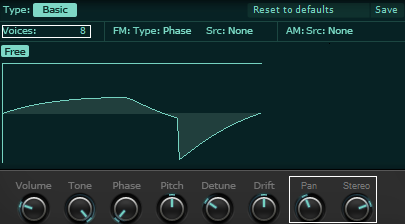
Done 8)

Image

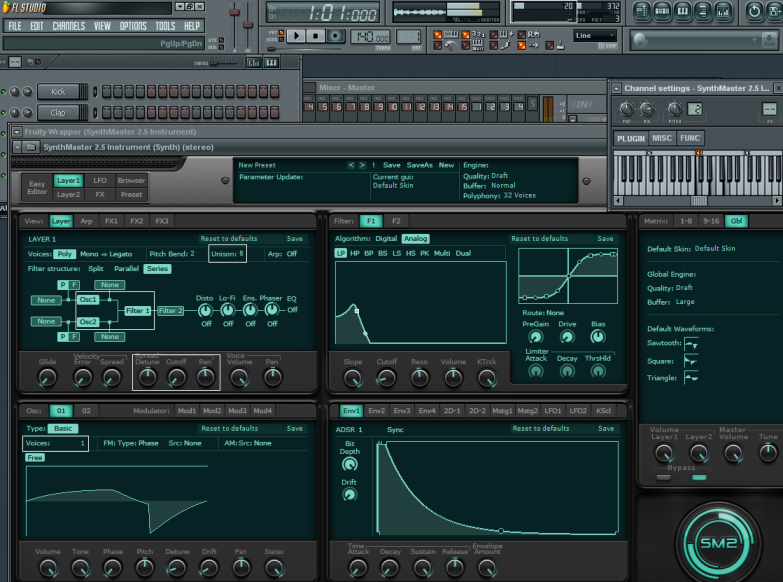
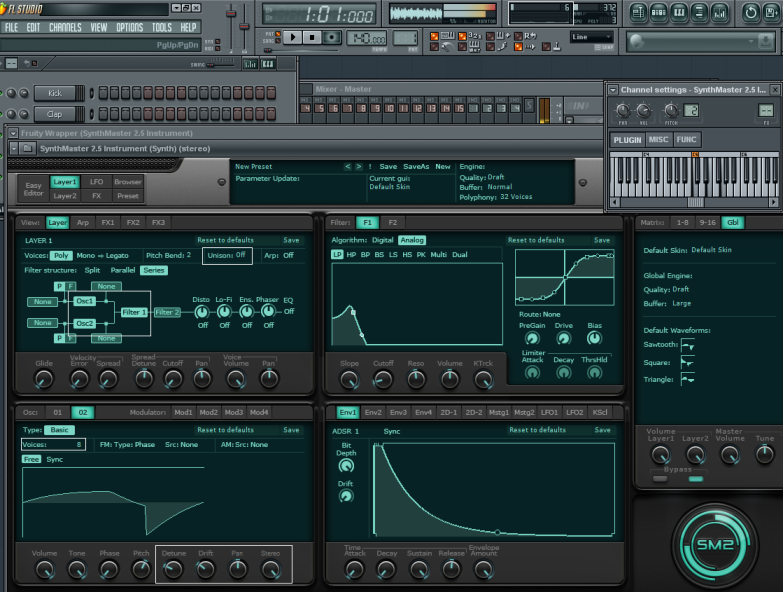
Here's a CPU usage comparison: A simple patch with 2 basic oscillators and 1 analog filter. Engine buffer is set to "large":

1. Old implementation: 20 % for 3 notes playing:

Image

2. New implementation: 6 % for 3 notes playing

Image

Just check out version 2.5.1.45 and I hope you'll be impressed :)

This was one major step toward beating the competition :D

Once we have the new factory presets + the expansions done in 2011, and with you guys' support, I hope 2011 will be a great year for the rise of the SynthMonster :D
Works at KV331 Audio
SynthMaster voted #1 in MusicRadar's "Best Synth of 2019" poll
SynthMaster One voted #4 in MusicRadar's "Best Synth of 2019" poll

Post

Bulent,

I haven't dived fully into Synthmaster as yet but does it have a 32 step trancegate and if not is it possible/feasible.

Cheers

Post

randyandyvandaman wrote:Bulent,

I haven't dived fully into Synthmaster as yet but does it have a 32 step trancegate and if not is it possible/feasible.

Cheers
Tonight I'll post a sample preset on this.
Works at KV331 Audio
SynthMaster voted #1 in MusicRadar's "Best Synth of 2019" poll
SynthMaster One voted #4 in MusicRadar's "Best Synth of 2019" poll

Post

You can use the LFO to step modulate anything that could be in SM.

Here's 8 step TG for the voice LFO. Modulate the Layer Gain with it and you're done.

BTW, Bulent, please make it possible to zoom in and out of the lfo view. I wanted to make a 32 step sequence for the lfo but the small view of the whole thing was painful so I just did 8. :)

Post

dsp music wrote:You can use the LFO to step modulate anything that could be in SM.

Here's 8 step TG for the voice LFO. Modulate the Layer Gain with it and you're done.

BTW, Bulent, please make it possible to zoom in and out of the lfo view. I wanted to make a 32 step sequence for the lfo but the small view of the whole thing was painful so I just did 8. :)
Yeah, it's time that I add that plus antialiased drawing...
Works at KV331 Audio
SynthMaster voted #1 in MusicRadar's "Best Synth of 2019" poll
SynthMaster One voted #4 in MusicRadar's "Best Synth of 2019" poll

Post

One more FR, still regarding lfo's, is make them a common folder in the Partial presets folders, so you can save a preset in the voice lfo and open the same in a global lfo. As it is now we have to copy/paste the presets from one to the other.

Post

Hi everyone,

Right now, in SM filters, when you increase Resonance, the overall filter volume decreases (this is how it happens in Moog LP filters).

Do you guys think I should add a "boost" switch for the filters so that if "boost" is on, the filter volume doesnt decrease when resonance is increased?

Who's up for this new feature?
Works at KV331 Audio
SynthMaster voted #1 in MusicRadar's "Best Synth of 2019" poll
SynthMaster One voted #4 in MusicRadar's "Best Synth of 2019" poll

Post

Me!!

:)

Post

+1

Post

Just finished the "pitch keytracking" implementation for oscillators & modulators!

Now let's move on to the "boost" parameter for the LP/HP filters!
Works at KV331 Audio
SynthMaster voted #1 in MusicRadar's "Best Synth of 2019" poll
SynthMaster One voted #4 in MusicRadar's "Best Synth of 2019" poll

Post

I can't switch GUI skins anymore, or am I perhaps doing it the wrong way?
No band limits, aliasing is the noise of freedom!

Post

Nielzie wrote:I can't switch GUI skins anymore, or am I perhaps doing it the wrong way?
Just change the global skin from the "Glb" tab! Since I've been making some GUI changes I set the default global skin to "Default Skin"
Works at KV331 Audio
SynthMaster voted #1 in MusicRadar's "Best Synth of 2019" poll
SynthMaster One voted #4 in MusicRadar's "Best Synth of 2019" poll

Post

djsubject wrote:Me!!

:)
Right now I'm implementing this one!
Works at KV331 Audio
SynthMaster voted #1 in MusicRadar's "Best Synth of 2019" poll
SynthMaster One voted #4 in MusicRadar's "Best Synth of 2019" poll

Post Reply

Return to “KV331 Audio”