The long DIVA thread

Official support for: u-he.com
Post Reply New Topic
RELATED
PRODUCTS
Diva$209.00Buy

Post

SJ_Digriz wrote:I have a lot of issue changing patches and some crackly audio when there shouldn't be.
On patch change sometimes I just get an occasional huge audio spike. When this happens that patch won't play until I cycle off of it and cycle back.

Win 7 x64
Cubase 6 x64
Me too. I have the same set up also.
Almost half the patches have problems.

-Club Ho
Last edited by ClubHo on Sat Dec 24, 2011 8:06 am, edited 1 time in total.

Post

zerocrossing wrote:Are you talking about overdriving the filter? It doesn't seem that Diva is set up for that, at least not in the way that DCAM or Olga does it. (or should I say "over does it?" You'll probably have to post process it. I think Urs said that type of behavior was more of a modern synth thing and he wanted to remain true to Diva's "vintage" emulation style.
Ah... well, actually I was thinking about the modificaions page where there are a couple of highly interesting labels such as rectify and invert. Have been looking through the presets but still haven't found any that make use of this section. Any idea of how to use it?
Neon City for u-he Repro - 80s pop & Synthwave soundbank
HARDWARE SAMPLER FANATIC - Akai S1100/S950/Z8 - Casio FZ20m - Emu Emax I - Ensoniq ASR10/EPS

Post

Hey I just installed Diva 1.0 but it still says Rev 480...that's wrong i assume? how do i fix it? All the new patches show up in Diva though...

Post

DrGonzo wrote:Ah... well, actually I was thinking about the modificaions page where there are a couple of highly interesting labels such as rectify and invert. Have been looking through the presets but still haven't found any that make use of this section. Any idea of how to use it?
Lots of my presets (for instance) make use of that section! Click on any rectangle in the lower Modifications panel - the list of options contains modulation sources...

A simple example: If you want to control (via modulation wheel) the amount that envelope 2 affects cutoff, select "Env2" and "ModWhl" as the two Multiply sources. Then select "Multiply" as a cutoff modulator in your filter, and turn up its amount.

BTW: I won't be able to start on the Diva manual until late January / early February.

Post

ddeez wrote:Hey I just installed Diva 1.0 but it still says Rev 480...that's wrong i assume? how do i fix it? All the new patches show up in Diva though...
Rev 480 is correct - that's the release version.

Post

awesome! thanks howard...now if you could only figure out why Diva doesn't show up in my vienna ensemble pro.. :( i've posted over at their forum twice and no response.

Post

DrGonzo wrote:
zerocrossing wrote:Are you talking about overdriving the filter? It doesn't seem that Diva is set up for that, at least not in the way that DCAM or Olga does it. (or should I say "over does it?" You'll probably have to post process it. I think Urs said that type of behavior was more of a modern synth thing and he wanted to remain true to Diva's "vintage" emulation style.
Ah... well, actually I was thinking about the modificaions page where there are a couple of highly interesting labels such as rectify and invert. Have been looking through the presets but still haven't found any that make use of this section. Any idea of how to use it?
Invert will invert a signal... so an envelop +20 on a parameter will be same as that parameter set to -20 without invert. So unless someone has some situation where a single parameter is useful with invert I think it does not matter cause you can already tuen a modulation knob either way... however, with multiply and add, you can invert one signal in relation to another and here it is useful.

It is cool to use two envelopes with add with one inverted for some unusual envelop shapes such as a quick attack but which then swells in volume... for parameters with only one modulation control, this is useful as well... For example High Pass Filter cutoff only has the one modulation. If you want to put some keytracking, you have to put the knob to the plus... then if you also wanted to have an env subtract, you would use invert and put invert and keytrack in add...

Rectify I thought I understood that it would make an LFO unipolar rather than bipolar... However it does not act as I imagined... for example, an LFO on square wave I thought should jump only up or down using rectify. That is not what happens so my understanding is poor. I'm still trying to figure that one out.

Lag is useful. You can send a square lfo to lag and the result is like using glide. Instead of a straight jump up and down, it gives you an attack envelop...

Quantize changes a modifier like an envelop from smooth to steps... so put env2 as the target in quantize, then put quantize as the modifier for cutoff and the modulation will go in steps... increasing the quantize control will make the steps finer

Add and Multiply seem self evident... great for using two modulators for parameters with only 1 mod control.

Well, there's a start...

Post

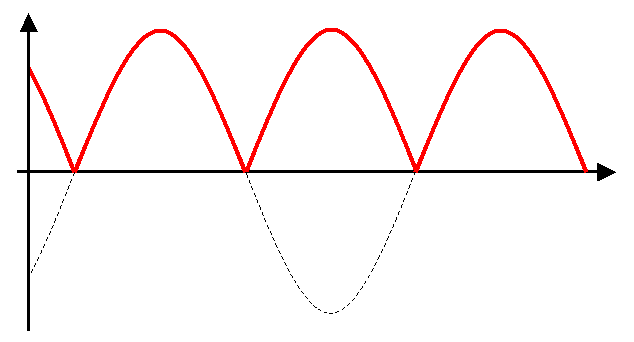
pdxindy wrote:Rectify I thought I understood that it would make an LFO unipolar rather than bipolar... However it does not act as I imagined... for example, an LFO on square wave I thought should jump only up or down using rectify. That is not what happens so my understanding is poor. I'm still trying to figure that one out.
Rectify makes the negative values positive. Applied to a square LFO you'll get a constant.
Here is what happens to a sine wave: Image
Sorry I can't find a better picture and I'm bad at explaining such things.

Cheers
Dennis

Post

DrGonzo wrote:
zerocrossing wrote:Are you talking about overdriving the filter? It doesn't seem that Diva is set up for that, at least not in the way that DCAM or Olga does it. (or should I say "over does it?" You'll probably have to post process it. I think Urs said that type of behavior was more of a modern synth thing and he wanted to remain true to Diva's "vintage" emulation style.
Ah... well, actually I was thinking about the modificaions page where there are a couple of highly interesting labels such as rectify and invert. Have been looking through the presets but still haven't found any that make use of this section. Any idea of how to use it?
Almost all my presets use them :)

Cheers
Dennis

Post

Argh! Spoke too soon! Diva is still crashing Cubase 6.0.5. I get this weird thing where the 1st voice doesn't sound (round robin, every time), or it spikes the CPU hard, then Cubase often crashes when I try to close it and load a new instance. Anybody else experiencing anything like this?
:dog:

Post

Howard wrote:
DrGonzo wrote:Ah... well, actually I was thinking about the modificaions page where there are a couple of highly interesting labels such as rectify and invert. Have been looking through the presets but still haven't found any that make use of this section. Any idea of how to use it?
Lots of my presets (for instance) make use of that section! Click on any rectangle in the lower Modifications panel - the list of options contains modulation sources...

A simple example: If you want to control (via modulation wheel) the amount that envelope 2 affects cutoff, select "Env2" and "ModWhl" as the two Multiply sources. Then select "Multiply" as a cutoff modulator in your filter, and turn up its amount.

BTW: I won't be able to start on the Diva manual until late January / early February.
Thanks Howard - I'll dive deeper into your presets and see what kind of craziness I find. All the best and happy holidays!

/C
Neon City for u-he Repro - 80s pop & Synthwave soundbank
HARDWARE SAMPLER FANATIC - Akai S1100/S950/Z8 - Casio FZ20m - Emu Emax I - Ensoniq ASR10/EPS

Post

DrWashington wrote:Argh! Spoke too soon! Diva is still crashing Cubase 6.0.5. I get this weird thing where the 1st voice doesn't sound (round robin, every time), or it spikes the CPU hard, then Cubase often crashes when I try to close it and load a new instance. Anybody else experiencing anything like this?
Confirmed with Cubase 6.05 64bit, some patches knock the CPU meter off scale (but I can play the same patches in Live 32 bit with 32 bit Diva)

Post

Bronto Scorpio wrote:
pdxindy wrote:Rectify I thought I understood that it would make an LFO unipolar rather than bipolar... However it does not act as I imagined... for example, an LFO on square wave I thought should jump only up or down using rectify. That is not what happens so my understanding is poor. I'm still trying to figure that one out.
Rectify makes the negative values positive. Applied to a square LFO you'll get a constant.
Here is what happens to a sine wave: Image
Sorry I can't find a better picture and I'm bad at explaining such things.

Cheers
Dennis

aha! Thanks... Now I know how to use it ::runs off with an idea::

Post

We'll check the 64bit issue - it's probably just a compiler setting (as always...) - won't happen before 28th though...

Post

Urs wrote:We'll check the 64bit issue - it's probably just a compiler setting (as always...) - won't happen before 28th though...
I should hope not! Enjoy your break! Happy Christmas!

.....what time on the 28th ... :wink:

Post Reply

Return to “u-he”