

I have been using Jscope and other freebees for some time to check my sounds, but I have a hard time getting them to draw a clean wave from my synths so maybe it is time to get a better oscilloscope plugin.
Help me out here, which ones are the best for drawing nice waves and offer a resizeable GUIs?

The best VST Oscilloscope?
-
- KVRist
- 433 posts since 28 Dec, 2017
-
- KVRist
- 361 posts since 20 Jul, 2018
Desperately seeking same, thanks for posting this question GearNstalgia.GearNostalgia wrote:I have been using Jscope and other freebees for some time to check my sounds, but I have a hard time getting them to draw a clean wave from my synths so maybe it is time to get a better oscilloscope plugin.
Help me out here, which ones are the best for drawing nice waves and offer a resizeable GUIs?
-

- KVRian
- 631 posts since 10 Jan, 2017
-
- KVRist
- 140 posts since 26 Feb, 2016
Best free one I have come across. Customizable & also does full screen. Options seem hidden at first, hover near top of screen & then try out various menus. Make sure to click on the drop down arrow on the tab, this gives you a huge amount of options.
http://www.jthorborg.com/index.html?ipage=signalizer
Great tutorial video from the dev here
http://www.jthorborg.com/index.html?ipage=signalizer
Great tutorial video from the dev here
Last edited by virtualpt on Tue Jul 24, 2018 2:09 pm, edited 2 times in total.
-
- KVRAF
- 35716 posts since 11 Apr, 2010 from Germany
For free, you can get MOscilloscope (pretty limited), and for almost free (the price of a magazine), there's this:
What i miss from all the free or magware ones though is a compare function, where you can layer different snapshots on top of each other, like in the Blue Cat Audio scope.
What i miss from all the free or magware ones though is a compare function, where you can layer different snapshots on top of each other, like in the Blue Cat Audio scope.
-

- KVRAF
- 2254 posts since 10 Apr, 2002 from Saint Germain en Laye, France

-
- KVRist
- Topic Starter
- 433 posts since 28 Dec, 2017
Seems interessting, but I wounder if it can go faster than 16ths? I want to see the shapes of my VCOs accurate so I can see if the Saw is really clean or not and stuff like that.
I just found this by googling. Seems sort of impressive. Anybody got it? https://www.bluecataudio.com/Products/P ... copeMulti/
-
- KVRAF
- 10597 posts since 13 Jun, 2004 from Alberto Balsam
I like good ol' s(M)exoscope. Has a bunch of sync options, no frills to make it look prettier, and extensive mouse-over statistics.
https://www.kvraudio.com/product/s_m_ex ... electronix
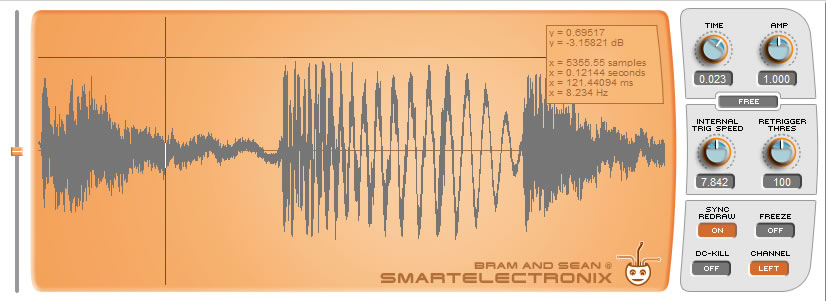
https://www.kvraudio.com/product/s_m_ex ... electronix
-

- KVRist
- 66 posts since 15 Jun, 2018 from England
My fave is DMG Audio track Meter it can resize and go full screen, it also has a tuner and many other thingys.
https://dmgaudio.com/trackmeter
https://dmgaudio.com/trackmeter
-

- KVRAF
- 8679 posts since 29 Sep, 2010 from Maui
The blue cat audio oscilloscope multi is very good, particularly if you want to look
at stuff in detail. It also goes on sale occasionally, I bought it for $9 a while back.
The only Blue Cat plugin I own actually, for some reason the Blue Cat sound
doesn't suit me.
at stuff in detail. It also goes on sale occasionally, I bought it for $9 a while back.
The only Blue Cat plugin I own actually, for some reason the Blue Cat sound
doesn't suit me.
-
- KVRAF
- 35716 posts since 11 Apr, 2010 from Germany
I'd get it as well, for that price. 49 € is a bit steep for a mere analyzer plugin. Yes, i'm a penny pincher.pekbro wrote:The blue cat audio oscilloscope multi is very good, particularly if you want to look
at stuff in detail. It also goes on sale occasionally, I bought it for $9 a while back.
-
- KVRist
- Topic Starter
- 433 posts since 28 Dec, 2017
Yes, that was a reasonable price. Will keep an eye open for it.pekbro wrote:The blue cat audio oscilloscope multi is very good, particularly if you want to look
at stuff in detail. It also goes on sale occasionally, I bought it for $9 a while back.
The only Blue Cat plugin I own actually, for some reason the Blue Cat sound
doesn't suit me.
-

- KVRAF
- 12615 posts since 7 Dec, 2004
Can you define:GearNostalgia wrote:I have been using Jscope and other freebees for some time to check my sounds, but I have a hard time getting them to draw a clean wave from my synths so maybe it is time to get a better oscilloscope plugin.
Help me out here, which ones are the best for drawing nice waves and offer a resizeable GUIs?
- Clean wave
- From my synths
- Nice waves

Vs. this:

"From my synths" do you mean single frequencies or groups of frequencies? What scale factor are you interested in? In the images I've posted above we see only a single cycle.
There is a major difference between frequency detection of a single uniform frequency tone (monophonic, unmodulated) vs. the chaotic behavior of a frequency detector or trigger/sync detector provided with multiple frequencies and modulation.
In many cases it isn't even possible to accurately sync without knowing the root frequency ahead of time. In an analog scope you'd input the sync signal from a known source like a comparator applied to the ramp waveform. You could then adjust the sync phase by adjusting the "pulse width" level into the comparator.
In terms of getting "nice waves" though without all the extraneous HF information this is very possible with the right filters. Essentially the problem is a combination of excessive HF information (frequencies above 1 pixel width) combined with aliasing. This is because essentially the signal is being sampled at the screen sample-rate. If you try to put a 5000 Hz signal into 1000 pixels it won't look right at all.
There are two solutions:
- The screen can be drawn "additively" by emulating how a real oscilloscope tube/phosphors/beam works.
- The input signal can be filtered down ("anti-aliased") to display only the information that discretely fits into those pixels.
The first strategy of phosphor-emulation works best for complex waveforms with a lot of frequency information. For example mixed signals like a full mix or many types of natural signals.
The second strategy works best for static waveforms like produced by a synthesizer. We know for example that there is always a specific "root frequency" and all other content is based upon that raw input signal from the oscillator(s). This method makes the most sense for single waveforms like the output of a single oscillator but it can also work for more complex signals as long as they have a known root frequency component.
For the second strategy you need to provide some communication channel to the scope device so it can adjust how it works based upon that information. Otherwise it is impossible to synthesize/measure the information losslessly and no matter how good your sync circuit is it will always behave chaotically in all but very specific circumstances.
Last edited by aciddose on Sun Jun 20, 2021 2:21 pm, edited 1 time in total.
Free plug-ins for Windows, MacOS and Linux. Xhip Synthesizer v8.0 and Xhip Effects Bundle v6.7.
The coder's credo: We believe our work is neither clever nor difficult; it is done because we thought it would be easy.
Work less; get more done.
The coder's credo: We believe our work is neither clever nor difficult; it is done because we thought it would be easy.
Work less; get more done.
-
- KVRist
- Topic Starter
- 433 posts since 28 Dec, 2017
Seems ok, I will check out the demo.I'm Ant wrote:My fave is DMG Audio track Meter it can resize and go full screen, it also has a tuner and many other thingys.
https://dmgaudio.com/trackmeter
-
- KVRist
- Topic Starter
- 433 posts since 28 Dec, 2017
aciddose wrote:Can you define:GearNostalgia wrote:I have been using Jscope and other freebees for some time to check my sounds, but I have a hard time getting them to draw a clean wave from my synths so maybe it is time to get a better oscilloscope plugin.
Help me out here, which ones are the best for drawing nice waves and offer a resizeable GUIs?Regarding "clean/nice wave" do you mean like this:
- Clean wave
- From my synths
- Nice waves
Vs. this:
Ok, lets see. Good questions, with clean I actually should say steady I guess. With the scpoe plugs I have tried so far it is very hard to get it to show a steady picture of a pure sine or saw VCO output. It jumps around too much to see now a cycle looks like. I don't really care if I see one, two or a few more cycles as long as it is a steady picture. I want something like Mordax Data but in VST I guess.