


This update fixes bugs mentioned above, and includes some improvements, such as optional white header and tag editor.
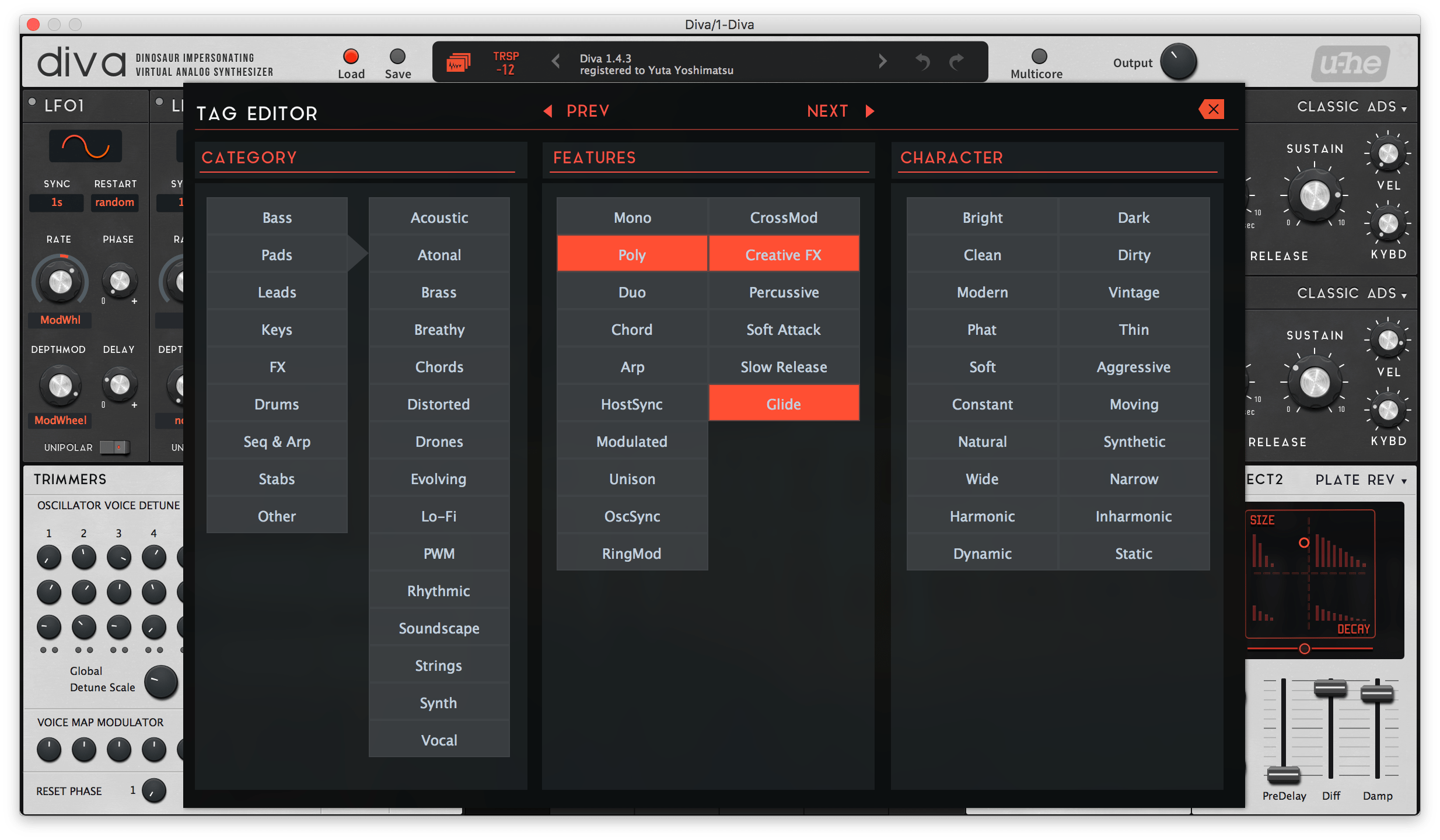
And with this tag editor, I set tags for all presets of T-2020 bonus sound set as well! You should re-download them.


Ah, forgot to note that the update is available on https://plugmon.jp for now. Update for Gumroad is going to be a couple of days later.mcbpete wrote: Wed Dec 05, 2018 1:43 pm Amazing, thank you! The best just keeps getting better
Do you know when will this new update be available? (looks like it's still v.1.4.4 on Gumroad)

I see. I'll do that next!BlobfishMastermind wrote: Wed Dec 05, 2018 8:35 pm Thanks a lot for such a fast update!
Is there a way to get a red header with the red skin ? (The standard skin is beautiful with the white header, but the red one is not so good with the default grey header...)
On the white header, the settings icon is poorly visible, you maybe could increase contrast a little...
The tag feature skin is a great addition !
Excuse me but I cannot clearly see what situation you're in, what trouble you're having and what action you want to proceed.Razzia wrote: Wed Dec 05, 2018 9:56 pm Hey, I had someone talking my ear off when I was trying to create my account, and if there was an option to add my address, I must have skipped it. I see the link to manage mailing address in my account area on plugmon.jp, but just takes me to a 404 error.
Right, sorry. I was unclear. I was trying to connect my gumroad account to your website. used the same email address, of course. If I understand correctly, account migration as you call it is based on physical address. When I try to edit my mailing/billing address I get this - see attached.plugmon wrote: Thu Dec 06, 2018 3:13 amI see. I'll do that next!BlobfishMastermind wrote: Wed Dec 05, 2018 8:35 pm Thanks a lot for such a fast update!
Is there a way to get a red header with the red skin ? (The standard skin is beautiful with the white header, but the red one is not so good with the default grey header...)
On the white header, the settings icon is poorly visible, you maybe could increase contrast a little...
The tag feature skin is a great addition !
Excuse me but I cannot clearly see what situation you're in, what trouble you're having and what action you want to proceed.Razzia wrote: Wed Dec 05, 2018 9:56 pm Hey, I had someone talking my ear off when I was trying to create my account, and if there was an option to add my address, I must have skipped it. I see the link to manage mailing address in my account area on plugmon.jp, but just takes me to a 404 error.
Which URL takes you to 404? E-mail manage page is below (login required):
https://plugmon.jp/my-account/edit-account/
Great, thanks!plugmon wrote: Thu Dec 06, 2018 1:11 pm It seems that you purchased AIKO on Gumroad very recently, so it was not yet reflected on our website side.
I've just imported your order. Now you should be able to download AIKO from our website as well. I'm sorry to get you in trouble. (Account linking is based on mail addresses, and there're no real address form on our website, btw.)
BTW, let me just add that I love that we can cycle through presets with the tag editor remaining open. Makes doing detailed tagging much more efficient.plugmon wrote: Wed Dec 05, 2018 12:35 pm AIKO is updated to v1.4.5.
This update fixes bugs mentioned above, and includes some improvements, such as optional white header and tag editor.
And with this tag editor, I set tags for all presets of T-2020 bonus sound set as well! You should re-download them.
YeeeeeeesFunkybot's Evil Twin wrote: Fri Dec 07, 2018 3:21 pm BTW, let me just add that I love that we can cycle through presets with the tag editor remaining open. Makes doing detailed tagging much more efficient.

I was actually going to post the same thing earlier, but didn't bother pointing out because most people know and it only makes sense with broad categories. Literally started writing out almost the same post but closed out the browser window.EvilDragon wrote: Fri Dec 07, 2018 9:43 pm Yuta, you do know you can multi-select presets and drop them on a tag, to automatically add that tag to all the selected presets?
Well of course, this makes sense only with broad tag categories. But still - very useful stuff.

Yes, Actually I learnt it from you somewhere in another threadEvilDragon wrote: Fri Dec 07, 2018 9:43 pm Yuta, you do know you can multi-select presets and drop them on a tag, to automatically add that tag to all the selected presets?
Well of course, this makes sense only with broad tag categories. But still - very useful stuff.

Submit: News, Plugins, Hosts & Apps | Advertise @ KVR | Developer Account | About KVR / Contact Us | Privacy Statement
© KVR Audio, Inc. 2000-2026
