


Hive 2.0 Tips, Tricks & Tuts
-
- KVRAF
- 2296 posts since 23 May, 2012 from London
I know that there are already too many Hive 2.0 threads kicking around but I thought it might be a good idea to have a one dedicated to sharing tips, tricks and tutorials/guides for Hive's new features in particular, but cool ways to use the existing vanilla features shouldn't be excluded either. I think that it will also be a good way to keep any of this stuff that's cropped up (and or will continue to crop up) in the aforementioned threads, in a single location for easier reference.
Always Read the Manual!
-
- KVRAF
- Topic Starter
- 2296 posts since 23 May, 2012 from London
Funkybot's Evil Twin wrote: Wed May 29, 2019 1:57 pmHere's where I'm at with it. Hope you have Hive in front of you. If so, try following these steps to see if they help you make sense of the FG's.Butwug wrote: Wed May 29, 2019 12:42 pm One thing I haven't figured out yet is the function tab. Read the manual to see if I could make out what it does but couldn't figure it out. Not saying the manual is poorly written, but I'm 100% sure it's because my synth skills are poorly developedIf someone can explain this with something simple to understand, such as how it can be applied to cutoff, I would appreciate it! Tried using the cross hairs on the rise/still/env but failed miserably and it's gonna bother me all day at work.
Load up an Init patch (right click the preset name and select INIT). Let's ignore the Slope for a second. Keep Function 1 in "Envelope" mode, keep input to "None." Attach F1 "Env" to the Scope so you can see what's happening. What we have is a simple Attack/Decay envelope. Now each time you press a note, an envelope will trigger. With Attack and Decay at 0, these look like trigger signals: quick spikes. If the attack is 0 and decay is around 3 o'clock. It will look like a saw shape. If both are at 3 o'clock, it looks like a triangle shape (ramp up and ramp down). If Attack is slow and decay is at zero, it'll look like a reverse saw. So now you've got two extra, simple, A/D envelopes between F1 and F2 that you can use to modulate things as needed. Think of Roland synths that use A/D envelopes to modulate pitch as one example.
Now, change the Mode of F1 to Cylcle On/Off. Change Attack to 3 o'clock and Decay to 3 o'clock, and Slope to noon. Check out the Scope. You'll see that you've turned it from an envelope to a Triangle LFO. Now you've got a 2 extra LFO's in case you need them. Change the Attack/Decay/Slope to change the shape of your LFO. Notice how it's not a triangle any longer, and kind of ramps up and down with a curve. Fun, new modulation shape. Fun, new LFO's you can use to modulate whatever you want with by dragging F1 Env to a modulation target.
For now, let's go back to our triangle LFO shape (Attack and Decay at 3 o'clock, Slope at noon, Input at None, and Mode to Cycle On/Off). On the left of F1, there are options for Rise and Still. Click and drag each into the Scope to see what each does. Rise will send an On type signal whenever the triangle LFO increases, and send an Off signal whenever the triangle LFO is headed back downwards. This means your LFO or Envelope can also act as a Gate-type signal at the exact same time. So that one function generator can act as an Envelope/LFO and Gate signal at the same time.
Alright, but what about Still mode? Go back to your triangle LFO. Nothing is happening in the scope. What's that do? Still is kind of an anti-gate. If nothing in FG1 is moving, Still sends an On signal and as soon as something starts moving it sends an Off signal. So right now, our triangle LFO means something is constantly moving so Still is constantly sending an Off signal. So to see how Still works in action, let's go back to our Triangle LFO and add an Input signal. Use Gate as your Input on FG1. Now, when you're not pressing a note, our triangle LFO is off. As a result, you'll see Still sends a constant On signal. Press a note, and FG1 Env turns into our Triangle LFO shape (i.e. it's moving again), which causes Still to send an off signal. So as long as nothing else is happening in FG1, still is sending a full blast signal. As soon as modulation occurs, Still stops. It's just another way you can modulate other signals.
Note: at this point, you may want to go back to LFO mode. But hey, where is Input = None from before? "None" is not an option in the Input dropdown. Use Input = "Constant" instead.
I think that's the most basic way to wrap your head around the Function generators. Just keep the scope open and play with them until you get what's happening. Don't even worry too much about modulating anything with them until you get a grasp of what's going on. Once you get that figured out, you can then start combining modulations and/or using the modifiers in the matrix for crazy modulations based on the basic FG's.
Hope that helps!
Always Read the Manual!
-
- KVRAF
- Topic Starter
- 2296 posts since 23 May, 2012 from London
krans wrote: Fri May 31, 2019 10:33 amNot really answering your question, but there is a neat method that can make anything abrupt disappear:cantaloupe wrote: Thu May 30, 2019 10:28 pm is there a trick to get longer release times? seems abrupt for slower ambienty stuff
Assign "Still" in Function generator 1 to Delay feedback, and turn it up quite a bit.
I love this feature, it makes delay feedback rise when nothing's playing, the sound can just linger on for. . . well, forever. But as soon as you play, feedback goes down again, avoiding a pile of sounds fighting for attention. I find this possibility great for soundscapes and slower stuff that can just keep hanging.
If you also assign your modwheel to for instance Delay time base, you can sit and make music with the echo without even playing your keyboard.
And ok, for those into noise:
White / pink in osc 1 and 2; FG1 Still assigned to Delay feedback, turn it up to max; add some rough compression (and of course adjust filters and effects) = Hive 2 just turned into an amazing, neverending noise machine.
Always Read the Manual!
-
Funkybot's Evil Twin Funkybot's Evil Twin https://www.kvraudio.com/forum/memberlist.php?mode=viewprofile&u=116627
- KVRAF
- 12492 posts since 16 Aug, 2006
Great idea! Don't forget: there's a Tips and Tricks section in the manual too.
So let's talk Still for one second. I haven't tried this yet, but that post, along with the discussion in the MPE+U-he thread got me thinking: would it be possible to use "Still" in combination with velocity to simulate release velocity? In reality, this would use note on velocity but trigger on the release of the note.
I haven't tried yet, but I'm thinking something like:
1. Setup FG1 or 2 to act as an LFO on gate signal - So Input = Gate, Mode = Cycle On/Off
2. That should get something resembling an LFO happening on Gate signals
3. That should also mean when you're pressing a note down, Still is sending an Off signal and when a Note is released, Still sends an On signal
4. Now assign Still to something like the Delay mix or maybe the Release portion of the envelope
5. Now in the matrix, where you have Still modulating Delay Mix (or whatever), use a Via assignment of Velocity
I'm thinking doing so could get you something like release velocity, but actually using note on velocity. I'm not sure if it would be polyphonic though.
So let's talk Still for one second. I haven't tried this yet, but that post, along with the discussion in the MPE+U-he thread got me thinking: would it be possible to use "Still" in combination with velocity to simulate release velocity? In reality, this would use note on velocity but trigger on the release of the note.
I haven't tried yet, but I'm thinking something like:
1. Setup FG1 or 2 to act as an LFO on gate signal - So Input = Gate, Mode = Cycle On/Off
2. That should get something resembling an LFO happening on Gate signals
3. That should also mean when you're pressing a note down, Still is sending an Off signal and when a Note is released, Still sends an On signal
4. Now assign Still to something like the Delay mix or maybe the Release portion of the envelope
5. Now in the matrix, where you have Still modulating Delay Mix (or whatever), use a Via assignment of Velocity
I'm thinking doing so could get you something like release velocity, but actually using note on velocity. I'm not sure if it would be polyphonic though.
-

- u-he
- 30215 posts since 8 Aug, 2002 from Berlin
"Still" is a gate signal which goes high once FG1 does not move anymore. To preempt any confusion: "Still" has nothing to do with the volume of the audio!
One major application for Still is a gate delay function. Keep FG 1 & 2 as normal envelopes. Still goes high when the FG 1 envelope finishes. Use Still as Input for FG 2. FG 2 envelope then starts when FG 1 finishes. So you can set FG 1 A and D to create a delay for FG 2.
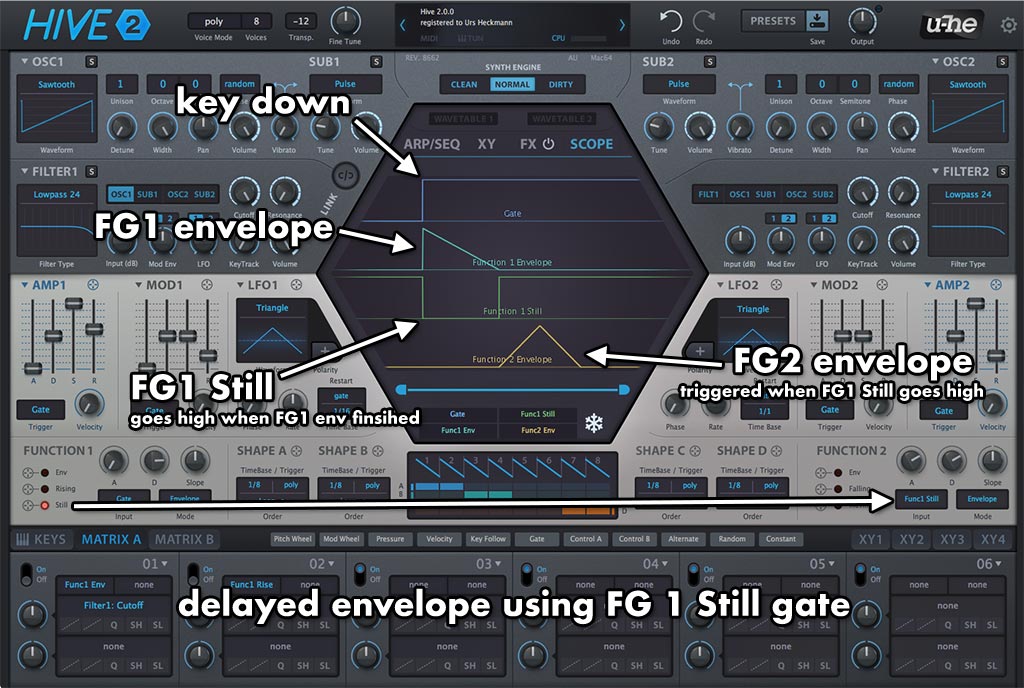
One major application for Still is a gate delay function. Keep FG 1 & 2 as normal envelopes. Still goes high when the FG 1 envelope finishes. Use Still as Input for FG 2. FG 2 envelope then starts when FG 1 finishes. So you can set FG 1 A and D to create a delay for FG 2.