


one fine day... probably after Z3...claudedefaren wrote: Wed Aug 12, 2020 10:40 pm I still think Hive 2 has the best GUI of any synth I've ever tried, and that includes pretty much all of them.
But I can't wait until u-he makes it so I can use Normal mode's envelopes with Dirty mode's filter/warmth and Clean mode's unison detune all at the same time.
Maybe a "Custom" mode to choose the different aspects of each algorithm you want to use.
Might need a new tab for that interface, which I wouldn't mind at all.
Hive2 feature request thread
-

- u-he
- 30213 posts since 8 Aug, 2002 from Berlin
-
- KVRist
- 317 posts since 17 Feb, 2014
This GUI is in my view better than the original.THE INTRANCER wrote: Wed Aug 12, 2020 9:29 pmEnlarged viewMorpherX wrote: Wed Aug 12, 2020 7:17 pm
That's an interesting approach. Could you show the hole GUI.
I know there exists an alternative skin from plugmon, but I don't like the strukture. The GUI strukture in Hive 2 is in my view OK, because it's similiar to Hive 1.2, but......
I've not yet uploaded all the screenshots as I've still to tweak a few things in the process of updating it, however you can see everything from the 11.42 mark in the film I made for U-HE's Zebralette, and see all the screens I've changed for Hive 2. You can see how I've really gone back to the original feeling of the Hive 1 blue style, which I actually prefer. I produce mainly in the dark and prefer the high contrast colour style generally.
First video at the top:
https://intrancersonic-ds.blogspot.com/p/f-i-l-m.html
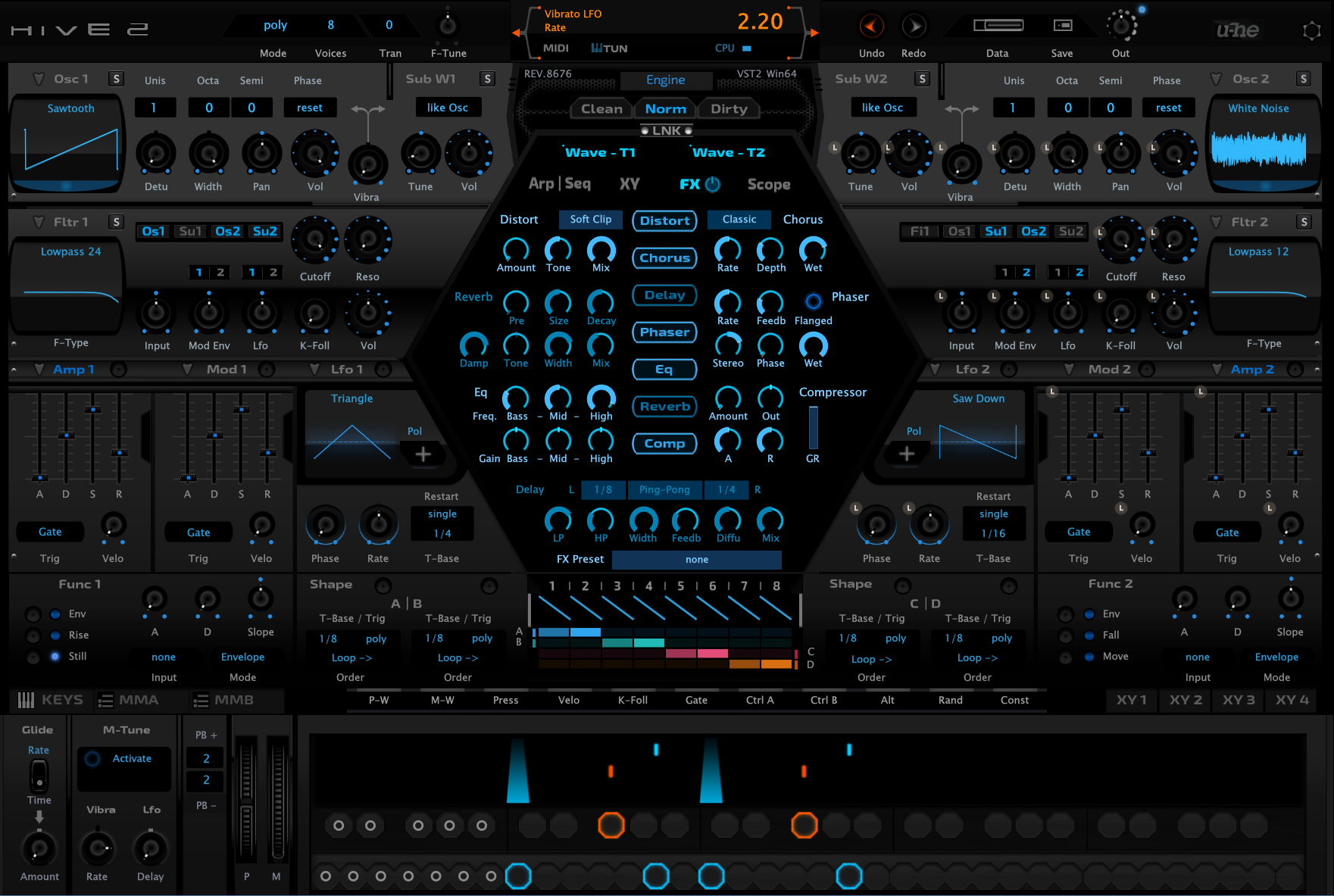
Would you share it ?
I would also pay some bucks for it !
Great work !
-
- KVRAF
- 3496 posts since 30 Dec, 2014
Thanks, I'd be lying if I said that it doesn't take lots of time, trial / error, and patience to get to that point. As for your question and it might be one, others are interested in knowing as I do design and give GUI's away for free. With this one, I've not decided yet either way yet in whether to put a price on it. Right now as I type, I'm in the middle of transitioning the colour of everything to just two colours of illuminated and unilluminated turquoise, rather than purple, blue and turquoise (was in two minds in which way to go). With the shaper sequencer being red, green, orange and blue, being as it is colour co-ordinated with the scope displays, I might just base that on shades of one colour. In any case, I'll try and focus more time on Hive 2's re-colourisation in the next days ahead. The website is quite happy at this point, to hold on for a while as it is now.MorpherX wrote: Thu Aug 13, 2020 10:38 pm This GUI is in my view better than the original.
Would you share it ?
I would also pay some bucks for it !
Great work !
KVR S1-Thread | The Intrancersonic-Design Source > Program Resource | Studio One Resource | Music Gallery | 2D / 3D Sci-fi Art | GUI Projects | Animations | Photography | Film Docs | 80's Cartoons | Games | Music Hardware |
-
- KVRian
- 1197 posts since 11 Nov, 2010 from ny
I dont know if this has been asked before, but I would like to be able to FM the Oscillators, and be able to mute one of them. Serum has this feature, and quite overly used in DNB music. However it is quite useful. This is literally the only feature that has me still using Serum for a lot of bass sound design that I would really prefer moving to Hive 2.
-

- KVRAF
- 24427 posts since 7 Jan, 2009 from Croatia
It's been asked for, and the answer is "it would take too much CPU which is not what Hive is about". So we got two-dimensional wavetables which can be used to get FM timbres quite nicely.
-
- KVRAF
- 2296 posts since 23 May, 2012 from London
I requested this for Z3 and was told by Urs that CPU would be something like 50x current Hive overheads, which is insane. I've come to accept that we can't have it all i.e. FMable and incredibly smooth scanning.
Always Read the Manual!
-
- KVRAF
- 2296 posts since 23 May, 2012 from London
Edit: that being said, I would kill for FM between the VA waveforms; I just want to be able to FM a saw with a sine 1 octave below, for those classic gritty psy lead vibes.PieBerger wrote: Mon Aug 17, 2020 11:31 am I requested this for Z3 and was told by Urs that CPU would be something like 50x current Hive overheads, which is insane. I've come to accept that we can't have it all i.e. FMable and incredibly smooth scanning.
Always Read the Manual!
-
- KVRAF
- 24427 posts since 7 Jan, 2009 from Croatia
And that is where .uhm scripts come into play. 
-
- KVRAF
- 2296 posts since 23 May, 2012 from London
I've had a little play around, but I can't work out how to do subharmonic (to borrow from Bazille's terminology) FM, between 2 sine operators, let alone a saw and a sine.
Always Read the Manual!
-
- u-he
- 30213 posts since 8 Aug, 2002 from Berlin
You gotta aim an octave or two higher for your actual fundamental. Then a suboctave (or two) is your wavetable's fundamental.
-
- KVRAF
- 24427 posts since 7 Jan, 2009 from Croatia
viewtopic.php?f=31&t=511639
So to do first subharmonic (one octave down), you would do:
sin(2 * pi * phase * 1/2)
So to do first subharmonic (one octave down), you would do:
Code: Select all
Wave "sin(pi*phase)"-
- KVRAF
- 2296 posts since 23 May, 2012 from London
Like so:Urs wrote: Mon Aug 17, 2020 12:40 pm You gotta aim an octave or two higher for your actual fundamental. Then a suboctave (or two) is your wavetable's fundamental.
Code: Select all
Wave "sin(2*pi*harmonic + sin(2*pi)*depth)"Edit: then I would just set the osc or global pitch down an octave or two to compensate?
Edit2: corrected formula
Always Read the Manual!
-
- u-he
- 30213 posts since 8 Aug, 2002 from Berlin
Almost.PieBerger wrote: Mon Aug 17, 2020 1:24 pmLike so:Urs wrote: Mon Aug 17, 2020 12:40 pm You gotta aim an octave or two higher for your actual fundamental. Then a suboctave (or two) is your wavetable's fundamental.
where harmonic = 2 for one octave below, 3 for two octaves below and so on.Code: Select all
Wave "sin(2*pi*harmonic + table*2*pi)"
Let's say, the lowest subharmonic is 2 octaves below your fundamental.
Your new fundamental is 2 octaves higher, hence 4 times the frequency:
Code: Select all
Wave "sin(2*pi*phase*4)"Code: Select all
Wave "sin(2*pi*phase*2)"Code: Select all
Wave "sin(2*pi*phase*1)"Yes.Edit: then I would just set the osc or global pitch down an octave or two to compensate?
-
- KVRAF
- 2296 posts since 23 May, 2012 from London
Thanks Urs, this is great. I got the compensation bit right at leastUrs wrote: Mon Aug 17, 2020 1:35 pmAlmost.PieBerger wrote: Mon Aug 17, 2020 1:24 pmLike so:Urs wrote: Mon Aug 17, 2020 12:40 pm You gotta aim an octave or two higher for your actual fundamental. Then a suboctave (or two) is your wavetable's fundamental.
where harmonic = 2 for one octave below, 3 for two octaves below and so on.Code: Select all
Wave "sin(2*pi*harmonic + table*2*pi)"
Let's say, the lowest subharmonic is 2 octaves below your fundamental.
Your new fundamental is 2 octaves higher, hence 4 times the frequency:
Your first subharmonic (sub octave actually) is twice the wavetable's fundamentalCode: Select all
Wave "sin(2*pi*phase*4)"
Your second subharmonic (two octaves lower) is on the wavetable's fundamentalCode: Select all
Wave "sin(2*pi*phase*2)"
How far down do you wish to go? - It gets tricky if you wish to go in steps of 1-2-3-4-5 instead of octaves 1-2-4-8-16, because then even I would have to sit down and write down the maths to get it right.Code: Select all
Wave "sin(2*pi*phase*1)"
Yes.Edit: then I would just set the osc or global pitch down an octave or two to compensate?

I'm only wanting to go down in octave steps, since that typically yields the best musical results. I'm sure I'll be able to do what I want armed with some new insight, especially if I reference against another synth, which admittedly I neglected to do for my previous attempts.
Always Read the Manual!
-
- KVRist
- 126 posts since 21 Sep, 2015
Although I do like the clean look of the stock Hive 2 skin, I also appreciate this one very much. It brings something back that made the original Hive 1 skin look badass. It is how the controls and displays look back lit and it gives the illusion of blue light glowing in a dark room. But beyond that I think your skin is a fresh take on the UI and I would much enjoy using it interchangeably with the original. So hopefully you make it available. Nice work!THE INTRANCER wrote: Wed Aug 12, 2020 9:29 pmEnlarged viewMorpherX wrote: Wed Aug 12, 2020 7:17 pm
That's an interesting approach. Could you show the hole GUI.
I know there exists an alternative skin from plugmon, but I don't like the strukture. The GUI strukture in Hive 2 is in my view OK, because it's similiar to Hive 1.2, but......
I've not yet uploaded all the screenshots as I've still to tweak a few things in the process of updating it, however you can see everything from the 11.42 mark in the film I made for U-HE's Zebralette, and see all the screens I've changed for Hive 2. You can see how I've really gone back to the original feeling of the Hive 1 blue style, which I actually prefer. I produce mainly in the dark and prefer the high contrast colour style generally.
First video at the top:
https://intrancersonic-ds.blogspot.com/p/f-i-l-m.html