

It seems release info mail of RPE2 didn't reach to some users.
If you haven't received it as before, send me a message.
Tadashi

Hyakken is the HY dev !
-
- KVRist
- 326 posts since 21 Dec, 2015 from Japan
-
 WatchTheGuitar WatchTheGuitar https://www.kvraudio.com/forum/memberlist.php?mode=viewprofile&u=440193
 - KVRAF
- 13256 posts since 30 Apr, 2019
I've tried using the same arrangement (I have TAL-U-NO-LX) as in your video and not getting the issue, but I also don't get the issue in other DAWs or most other synths/presets so it's down to some wacky combination of the DAW and synth preset and I don't think it's caused by your arp, all it did was highlight the issue.hyakken wrote: Sun Oct 11, 2020 4:47 am Can you check this video?
https://drive.google.com/file/d/1f90aAK ... sp=sharing
I tried to reproduce stacking note issue with your pattern, but no luck so far .
If you can reproduce it, please tell me the way.
Tadashi
Everytime I use Reaper's default 4/4 120BPM settings and RPE2 with that custom preset and point it at u-he Repro-5 with the 'Like Faith' preset I get stuck notes appear usually between bars 9 and 13, but sometimes around bar 17. It's really odd. Exact same setup in Bitwig and I get no stuck notes at all.
Thanks for checking anyway. I now need to work out if this is a Reaper bug or a u-he Repro bug though it does seem like it's related to the combination of both somehow.
-
- KVRian
- 805 posts since 17 May, 2011 from Philadelphia
I'm still experiencing the same issue with 1.0.1. When I record MIDI onto an instrument track, with RPE2 as the MIDI input, the Euclidean Mode is out of sync. The Standard Mode works as expected.hyakken wrote: Sat Oct 10, 2020 4:21 pmCan you try v1.0.1?
It seems to be ok now.
Win:
https://hy-plugins.com/wp-content/uploa ... taller.exe
https://hy-plugins.com/wp-content/uploa ... Y-RPE2.zip
Mac:
https://hy-plugins.com/wp-content/uploa ... E2.pkg.zip
Tadashi
Here is a screenshot of the recorded MIDI on the instrument track with RPE2 1.0.1 in the Default Euclid Mode. At the start of the measure the C1 note starts at the same time as the D1 note, and the C1 note is not being gated properly. Later they fall back into sync but with the C1 note triggered a 16th note early.
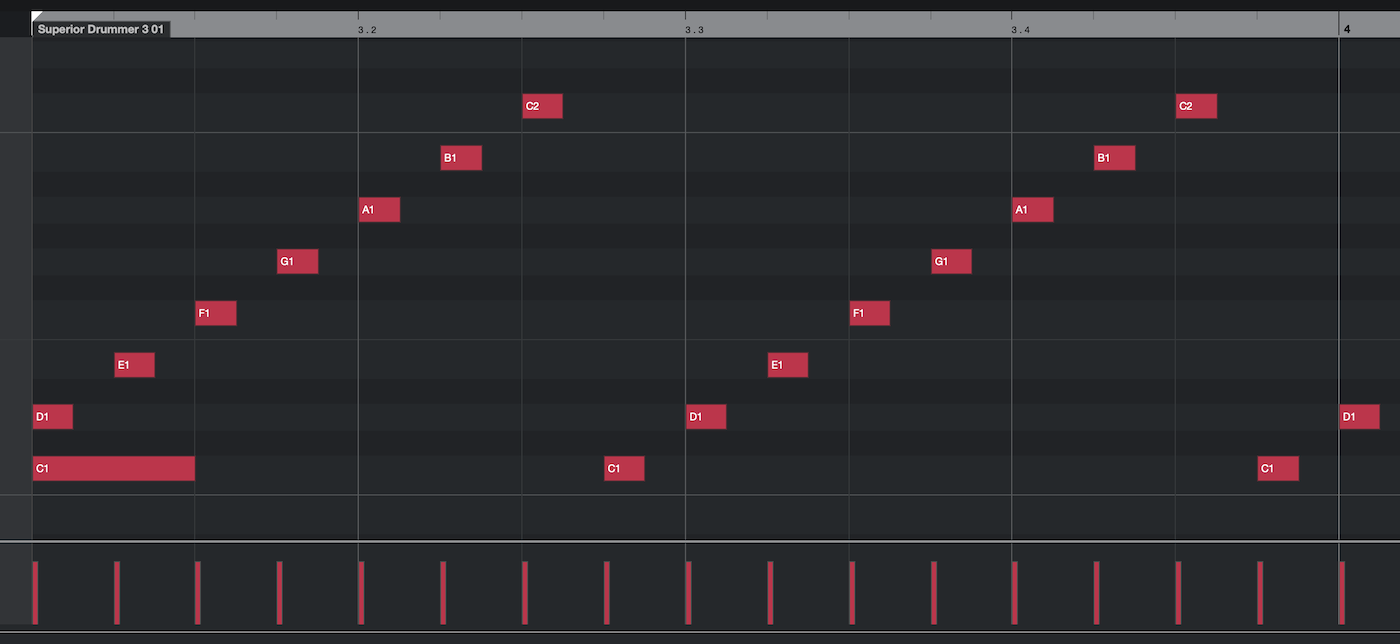
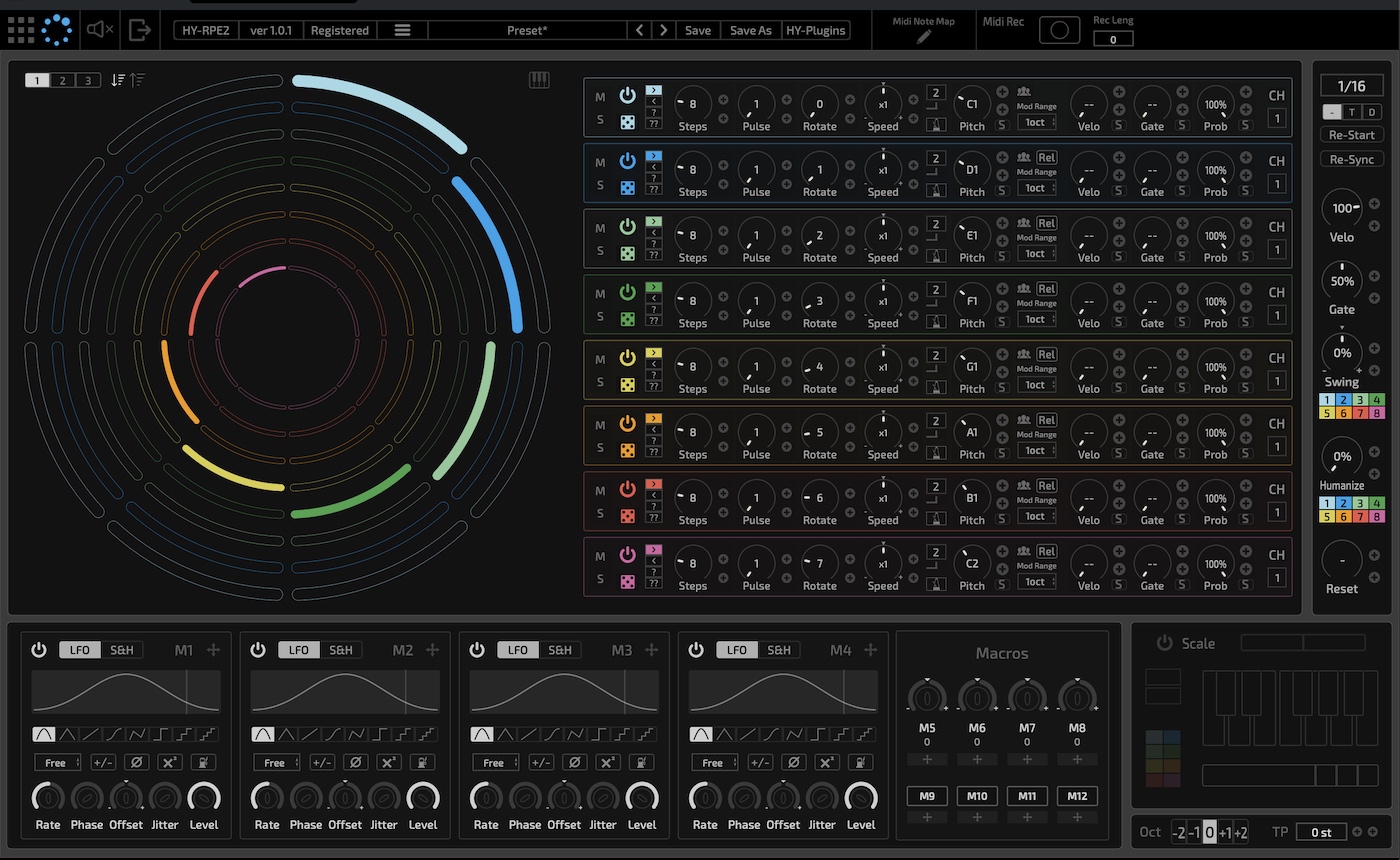
EDIT: After further testing I noticed that this occurs when starting the recording at any measure other than the 1st measure in Cubase. If I start the recording at the very beginning of the project, measure 1.0.0, then Euclidean Mode is perfectly in sync. If I start the MIDI recording at a later measure it is out of sync as shown above.
-
- KVRist
- 326 posts since 21 Dec, 2015 from Japan
I will check it again with Repro-5.WatchTheGuitar wrote: Sun Oct 11, 2020 4:04 pmI've tried using the same arrangement (I have TAL-U-NO-LX) as in your video and not getting the issue, but I also don't get the issue in other DAWs or most other synths/presets so it's down to some wacky combination of the DAW and synth preset and I don't think it's caused by your arp, all it did was highlight the issue.hyakken wrote: Sun Oct 11, 2020 4:47 am Can you check this video?
https://drive.google.com/file/d/1f90aAK ... sp=sharing
I tried to reproduce stacking note issue with your pattern, but no luck so far .
If you can reproduce it, please tell me the way.
Tadashi
Everytime I use Reaper's default 4/4 120BPM settings and RPE2 with that custom preset and point it at u-he Repro-5 with the 'Like Faith' preset I get stuck notes appear usually between bars 9 and 13, but sometimes around bar 17. It's really odd. Exact same setup in Bitwig and I get no stuck notes at all.
Thanks for checking anyway. I now need to work out if this is a Reaper bug or a u-he Repro bug though it does seem like it's related to the combination of both somehow.
Tadashi
-
- KVRist
- 326 posts since 21 Dec, 2015 from Japan
Can you check this?evo2slo wrote: Sun Oct 11, 2020 4:12 pmI'm still experiencing the same issue with 1.0.1. When I record MIDI onto an instrument track, with RPE2 as the MIDI input, the Euclidean Mode is out of sync. The Standard Mode works as expected.hyakken wrote: Sat Oct 10, 2020 4:21 pmCan you try v1.0.1?
It seems to be ok now.
Win:
https://hy-plugins.com/wp-content/uploa ... taller.exe
https://hy-plugins.com/wp-content/uploa ... Y-RPE2.zip
Mac:
https://hy-plugins.com/wp-content/uploa ... E2.pkg.zip
Tadashi
Here is a screenshot of the recorded MIDI on the instrument track with RPE2 1.0.1 in the Default Euclid Mode. At the start of the measure the C1 note starts at the same time as the D1 note, and the C1 note is not being gated properly. Later they fall back into sync but with the C1 note triggered a 16th note early.
EDIT: After further testing I noticed that this occurs when starting the recording at any measure other than the 1st measure in Cubase. If I start the recording at the very beginning of the project, measure 1.0.0, then Euclidean Mode is perfectly in sync. If I start the MIDI recording at a later measure it is out of sync as shown above.
https://drive.google.com/file/d/1Mjo-DZ ... sp=sharing
I can't reproduce that issue.
If you are using "Asio guard", please try to disable it.
I don't remember well, but it affects to midi timing.
Tadashi
-
- KVRist
- 326 posts since 21 Dec, 2015 from Japan
I don't own Repro-5, so I tested with demo version of Repro-5.WatchTheGuitar wrote: Sun Oct 11, 2020 4:04 pmI've tried using the same arrangement (I have TAL-U-NO-LX) as in your video and not getting the issue, but I also don't get the issue in other DAWs or most other synths/presets so it's down to some wacky combination of the DAW and synth preset and I don't think it's caused by your arp, all it did was highlight the issue.hyakken wrote: Sun Oct 11, 2020 4:47 am Can you check this video?
https://drive.google.com/file/d/1f90aAK ... sp=sharing
I tried to reproduce stacking note issue with your pattern, but no luck so far .
If you can reproduce it, please tell me the way.
Tadashi
Everytime I use Reaper's default 4/4 120BPM settings and RPE2 with that custom preset and point it at u-he Repro-5 with the 'Like Faith' preset I get stuck notes appear usually between bars 9 and 13, but sometimes around bar 17. It's really odd. Exact same setup in Bitwig and I get no stuck notes at all.
Thanks for checking anyway. I now need to work out if this is a Reaper bug or a u-he Repro bug though it does seem like it's related to the combination of both somehow.
And it seems to be fine for me.
Please check it. (Reaper v6.14/64bit, Repro-5 Demo VST3 v1.1.1)
https://drive.google.com/file/d/1xKsnle ... sp=sharing
Tadashi
-
Jonathan Shepherd Jonathan Shepherd https://www.kvraudio.com/forum/memberlist.php?mode=viewprofile&u=5644
- KVRian
- 760 posts since 28 Jan, 2003
Great work on RPE2 Tadashi! Euclidean sequencing is always fun but now with your
modulation system, there's even more variety and movement in the patterns. I look forward to whatever you have in the pipeline.
modulation system, there's even more variety and movement in the patterns. I look forward to whatever you have in the pipeline.
-
WatchTheGuitar WatchTheGuitar https://www.kvraudio.com/forum/memberlist.php?mode=viewprofile&u=440193
- KVRAF
- 13256 posts since 30 Apr, 2019
Hi Tadashi, like I said before I don't think this is a bug in your sequencer, but I don't know exactly the issue as I have the same everything as you except you're on a Mac and I'm on a Win10Prox64 PC.hyakken wrote: Sun Oct 11, 2020 6:31 pm I don't own Repro-5, so I tested with demo version of Repro-5.
And it seems to be fine for me.
Please check it. (Reaper v6.14/64bit, Repro-5 Demo VST3 v1.1.1)
https://drive.google.com/file/d/1xKsnle ... sp=sharing
Tadashi
As it's such an edge case I'll wait for something to come to light as to why this is happening just on this for me. At my end it's reproducable, but maybe it's some quirk of my own PC and other things I have installed. I even went to download the demo and realised it's the exact same version. Go figure.
FWIW if I ever find the fix I'll let you know. I do really appreciate the time you spent looking at it.
-
- KVRian
- 805 posts since 17 May, 2011 from Philadelphia
Not much you can do if you can't reproduce it, but thank you for trying.hyakken wrote: Sun Oct 11, 2020 6:14 pm
Can you check this?
https://drive.google.com/file/d/1Mjo-DZ ... sp=sharing
I can't reproduce that issue.
If you are using "Asio guard", please try to disable it.
I don't remember well, but it affects to midi timing.
Tadashi
In case they are of any help here are screen recordings of what is occurring with my system, with ASIO enabled and disabled.
ASIO enabled:
Code: Select all
https://www.dropbox.com/s/yi3fk4i05gltzks/RPE2%20ASIO%20enabled.mp4?dl=0Code: Select all
https://www.dropbox.com/s/a2byad4e76yvnxe/RPE2%20ASIO%20disabled.mp4?dl=0-
- KVRist
- 326 posts since 21 Dec, 2015 from Japan
Thank you for your video.evo2slo wrote: Sun Oct 11, 2020 9:09 pmNot much you can do if you can't reproduce it, but thank you for trying.hyakken wrote: Sun Oct 11, 2020 6:14 pm
Can you check this?
https://drive.google.com/file/d/1Mjo-DZ ... sp=sharing
I can't reproduce that issue.
If you are using "Asio guard", please try to disable it.
I don't remember well, but it affects to midi timing.
Tadashi
In case they are of any help here are screen recordings of what is occurring with my system, with ASIO enabled and disabled.
ASIO enabled:ASIO disabled:Code: Select all
https://www.dropbox.com/s/yi3fk4i05gltzks/RPE2%20ASIO%20enabled.mp4?dl=0Code: Select all
https://www.dropbox.com/s/a2byad4e76yvnxe/RPE2%20ASIO%20disabled.mp4?dl=0
I will check it again.
By the way, what is your version of Cubase?
I only have Cubase Elements 10.5.
Tadashi
Last edited by hyakken on Mon Oct 12, 2020 5:04 am, edited 1 time in total.
-
- KVRist
- 326 posts since 21 Dec, 2015 from Japan
If I have a chance, I will test on Windows.WatchTheGuitar wrote: Sun Oct 11, 2020 8:41 pmHi Tadashi, like I said before I don't think this is a bug in your sequencer, but I don't know exactly the issue as I have the same everything as you except you're on a Mac and I'm on a Win10Prox64 PC.hyakken wrote: Sun Oct 11, 2020 6:31 pm I don't own Repro-5, so I tested with demo version of Repro-5.
And it seems to be fine for me.
Please check it. (Reaper v6.14/64bit, Repro-5 Demo VST3 v1.1.1)
https://drive.google.com/file/d/1xKsnle ... sp=sharing
Tadashi
As it's such an edge case I'll wait for something to come to light as to why this is happening just on this for me. At my end it's reproducable, but maybe it's some quirk of my own PC and other things I have installed. I even went to download the demo and realised it's the exact same version. Go figure.
FWIW if I ever find the fix I'll let you know. I do really appreciate the time you spent looking at it.
I would like to know the cause of the stack notes.
Tadashi
-
WatchTheGuitar WatchTheGuitar https://www.kvraudio.com/forum/memberlist.php?mode=viewprofile&u=440193
- KVRAF
- 13256 posts since 30 Apr, 2019
Cheers. I found an immediate use for REP2 tonight as I was updating a track I'd done a while ago using Rob Papen SubBoomBass 2 to also have a Roland Cloud TB-303 track using the same sequence, but the Rob Papen track was using the onboard sequencer and there's no equivalent on the 303, but REP2 was perfect for getting that sequence into the 303.
-
- KVRian
- 805 posts since 17 May, 2011 from Philadelphia
I am using Nuendo 10.3.0. In looking into it further I am certain that it is a delay compensation issue, as changes that I make to ASIO guard and buffer size, as well as turning off delay compensation, have a direct effect on the midi sync of RPE2 Euclidean mode.hyakken wrote: Mon Oct 12, 2020 4:59 am
Thank you for your video.
I will check it again.
By the way, what is your version of Cubase?
I only have Cubase Elements 10.5.
Tadashi
I made a video comparing Groove Agent's sequencer, RPE2's Standard Mode, and RPE2's Euclid Mode. All are perfectly in sync when starting at the first measure of the project. When starting at a later measure, Groove Agent and RPE2 Standard Mode behave alike and are in sync with the project. RPE2 Euclid Mode is the outlier and is not in sync. Because RPE2 Standard Mode is working fine on my system, I'm hopeful that maybe there could be a fix for the Euclid Mode - and the problem is not necessarily with Nuendo but with the delay compensation settings of the Euclid Mode section of RPE2.
I appreciate your help with this!
Code: Select all
https://www.dropbox.com/s/ytlhu9izm8s1n6d/RPE2%20Standard%20and%20Euclid%20Sync.mp4?dl=0-
- KVRist
- 326 posts since 21 Dec, 2015 from Japan
Thank you for your video.evo2slo wrote: Mon Oct 12, 2020 12:56 pmI am using Nuendo 10.3.0. In looking into it further I am certain that it is a delay compensation issue, as changes that I make to ASIO guard and buffer size, as well as turning off delay compensation, have a direct effect on the midi sync of RPE2 Euclidean mode.hyakken wrote: Mon Oct 12, 2020 4:59 am
Thank you for your video.
I will check it again.
By the way, what is your version of Cubase?
I only have Cubase Elements 10.5.
Tadashi
I made a video comparing Groove Agent's sequencer, RPE2's Standard Mode, and RPE2's Euclid Mode. All are perfectly in sync when starting at the first measure of the project. When starting at a later measure, Groove Agent and RPE2 Standard Mode behave alike and are in sync with the project. RPE2 Euclid Mode is the outlier and is not in sync. Because RPE2 Standard Mode is working fine on my system, I'm hopeful that maybe there could be a fix for the Euclid Mode - and the problem is not necessarily with Nuendo but with the delay compensation settings of the Euclid Mode section of RPE2.
I appreciate your help with this!
Code: Select all
https://www.dropbox.com/s/ytlhu9izm8s1n6d/RPE2%20Standard%20and%20Euclid%20Sync.mp4?dl=0
I will check delay compensation setting.
Tadashi