


DrivenByMoss: Bitwig extension for many hardware controllers (version 26.6.2)
-

- KVRist
- 143 posts since 20 Nov, 2013
Thanks for your response!
I'd like to use the MidiMix for anything else, mainly for controlling VSTs. And that's working fine for the knobs and faders. Only thing I can't get to work is to make the buttons toggle.
BTW, this is zero problem in Studio One, I can set that up in seconds there. So it's not the case that it's impossible to do this, I just can't find a way to translate it into Bitwig.
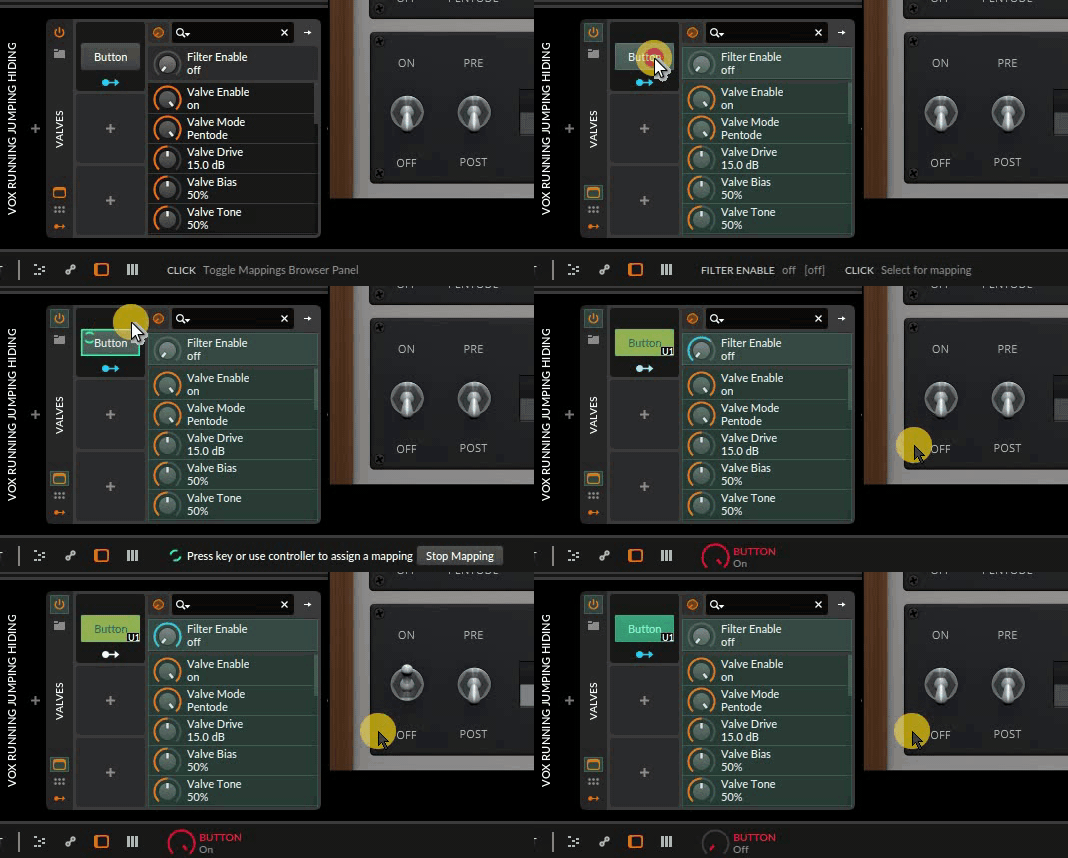
I guess that I must be overlooking a little detail somewhere. Because I refuse to believe this wouldn't be possible in Bitwig.

EDIT:
forgot to mention: I've been using your MidimixDub.properties file yesterday and the Mute buttons are working as expected (toggle). A fact that confuses me even more lol
Those LEDs are a bit of a mystery to me. Seems they only light up in Ableton. Maybe this is pre-scripted/configured for Ableton, I don't know.
Thing is that I got other controllers for the Bitwig functions, like the Nektar Panorama P1.carlca wrote: Thu Jan 14, 2021 6:12 pmUPDATE: I've just seen the video you posted. I was referring to built in Bitwig functions, ...
I'd like to use the MidiMix for anything else, mainly for controlling VSTs. And that's working fine for the knobs and faders. Only thing I can't get to work is to make the buttons toggle.
BTW, this is zero problem in Studio One, I can set that up in seconds there. So it's not the case that it's impossible to do this, I just can't find a way to translate it into Bitwig.
Using a Bitwig button was one of the first things I tried as a workaround, but same result as always...carlca wrote: Thu Jan 14, 2021 6:12 pm ... setting up a button modulator, using that to control the VST parameter, and using the Midimix via the Flexi Generic to control that...
I guess that I must be overlooking a little detail somewhere. Because I refuse to believe this wouldn't be possible in Bitwig.
Yummy!!!

EDIT:
forgot to mention: I've been using your MidimixDub.properties file yesterday and the Mute buttons are working as expected (toggle). A fact that confuses me even more lol
-
- KVRer
- 1 posts since 13 Jan, 2021
Hi, I'm new to Bitwig and was trying out DrivenByMoss with my old Push 1.
Unfortunately, the controller responds a bit erratic (most likely because I'm on macOS Big Sur).
My system: macOS Big Sur 11.1, Bitwig 3.3.1 (16-track).
My symptoms:
Is there any workaround available for this? (except for downgrading / getting another OS)
Is this something on the Bitwig level, if so do they have a tracking issue?
Is there a way to debug this? There is no warning or error anywhere when my controller fails, which is a bit unnerving. Is there a mechanism to get some logs? (I don't mind parsing some logs or Java for that matter).
Other than that, the functionality provided looks amazing! Once I get it working reliably I'd like to support this, is that possible?
Unfortunately, the controller responds a bit erratic (most likely because I'm on macOS Big Sur).
My system: macOS Big Sur 11.1, Bitwig 3.3.1 (16-track).
My symptoms:
- when I start Bitwig Push not all lights are set correctly, this also happens when I switch pages. The lights usually update when I touch the pads, but it's not always responsive
- sometimes input fails. I'll have periods that it works fine and then all of a sudden the pads won't work anymore...
Is there any workaround available for this? (except for downgrading / getting another OS)
Is this something on the Bitwig level, if so do they have a tracking issue?
Is there a way to debug this? There is no warning or error anywhere when my controller fails, which is a bit unnerving. Is there a mechanism to get some logs? (I don't mind parsing some logs or Java for that matter).
Other than that, the functionality provided looks amazing! Once I get it working reliably I'd like to support this, is that possible?
-
tanguerrillero tanguerrillero https://www.kvraudio.com/forum/memberlist.php?mode=viewprofile&u=488833
- KVRer
- 1 posts since 12 Jan, 2021
Hey Jürgen! Great work! I just checked out the Novation Launchkey 49 MK3 on Bitwig3 and its working like a charm  Thank you very much for your great work
A friend of mine just bought the M-Audio Oxygen Pro (49) which is about in the same price-range as the Launchkey, with a similar layout but with a really really good keyboard (more Piano-like feeling). I am thinking about diving a bit into Java to see if I can get things working on the M-Audio.
My question is, how to control the colors of the 16 color-pads on the M-audio (to visualize the colors of the tracks/scenes or a drum machine). Even in Ableton (which is officially supported by M-Audio) colors are not changes with Ableton colors (All I can do is changing the colors with presets on the keyboard itself).
Maybe you have an idea, otherwise I'll stick with the Launchkey for now.
Thank you very much and kind regards from Buenos Aires*
*Argentina is already driven by Moss
Thank you very much for your great work
A friend of mine just bought the M-Audio Oxygen Pro (49) which is about in the same price-range as the Launchkey, with a similar layout but with a really really good keyboard (more Piano-like feeling). I am thinking about diving a bit into Java to see if I can get things working on the M-Audio.
My question is, how to control the colors of the 16 color-pads on the M-audio (to visualize the colors of the tracks/scenes or a drum machine). Even in Ableton (which is officially supported by M-Audio) colors are not changes with Ableton colors (All I can do is changing the colors with presets on the keyboard itself).
Maybe you have an idea, otherwise I'll stick with the Launchkey for now.
Thank you very much and kind regards from Buenos Aires*
*Argentina is already driven by Moss
-

- KVRAF
- Topic Starter
- 4910 posts since 13 May, 2004
Yes, the Bitwig API is the same across all version.benbee wrote: Thu Jan 14, 2021 8:08 pm Is the new Driven by Moss scripts supported in Bitwig 8 track edition?
-
- KVRAF
- Topic Starter
- 4910 posts since 13 May, 2004
As I wrote before, I have no idea what to do about it. I already checked the Ableton docs and also checked the Push scripts in Ableton. Furthermore, it does not happen on my device.artsense wrote: Thu Jan 14, 2021 1:45 pmstill have this problem..artsense wrote: Thu Dec 24, 2020 5:19 pm hey Moss,
p.s. is there any way to control brightness of side buttons? or at least make them brighter by default?
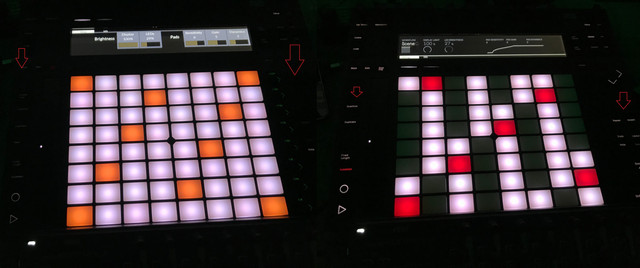
side buttons are too dark on low LEDs levels..
on high LEDs levels situation is better, but then LEDs are so bright that blowing my head..
im working with connected power adapter.
side buttons are much brighter in ableton on low LEDs level
-
- KVRAF
- Topic Starter
- 4910 posts since 13 May, 2004
That's not confusing at allmesamask wrote: Fri Jan 15, 2021 9:00 am forgot to mention: I've been using your MidimixDub.properties file yesterday and the Mute buttons are working as expected (toggle). A fact that confuses me even more lol
The user parameters are intended to be used with continuous controllers aka knobs or faders, therefore they cover the full range. Your button sends 127 when you press it and 0 when you release it, so it will switch on the button in your plugin and switch it off when you release the button.
I took a look at the Midimix editor and this is REALLY basic. As a solution for you I will add "toggle user parameter" functions in the next version, which will toggle between minimum and maximum values.
-
- KVRAF
- Topic Starter
- 4910 posts since 13 May, 2004
Yes, this is a Big Sur issue. No, there is no workaround. I reported it to Bitwig. Send a letter of love to Apple for screwing things up with every update...kvrhdn wrote: Fri Jan 15, 2021 2:15 pm Hi, I'm new to Bitwig and was trying out DrivenByMoss with my old Push 1.
Unfortunately, the controller responds a bit erratic (most likely because I'm on macOS Big Sur).
My system: macOS Big Sur 11.1, Bitwig 3.3.1 (16-track).
My symptoms:
- when I start Bitwig Push not all lights are set correctly, this also happens when I switch pages. The lights usually update when I touch the pads, but it's not always responsive
This seem to match with an earlier report in this thread, so I'm assuming this is caused by Big Sur
- sometimes input fails. I'll have periods that it works fine and then all of a sudden the pads won't work anymore...
Is there any workaround available for this? (except for downgrading / getting another OS)
Is this something on the Bitwig level, if so do they have a tracking issue?
Is there a way to debug this? There is no warning or error anywhere when my controller fails, which is a bit unnerving. Is there a mechanism to get some logs? (I don't mind parsing some logs or Java for that matter).
Other than that, the functionality provided looks amazing! Once I get it working reliably I'd like to support this, is that possible?
-
- KVRAF
- Topic Starter
- 4910 posts since 13 May, 2004
Sorry, no idea. I do not have the device. Check if they have a developer manual or ask them. If not you can either take a look at the Ableton script or reverse engineer the commands yourself.tanguerrillero wrote: Fri Jan 15, 2021 4:11 pm A friend of mine just bought the M-Audio Oxygen Pro (49) which is about in the same price-range as the Launchkey, with a similar layout but with a really really good keyboard (more Piano-like feeling). I am thinking about diving a bit into Java to see if I can get things working on the M-Audio.
My question is, how to control the colors of the 16 color-pads on the M-audio (to visualize the colors of the tracks/scenes or a drum machine). Even in Ableton (which is officially supported by M-Audio) colors are not changes with Ableton colors (All I can do is changing the colors with presets on the keyboard itself).
Maybe you have an idea, otherwise I'll stick with the Launchkey for now.
Haha, nice!tanguerrillero wrote: Fri Jan 15, 2021 4:11 pm
Thank you very much and kind regards from Buenos Aires*
*Argentina is already driven by Moss
-
- KVRAF
- Topic Starter
- 4910 posts since 13 May, 2004
I will put it on Grid button combinations (Play / Piano mode combinations are adjusted accordingly).melodyz wrote: Wed Jan 13, 2021 8:25 pm 2. Can we get scale and root note select on the Step sequencer mode (first bottom left button mode)
Sorry, didn't get that. Why would you want to delete a note and then create it again? Change its' length and velocity is already possible.melodyz wrote: Wed Jan 13, 2021 8:25 pm 3. Can we have that note mode work so that a pressing a new note overrides an existing one just by pressing the new step and placing the note over the top? Currently when we tap a pad with a note, the fire first erases the old note and we have to press the pad again to apply the new note.
Yes, the sensitivity is the reason. But you can use the slow version (Shift + Knob) to get to center.melodyz wrote: Wed Jan 13, 2021 8:25 pm 4. any way to get the drum sequencer (channel mode) to have the pan settings return to 0?) Maybe its because I changed the sensitivity? So it doesnt center now but varies from right to left the more I turn the knob.
I guess you are talking about about parameter mode (User 1). If you want to stick to a device you need to pin it in Bitwig. User parameters (User 2) are independent of track / device selections.melodyz wrote: Wed Jan 13, 2021 8:25 pm 5. If I select a track using the mouse, the fire loses focus on it, so the user 1 and 2 knobs dont work. I have to first use the elector knob to select the track instead before turning the knobs. Conflict with how fire see a track selected by the mouse.
In parameters mode it switches parameter pages and I wanted it to be consistent with user parameters mode it switches pages there too.melodyz wrote: Wed Jan 13, 2021 8:25 pm 6. can we use alt plus selector knob to change tracks on user 1 and 2 modes? (mixer as well I guess)
Hmm.melodyz wrote: Wed Jan 13, 2021 8:25 pm 7. can we get an option in the settings to flip the functionality of using selector knob to change note range of keyboard verses selecting track? Making it so we have to press alt and selector knob to change note range instead and just selector knob to switch tracks? (this would be better for performance where midi tracks are already made)
Congratulations, you found an easter eggmelodyz wrote: Wed Jan 13, 2021 8:25 pm 8. I found something strange but cool. If i select a midi track and press shift plus selector knob when in step mode, I can transpose the midi notes. Maybe thats deliberate?
I will document it and add it to the Note Sequencer too.-
- KVRist
- 143 posts since 20 Nov, 2013
Yup, after reading your explanation I gotta say that it's not confusing at all
I probably just confused myself, after spending like hours with this.
Yes, it's as basic it can get.
This is great news!moss wrote: Fri Jan 15, 2021 7:29 pmAs a solution for you I will add "toggle user parameter" functions in the next version, which will toggle between minimum and maximum values.
Thanks for this, your help and your amazing work! Highly appreciated

EDIT: would it be possible to increase the current number of eight available User Parameters?
-
- KVRAF
- Topic Starter
- 4910 posts since 13 May, 2004
There are already 64 parameters available in pages of 8. Use the prev/next user function to switch between them.mesamask wrote: Sat Jan 16, 2021 4:25 am EDIT: would it be possible to increase the current number of eight available User Parameters?
-
- KVRer
- 19 posts since 16 Jan, 2021
Hello, I am having a problem with using the controller extension and a Novation Launchkey 25 MK3.
In Bitwig, when ever I click a "+" for a new track or adding a modulator, the interface in both Bitwig and on the front panel of the Launchkey (pad colors) freak out for a bit. Then, Bitwig won't add a new track or open the modulation browser, it instead opens the main browser (after it flashes around the screen a bit). Its like something takes over and tries to focus on a bunch of different things in Bitwig. If I disable/remove the MK3 controller extension, everything behaves normally. The generic flexi driver works without this problem (but without the cool features)..
In Bitwig, when ever I click a "+" for a new track or adding a modulator, the interface in both Bitwig and on the front panel of the Launchkey (pad colors) freak out for a bit. Then, Bitwig won't add a new track or open the modulation browser, it instead opens the main browser (after it flashes around the screen a bit). Its like something takes over and tries to focus on a bunch of different things in Bitwig. If I disable/remove the MK3 controller extension, everything behaves normally. The generic flexi driver works without this problem (but without the cool features)..
-
- KVRer
- 11 posts since 18 Apr, 2012
with OSC in bitwig, is there a way to fix that the bank page doesn't move with the mouse selection ?
If I clic on a track that is out of the bank range it changes all my display. Thx
If I clic on a track that is out of the bank range it changes all my display. Thx
-
- KVRAF
- Topic Starter
- 4910 posts since 13 May, 2004
You can use the "pinned" commands of the track and device (also available for clip) to not follow the Bitwig selections.lebarde wrote: Sat Jan 16, 2021 11:43 pm with OSC in bitwig, is there a way to fix that the bank page doesn't move with the mouse selection ?
If I clic on a track that is out of the bank range it changes all my display. Thx