Ableton Live 11

Audio Plugin Hosts and other audio software applications discussion
Post Reply New Topic
RELATED
PRODUCTS
Live

Post

dayjob wrote: Sun Jan 24, 2021 8:26 pm
EnGee wrote: Sun Jan 24, 2021 9:26 am I don't record live drums, but when I insert a mono sample, it seems it is still mono and when I insert a stereo sample, it is a stereo. The only thing is I can't tell which one is mono or stereo from the browser (unlike Studio One for example):
yeah.. you can use mono samples and recordings in tracks.. but when i put a mono sample into a drum rack then record/render that out to a track it becomes stereo or dual mono more accurately. i record a lot of jams from my modular and other synths and often those are mono tracks so editing/arranging in live is fine w/mono tracks until fx etc are added since they're all stereo. so i always consolidate all the tracks then grab those audio files and dump them in logic which has support for mono plug ins. live just wants everything to be stereo all the time and i find it annoying. i still love live and use it for many many parts of my process.
This is annoying indeed! I would use Logic for everything if I were you.

I also have Cubase and Studio One but I like the instruments/effects/contents more in Live. I also like the workflow from recording the ideas and experimenting in the session view, then start in the arrangement view. However, sometimes just delving into the arrangement view of Cubase or Studio One might be faster and more productive! I'm taking my time to experiment now though :hihi:

p.s. thecontrolcentre has posted a solution above it seems. Hope that solved your problem :)
Using: Cubase Pro 15, Reason 13, Tascam US-4x4HR, MODX6, DM12D, LaunchKey 49, Yamaha guitar(Pacifica 612v) and bass (BB234) and some virtual instruments and synths.

Post

EnGee wrote: Sun Jan 24, 2021 8:58 pm
dayjob wrote: Sun Jan 24, 2021 8:26 pm
EnGee wrote: Sun Jan 24, 2021 9:26 am I don't record live drums, but when I insert a mono sample, it seems it is still mono and when I insert a stereo sample, it is a stereo. The only thing is I can't tell which one is mono or stereo from the browser (unlike Studio One for example):
yeah.. you can use mono samples and recordings in tracks.. but when i put a mono sample into a drum rack then record/render that out to a track it becomes stereo or dual mono more accurately. i record a lot of jams from my modular and other synths and often those are mono tracks so editing/arranging in live is fine w/mono tracks until fx etc are added since they're all stereo. so i always consolidate all the tracks then grab those audio files and dump them in logic which has support for mono plug ins. live just wants everything to be stereo all the time and i find it annoying. i still love live and use it for many many parts of my process.
This is annoying indeed! I would use Logic for everything if I were you.

I also have Cubase and Studio One but I like the instruments/effects/contents more in Live. I also like the workflow from recording the ideas and experimenting in the session view, then start in the arrangement view. However, sometimes just delving into the arrangement view of Cubase or Studio One might be faster and more productive! I'm taking my time to experiment now though :hihi:

p.s. thecontrolcentre has posted a solution above it seems. Hope that solved your problem :)
there's a lot that is really excellent about working live. i use a lot of max for live stuff and it makes a great environment for jamming. i much prefer editing audio in live than in logic. all the DAWs have their pros and cons. none of them do it all for me. also, collaborations in live make for easy file swapping and building tracks with friends.

Post

thecontrolcentre wrote: Sun Jan 24, 2021 8:48 pm I found this on the ableton forum:
: How do you create a mono track. Seriously..

Post Tue Dec 15, 2009 1:37 am

In order to record in mono, do the following:

In the toolbar select View ---> Bus (or you can click the bus icon at the bottom right part of the Live window.

From the bus display select "input"

The click on "link" - this will unlink the left and right input channels, and you will now be able to record from one or the other.

the following may be too much information, but:

Now from the "input type" dropdown select "live in"

The from the "input channel" dropdown select left or right.

There you go
the problem isn't recording in mono from external sources it's maintaining a mono signal path from internal sources.

create a drum rack with mono samples. route all the out puts of the drum rack to internal audio tracks so you can multitrack and have control of each part of the drum rack and end up with having everything split out for further editing/manipulation.

i've not found any way to record the output of a drum rack in separate mono channels. the output of each part of the drum rack records to a track in stereo (dual mono) even if the sample in the drum rack is a mono sample.
from the manual:
14.2.1 Mono/Stereo Conversions

When a mono signal is chosen as an audio track’s input, the track will record mono samples; otherwise it will record stereo samples. Signals in the track’s device chain are always stereo, even when the track’s input is mono or when the track plays mono samples.

Mono is turned into stereo simply by using the identical signal for left and right channels. When a track is routed into a mono output, the left and right signals are added together and attenuated by 6 dB to avoid clipping.

Post

WatchTheGuitar wrote: Sat Jan 23, 2021 4:16 pm
pdxindy wrote: Sat Jan 23, 2021 4:00 pm So it is still not clear if Live 11 can record actual PolyAT midi messages (which Live has never been able to do)
I have a Hydrasynth and don't like using it in MPE mode because I do a lot of stuff with discrete MIDI channels and the ribbon and PolyAT features don't need full MPE mode to function, so I believe I am running in this 'PolyAT mode' and I can record Poly aftertouch pressure output from the Hydrasynth to a MIDI track and play it back and hear it.

Basic test is find a patch on the synth that handles polyAT like "Sawpressive GD", hold a chord and then manually arpeggiate by alternating the finger pressure used. It records that and plays that back so is this what you mean or is there something else I'd need to look for?

It produces this...
poly at live 11.png
Quite interesting to see Hydrasynth and Live 11 in a demo! PollyAT AT then MPE (Warning- a bit of Bitwig in there as well :wink: )


X32 Desk, i9 PC, S88MK3, S1, BWS, Live + PUSH 3, Osmose, RedShift 6 Pro3, Tempera, Syntakt, Digitone II, OP1-F, OPXY, Eurorack, TD27 Drums, Guitars, Basses, Amps and of course lots of pedals!

Post

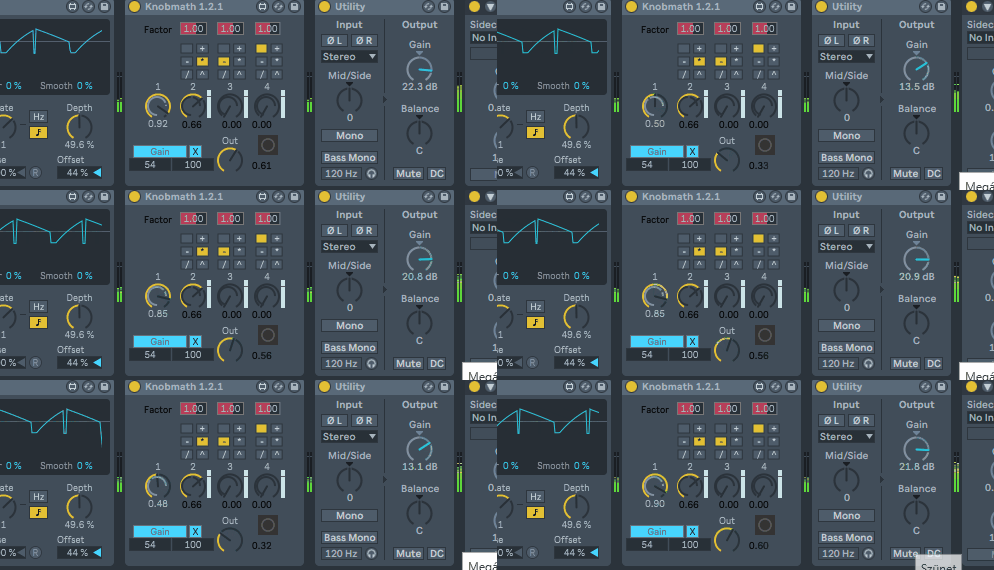
if I've started ... orig device...https://maxforlive.com/library/device/3196/knobmath Knobmath 1.2.1 both m4l audio, MIDI versions ... nothing has been changed(hopefully) just UI components of it have been updated to able to get the interface colors

Image

have fun

as I've seen it was introduced around 8.1
https://cycling74.com/forums/max-8-1-released
...
• live.comment: new object - text color follows live interface colors
...
You do not have the required permissions to view the files attached to this post.
"Where we're workarounding, we don't NEED features." - powermat

Post

I'm not sure since when it's there but I just realized that in MIDI editing we can select one or many note and juste type a number to set the velocity ...that's nice !

Post

I'm really excited about the tempo following. As a pianist, I like to play expressively without a metronome. Now I can add new dimensions with backing tracks! I've even bought Intro for the occasion.

Post

WatchTheGuitar wrote: Sun Jan 24, 2021 10:45 am Oh from the browser. Yeah, that could do with an overhaul.
I like the browser, every other DAW just has way too much going on with theirs. I'm not not against an overhaul per se, I just hope that they don't overcomplicate it in the process.
Always Read the Manual!

Post

PieBerger wrote: Wed Jan 27, 2021 1:50 pm
WatchTheGuitar wrote: Sun Jan 24, 2021 10:45 am Oh from the browser. Yeah, that could do with an overhaul.
I like the browser, every other DAW just has way too much going on with theirs. I'm not not against an overhaul per se, I just hope that they don't overcomplicate it in the process.
Agree. The only thing they need to change is that I could Ctrl+F and start typing e.g. "ser..." and it would find Serum regardless of which browser cathegory I'm on right now and would also reveal the VST, instead of giving me the top folder that I need to click into.
Music tech enthusiast
DAW, VST & hardware hoarder
My "music": https://soundcloud.com/antic604

Post

antic604 wrote: Wed Jan 27, 2021 2:01 pm
PieBerger wrote: Wed Jan 27, 2021 1:50 pm
WatchTheGuitar wrote: Sun Jan 24, 2021 10:45 am Oh from the browser. Yeah, that could do with an overhaul.
I like the browser, every other DAW just has way too much going on with theirs. I'm not not against an overhaul per se, I just hope that they don't overcomplicate it in the process.
Agree. The only thing they need to change is that I could Ctrl+F and start typing e.g. "ser..." and it would find Serum regardless of which browser cathegory I'm on right now and would also reveal the VST, instead of giving me the top folder that I need to click into.
That should be somehow configurable, because most often I search something that has results in more than one category, even with the same or similar name.

Post

ReleaseCandidate wrote: Wed Jan 27, 2021 2:04 pm
antic604 wrote: Wed Jan 27, 2021 2:01 pm
PieBerger wrote: Wed Jan 27, 2021 1:50 pm
WatchTheGuitar wrote: Sun Jan 24, 2021 10:45 am Oh from the browser. Yeah, that could do with an overhaul.
I like the browser, every other DAW just has way too much going on with theirs. I'm not not against an overhaul per se, I just hope that they don't overcomplicate it in the process.
Agree. The only thing they need to change is that I could Ctrl+F and start typing e.g. "ser..." and it would find Serum regardless of which browser cathegory I'm on right now and would also reveal the VST, instead of giving me the top folder that I need to click into.
That should be somehow configurable, because most often I search something that has results in more than one category, even with the same or similar name.
Configurable would be good maybe a different keyboard modifier (if one is available) like Ctrl+F for top folder and Alt+F for currently/last selected folder.
Always Read the Manual!

Post

tbh I can live with just about everything in Live, but thing I'm missing most is in place ARA2 integration. It would be so much better with that, could do 95% of stuff within Live then.

Are you safe?
"For now… a bit like a fish on the floor"
https://tidal.com/artist/33798849

Post

antic604 wrote: Wed Jan 27, 2021 2:01 pm
PieBerger wrote: Wed Jan 27, 2021 1:50 pm
WatchTheGuitar wrote: Sun Jan 24, 2021 10:45 am Oh from the browser. Yeah, that could do with an overhaul.
I like the browser, every other DAW just has way too much going on with theirs. I'm not not against an overhaul per se, I just hope that they don't overcomplicate it in the process.
Agree. The only thing they need to change is that I could Ctrl+F and start typing e.g. "ser..." and it would find Serum regardless of which browser cathegory I'm on right now and would also reveal the VST, instead of giving me the top folder that I need to click into.
it can see the file extensions so it's 'ser v' if it can help (vst3) depends on how many .vstpreset do you have ... 'serum vst' will be fine for sure
"Where we're workarounding, we don't NEED features." - powermat

Post

Hello,

Does any one know if Live 11 has touch automation capabilities for arrangement view? I have a motorized fader controller I'd love to be able to use for overdubbing automation like this... I know Push 2 has touch sensitive encoders, so hopefully it's more than just a niche interest.

Post

thresholdpeople wrote: Wed Jan 27, 2021 5:01 pmDoes any one know if Live 11 has touch automation capabilities for arrangement view? I have a motorized fader controller I'd love to be able to use for overdubbing automation like this... I know Push 2 has touch sensitive encoders, so hopefully it's more than just a niche interest.
Why won't you just google it, or at least mention the controller you have to help us out?

Music tech enthusiast
DAW, VST & hardware hoarder
My "music": https://soundcloud.com/antic604

Post Reply

Return to “Hosts & Applications (Sequencers, DAWs, Audio Editors, etc.)”