


Few Questions About Waveform
-
- KVRist
- Topic Starter
- 142 posts since 9 Apr, 2022
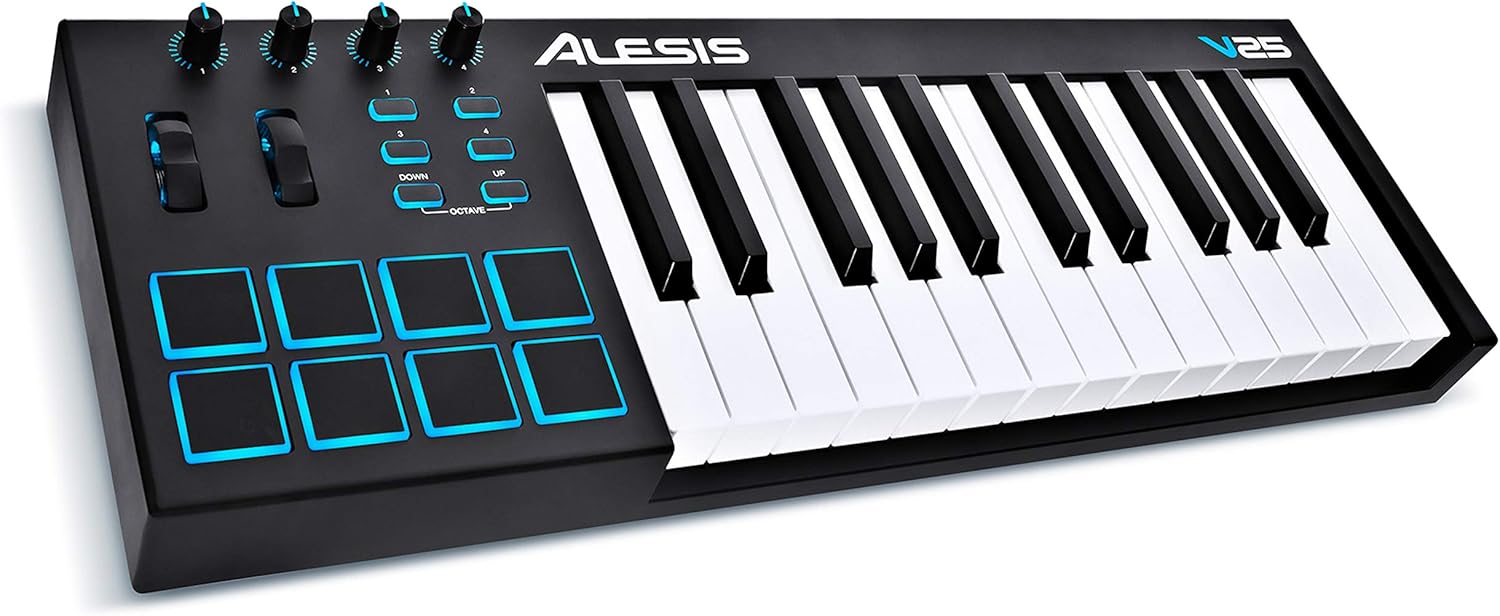
I have a question about this keyboard. I just received it and opened it, and the keys feel very hard to press. I am considering returning it, but I wanted to ask, is this something I will/should get used to? I'm just not sure I can be tapping out beats with this thing, especially if I need to do anything fast paced? Again, unless you think I should just suck it up and get used to it? To reiterate, I ordered the Alesis V25.
-
Peter Widdicombe Peter Widdicombe https://www.kvraudio.com/forum/memberlist.php?mode=viewprofile&u=336849
- KVRian
- 1205 posts since 29 Aug, 2014
The Alesis is "semi-weighted" keys, sort of half way between synth-action and real piano. You tend to have fewer "accidental" note hits on adjacent keys, plus tends artificially give you more "feel" or control when trying to control velocity levels.
It IS a personal preference, though. How soon would you have to return it, and can you try it for a few days to see if it's annoying?
It IS a personal preference, though. How soon would you have to return it, and can you try it for a few days to see if it's annoying?
Waveform 13; Win10 desktop/8 Gig; Win11 Laptop; MPK261; VFX+disfunctional ESQ-1
-
- KVRAF
- 1602 posts since 9 Jan, 2018
Peter's 100% correct. Different keybeds have very different feels. You *do* absolutely get used to them, for the most part, so give it a little time.
Pianos are heavier, organs tend to be very light. A lot of synths feel "clacky," but are perfectly useable. Yours is somewhere in between.
Personal note: you don't always get used to some. I really dislike the Yamaha MODX 6 keybed...but, my point is, it's still 100% playable.
Pianos are heavier, organs tend to be very light. A lot of synths feel "clacky," but are perfectly useable. Yours is somewhere in between.
Personal note: you don't always get used to some. I really dislike the Yamaha MODX 6 keybed...but, my point is, it's still 100% playable.
Spotify, Apple Music, YouTube, and even Deezer, whatever the hell Deezer is.
More fun at Twitter @watchfulactual
More fun at Twitter @watchfulactual
-
- KVRAF
- 1602 posts since 9 Jan, 2018
Yep, you have it exactly right.ChiroVette wrote: Fri May 27, 2022 9:18 pm I am going to try my hand at option B, just live recording a drum track. It really sounds way too dry and tedious to start slicing up the audio track into little pieces and force it into the same, consistent BPM throughout. If it was really bad, I might feel I had to. But when the only difference is that there are variations all over the place that are all within like +/- about 8 BPM from each other, it feels like a whole lot of work for very little in return. Plus, I was listening to a live recording of this song, and The Dead drummers do a really nice job on the drums. I think I can kind of, sort of replicate it if I take it slow.
The differences between the 808 and 909 are many--I tend to like neither of them, so don't feel qualified to say. Some points, though:ChiroVette wrote: Fri May 27, 2022 9:18 pm I decided just for the moment to stick with the built in preset for the 808 or 909 drum kit. I think 808 is supposed to be a little better? One thing I am curious about. I think this is a high hat sound I am hearing on the live recording, and I can tell the difference between the open and close sounds, both of which are good. But there is another sound I am having difficulty finding. Maybe it isn't in the 808 or 909, but I have also heard drummers I have worked with do it.
1. A typical "General MIDI" drum kit will have 47 common sounds: https://www.zendrum.com/resource-site/drumnotes.htm
The sound you're after is likely the pedal hi-hat.
2. The 808 and 909 had 16 sounds due to the limitations of their day, and they definitely pre-dated the General MIDI standard; the pedal hi-hat is not among them, alas. This limited nature and the not-very-realistic samples were part of their charm (I guess; I've never been a fan of their sounds, personally).
This means you won't find the sound you're describing, and software plugins that emulate the 808 and 909 likewise can be mapped all over the place relative to your new keyboard, so be patient.
Spotify, Apple Music, YouTube, and even Deezer, whatever the hell Deezer is.
More fun at Twitter @watchfulactual
More fun at Twitter @watchfulactual
-
- KVRist
- Topic Starter
- 142 posts since 9 Apr, 2022
OK, there’s a lot of really good information in the last few posts. But I’m not on my computer, I’m responding from my iPhone LOL. I really need to read over a lot of the stuff that you guys have been posting, but I don’t want you to think that I’m glossing over it. I just need to go over it a lot more meticulously.
The one thing I will respond to, is since I know nothing about a keyboard, I’m not sure what it supposed to feel like. Amazon has a 30 day return policy. Before I even made the post above, I made sure to save the box the keyboard came in, as well as all the paperwork, the USB wire, and such. I’m going to try it for a few days, see if I can get used to it. It just seems like if I have to do a whole drum track and I have to keep pressing buttons on the keyboard, it may get a little bit daunting. Or I may just get used to it.
But there’s no reason for me to return it right away, as long as I keep the keyboard in brand new condition, I can try working with it for a few days. I’ll respond to the rest of the points you guys made when I’m in front of my computer.
The one thing I will respond to, is since I know nothing about a keyboard, I’m not sure what it supposed to feel like. Amazon has a 30 day return policy. Before I even made the post above, I made sure to save the box the keyboard came in, as well as all the paperwork, the USB wire, and such. I’m going to try it for a few days, see if I can get used to it. It just seems like if I have to do a whole drum track and I have to keep pressing buttons on the keyboard, it may get a little bit daunting. Or I may just get used to it.
But there’s no reason for me to return it right away, as long as I keep the keyboard in brand new condition, I can try working with it for a few days. I’ll respond to the rest of the points you guys made when I’m in front of my computer.
-
Peter Widdicombe Peter Widdicombe https://www.kvraudio.com/forum/memberlist.php?mode=viewprofile&u=336849
- KVRian
- 1205 posts since 29 Aug, 2014
For drums you MAY find it's easier to use the pads - but you may have to customize them first; and I THINK from what I read you need a companion software for the V25 to "customize" the keyboard. 2 things you would want to do sooner or later (if you keep it; maybe even while deciding...):
1. Adjust the keyboard sensitivity. Evidently it's set to a level 4, and there are about a dozen choices - and a moderate one would be better.
2. Pads are normally set up to match what you intend to do. They can send keystrokes on some (i.e. spacebar, play, record, etc) or send MIDI note events (which you probably want for drums) - so PICK you 8 drums you want on pads AND where you want them (i.e. key 1 is Kick drum, maybe a C2?) and PHYSICALLY which location so you COULD play with one hand, or your hands aren't playing twister while doing drums. and to handle rolls or double-kicking, you MAY find it easier to assign keys side by side both with C2 Kick or D2 snare ?
3. Eventually you will want to have the pads on a different MIDI channel so pad hits don't play piano...
1. Adjust the keyboard sensitivity. Evidently it's set to a level 4, and there are about a dozen choices - and a moderate one would be better.
2. Pads are normally set up to match what you intend to do. They can send keystrokes on some (i.e. spacebar, play, record, etc) or send MIDI note events (which you probably want for drums) - so PICK you 8 drums you want on pads AND where you want them (i.e. key 1 is Kick drum, maybe a C2?) and PHYSICALLY which location so you COULD play with one hand, or your hands aren't playing twister while doing drums. and to handle rolls or double-kicking, you MAY find it easier to assign keys side by side both with C2 Kick or D2 snare ?
3. Eventually you will want to have the pads on a different MIDI channel so pad hits don't play piano...
Waveform 13; Win10 desktop/8 Gig; Win11 Laptop; MPK261; VFX+disfunctional ESQ-1
-
- KVRist
- Topic Starter
- 142 posts since 9 Apr, 2022
Widdicombe, a lot of that is beyond my understanding at this point, so I am going to stay in my lane for now. I agree that if I start getting competent at creating any sort of MIDI tracks, that I will need to edit the button/keys/pad configuration. I am, however, trying to start slow for now.
Watchful, I also took your advice to heart and ditched the 808 and 909 plugins from this project, and am using the MT Powedrumkit instead. It is very slow going, and here is my problem thus far. Well actually two problems, the first being I am no drummer, so everything I am doing for now is experimental, and I keep having to toss it in the trash heap because, well, to be honest, I sound like an 8 year old who is just learning what drums and symbols are for the first time. I am NOT making music at this point, only noise. Which is fine, I suppose. Hahaha, I mean I wanted to give up, then sort of took a breath and realized I spent a whole hour on my first attempt at making a drum track. Obviously, I will need to learn and practice.
So I will for the moment concentrate on a problem I may be able to solve quicker, at least I hope so. in this song, it is around 66 BPM, varying throughout, as I already explained. The most prominent thing I can hear in the live Grateful Dead track is a high hat throughout the song. It is what stands out to my ear. The only thing I really hear consistently, if I am being embarrassingly honest. But it is kind of in your face, so I decided to make it my starting point and what I am concentrating on.
Essentially, through MOST of the song, the drummer(s) seems to be playing triplets on the high hat on every beat. It is in 3/4, so what's happening mostly is something like this (if I am getting the visual right):
| /// /// /// | ... | /// /// /// | ... | /// /// /// | ... | /// /// /// | repeats through most of the song (Sorry, I had to use periods, because putting spaces between each measure was being ignored by the site, and the measures were all close together with one space)
So this should be easy, right? I mean, it varies a little throughout to make it interesating, and I can certainly be a little improvisational about it. I can use a key on the keyboard, I can use one of the touch pads, or, for that matter a key on my PC keyboard or mouse if I wanted to.
However, here is what's happening, which I'm sure you can predict: On the live recording, it sounds human, warm, and oddly creative for such a repetitive part. When I do it, however, it sounds like a cyborg, and not a human being. I realize why, too, but I'm not sure what to do about it. I tried three times, and one partial solution was to try not to tap out those high hat hits so "perfectly," which helped a little. HOWEVER, what I can't seem to do is what the human drummer does on this recording, which is to get different sounds from beat to beat from the high hat. It sounds like the drummer is opening and closing it and hitting at different times and with varying attacks. Which I obviously can't do. At least I don't know how to do. I have tried tapping the high hat and varying my attack, but this was only partially effective and quite minuscule as a solution. Is this a limitation in digital media like this?
The irony is that I actually think I could replicate this passably if I had an actual high hat and a drum stick and mic'd it. LMAO But not having that, literally ALL my notes/hits sound almost exactly the same. Because I don't have the ability to open and close the high hat and hit at different times and with different velocities/attacks.
The first and more serious problem, I have no idea what to do about except to practice. I mean, thinking with a kick, snare, Tom(s) is beyond my abilities at this point. Don't even get me started on "rim shots" which a slow song like this seems to use a decent amount of.
On the plus side, I am starting to have a whole new respect for drummers!
Watchful, I also took your advice to heart and ditched the 808 and 909 plugins from this project, and am using the MT Powedrumkit instead. It is very slow going, and here is my problem thus far. Well actually two problems, the first being I am no drummer, so everything I am doing for now is experimental, and I keep having to toss it in the trash heap because, well, to be honest, I sound like an 8 year old who is just learning what drums and symbols are for the first time. I am NOT making music at this point, only noise. Which is fine, I suppose. Hahaha, I mean I wanted to give up, then sort of took a breath and realized I spent a whole hour on my first attempt at making a drum track. Obviously, I will need to learn and practice.
So I will for the moment concentrate on a problem I may be able to solve quicker, at least I hope so. in this song, it is around 66 BPM, varying throughout, as I already explained. The most prominent thing I can hear in the live Grateful Dead track is a high hat throughout the song. It is what stands out to my ear. The only thing I really hear consistently, if I am being embarrassingly honest. But it is kind of in your face, so I decided to make it my starting point and what I am concentrating on.
Essentially, through MOST of the song, the drummer(s) seems to be playing triplets on the high hat on every beat. It is in 3/4, so what's happening mostly is something like this (if I am getting the visual right):
| /// /// /// | ... | /// /// /// | ... | /// /// /// | ... | /// /// /// | repeats through most of the song (Sorry, I had to use periods, because putting spaces between each measure was being ignored by the site, and the measures were all close together with one space)
So this should be easy, right? I mean, it varies a little throughout to make it interesating, and I can certainly be a little improvisational about it. I can use a key on the keyboard, I can use one of the touch pads, or, for that matter a key on my PC keyboard or mouse if I wanted to.
However, here is what's happening, which I'm sure you can predict: On the live recording, it sounds human, warm, and oddly creative for such a repetitive part. When I do it, however, it sounds like a cyborg, and not a human being. I realize why, too, but I'm not sure what to do about it. I tried three times, and one partial solution was to try not to tap out those high hat hits so "perfectly," which helped a little. HOWEVER, what I can't seem to do is what the human drummer does on this recording, which is to get different sounds from beat to beat from the high hat. It sounds like the drummer is opening and closing it and hitting at different times and with varying attacks. Which I obviously can't do. At least I don't know how to do. I have tried tapping the high hat and varying my attack, but this was only partially effective and quite minuscule as a solution. Is this a limitation in digital media like this?
The irony is that I actually think I could replicate this passably if I had an actual high hat and a drum stick and mic'd it. LMAO But not having that, literally ALL my notes/hits sound almost exactly the same. Because I don't have the ability to open and close the high hat and hit at different times and with different velocities/attacks.
The first and more serious problem, I have no idea what to do about except to practice. I mean, thinking with a kick, snare, Tom(s) is beyond my abilities at this point. Don't even get me started on "rim shots" which a slow song like this seems to use a decent amount of.
On the plus side, I am starting to have a whole new respect for drummers!
-
- KVRist
- Topic Starter
- 142 posts since 9 Apr, 2022
Okay, adding this as a separate post, Watchful, because I have to now eat some of my words from the previous page, when you were talking about effects/processing on different drums. I want to work on the kick, as with this song, I am starting to hear it more clearly when I listen to the live version through a good pair of studio/recording headphones. But I can also hear reverb in the kick now.
I can't figure out how to put Reverb on a MIDI track, though, as when I drag the plugin to the track, it only works on regular tracks for effects. I am sure this is easy, but I Googled it and couldn't specifically find MIDI + Effects for Waveform.
Oh and I remembered something my drummer used to say in a band I worked with him in, when he didn't like the bass player. Often he complained that the bassist couldn't connect to his kick drum. Sure enough, listening to this song in the headphones, I can hear the bass and kick lining up, so that's a good starting point for me, I think.
I can't figure out how to put Reverb on a MIDI track, though, as when I drag the plugin to the track, it only works on regular tracks for effects. I am sure this is easy, but I Googled it and couldn't specifically find MIDI + Effects for Waveform.
Oh and I remembered something my drummer used to say in a band I worked with him in, when he didn't like the bass player. Often he complained that the bassist couldn't connect to his kick drum. Sure enough, listening to this song in the headphones, I can hear the bass and kick lining up, so that's a good starting point for me, I think.
-
Peter Widdicombe Peter Widdicombe https://www.kvraudio.com/forum/memberlist.php?mode=viewprofile&u=336849
- KVRian
- 1205 posts since 29 Aug, 2014
You can put reverb on any track including those with VST. Just remember to put it BETWEEN the VST and the volume control. You can't reverb a MIDI signal, but once it's audio (i.e. after the VST) it's all game.
HOWEVER, you will find the reverb now affects ALL of the drums/cymbals on the track. This may be OK; but if not you get into "trickier" territory. You either have 2 tracks (one specifically for those with reverb), or get into creating a rack using the Multi-out capability of the drum VST to do the same thing.
As to the actual sound, try using your new keyboard, which should give you high hat on F# G# A# just above the kick drum (you may have to "shift down" an octave on the keyboard?). This may also give you some velocity variation which you don't get easily by MOUSING.
A# (open) can then be "muted" by pressing either of the others immediately afterward, like pressing the pedal on a high hat.
Try a quick triplet of A# G# F# and you should hear the open high hat get "choked".
HOWEVER, you will find the reverb now affects ALL of the drums/cymbals on the track. This may be OK; but if not you get into "trickier" territory. You either have 2 tracks (one specifically for those with reverb), or get into creating a rack using the Multi-out capability of the drum VST to do the same thing.
As to the actual sound, try using your new keyboard, which should give you high hat on F# G# A# just above the kick drum (you may have to "shift down" an octave on the keyboard?). This may also give you some velocity variation which you don't get easily by MOUSING.
A# (open) can then be "muted" by pressing either of the others immediately afterward, like pressing the pedal on a high hat.
Try a quick triplet of A# G# F# and you should hear the open high hat get "choked".
Waveform 13; Win10 desktop/8 Gig; Win11 Laptop; MPK261; VFX+disfunctional ESQ-1
-
- KVRist
- Topic Starter
- 142 posts since 9 Apr, 2022
Okay, so while waiting for a response, I decided to try something. I laid down a basic kick drum, and I also laid down a high hat track. More below:
I now need to figure out how to tastefully add in light Snare, Tom(s), rum shots, and the other symbols. But that's later.
On a side note, this keyboard may have to go back after all, and be replaced by a more expensive model. A lot of the reviewers were complaining about pad-presses creating double and triple notes/hits. It is true, if anyone is interested, and really freaking annoying! It isn't so bad with the high hat, because I am playing those triplets fast enough that even double sounds didn't make a difference I could notice. But the kick drum...holy crap!! I ended up having to spend like 10 minutes going back and editing out those unintentional double/triple notes. I notice that varying the attack has no effect. Every few notes, you get double and triple notes. I fixed the kick, but I am thinking that before the 30 day period is up, I will need to send this back and buy something else. I looked up fixes, and this was supposed to be addressed 4 years ago, according to a Reddit post, but apparently wasn't.
Oh well, I was starting to like this keyboard, too.
I kind of anticipated this after re-reading Watchful's post last page, so I recorded the kick on its own track and the high hat on another separate track. I'll worry about effect later, when I sift through your point above.Peter Widdicombe wrote: Sat May 28, 2022 12:32 pm You can put reverb on any track including those with VST. Just remember to put it BETWEEN the VST and the volume control. You can't reverb a MIDI signal, but once it's audio (i.e. after the VST) it's all game.
HOWEVER, you will find the reverb now affects ALL of the drums/cymbals on the track. This may be OK; but if not you get into "trickier" territory. You either have 2 tracks (one specifically for those with reverb), or get into creating a rack using the Multi-out capability of the drum VST to do the same thing.
I did notice that the octave shifting changed the drums on the keys. I actually went a different way for these tracks. What I did was found which pads were the kick and the high hat and used them. Only I noticed that the attack on the pad changed the sound appreciably, not just volume but velocity as well. I also noticed that some taps seemed to "open" the high hat a little, and others closed it, though, I am not entirely sure what did what. The result is that it isn't perfect, but it at least sounds human now. I only have kick and high hat, though, and it already sounds a lot nicer with just that.Peter Widdicombe wrote: Sat May 28, 2022 12:32 pm As to the actual sound, try using your new keyboard, which should give you high hat on F# G# A# just above the kick drum (you may have to "shift down" an octave on the keyboard?). This may also give you some velocity variation which you don't get easily by MOUSING.
I now need to figure out how to tastefully add in light Snare, Tom(s), rum shots, and the other symbols. But that's later.
Can you clarify? Because I am not entirely sure what you just said here. lolPeter Widdicombe wrote: Sat May 28, 2022 12:32 pm A# (open) can then be "muted" by pressing either of the others immediately afterward, like pressing the pedal on a high hat.
Try a quick triplet of A# G# F# and you should hear the open high hat get "choked".
On a side note, this keyboard may have to go back after all, and be replaced by a more expensive model. A lot of the reviewers were complaining about pad-presses creating double and triple notes/hits. It is true, if anyone is interested, and really freaking annoying! It isn't so bad with the high hat, because I am playing those triplets fast enough that even double sounds didn't make a difference I could notice. But the kick drum...holy crap!! I ended up having to spend like 10 minutes going back and editing out those unintentional double/triple notes. I notice that varying the attack has no effect. Every few notes, you get double and triple notes. I fixed the kick, but I am thinking that before the 30 day period is up, I will need to send this back and buy something else. I looked up fixes, and this was supposed to be addressed 4 years ago, according to a Reddit post, but apparently wasn't.
Oh well, I was starting to like this keyboard, too.
-
- KVRist
- Topic Starter
- 142 posts since 9 Apr, 2022
I just wanted to post this separately. I just added a little reverb to the high hat and kick tracks, and WOW! What a huge difference. I will say anecdotally, based on like 2 minutes experience that I am VERY GLAD I put the two drums on separate tracks. Because the kick drum sounded crappy with the "wet sound" any higher than like -10db and the Snare seemed to dial in nicely with the wet sound at about -7.2 db.
-
Peter Widdicombe Peter Widdicombe https://www.kvraudio.com/forum/memberlist.php?mode=viewprofile&u=336849
- KVRian
- 1205 posts since 29 Aug, 2014
In MT, there are 3 DIFFERENT notes to activate the high hat. One is choked, one partly choked, and one wide open. This means you can hit an open high hat, and then turn around and choke it (fully, or partly) by hitting the keys. Don't know if the pads happen to map all 3 by default - I'm kinda surprised the kick and others were "pre-mapped", but these could be fairly common across the different drum VST's - at least for the basic ones. Come to think of it, they probably follow much of the "General Midi" percussion note numbers.
If you "octave down" and find the kick on C, then the 3 black keys just to the right of that should map to 3 DIFFERENT methods of using the high hat. And, conveniently enough, you can't play all 3 at the same time, so when hitting the closed version, it implicitly switches - so you have 3 different high hat sounds, and playing open followed by closed will have the effect of using the high hat pedal and "choking" the ring of the open high-hat. Sort of the "cha-chick cha-cha-chick of a lazy jazz number.
If you "octave down" and find the kick on C, then the 3 black keys just to the right of that should map to 3 DIFFERENT methods of using the high hat. And, conveniently enough, you can't play all 3 at the same time, so when hitting the closed version, it implicitly switches - so you have 3 different high hat sounds, and playing open followed by closed will have the effect of using the high hat pedal and "choking" the ring of the open high-hat. Sort of the "cha-chick cha-cha-chick of a lazy jazz number.
Waveform 13; Win10 desktop/8 Gig; Win11 Laptop; MPK261; VFX+disfunctional ESQ-1
-
Peter Widdicombe Peter Widdicombe https://www.kvraudio.com/forum/memberlist.php?mode=viewprofile&u=336849
- KVRian
- 1205 posts since 29 Aug, 2014
Ah the notes ARE standard, but all can't be mapped to the pads; and MT doesn't implement all of them, but...
Odd here that SOME of the note names are # and others b - you'd think they could be consistent !
https://musescore.org/sites/musescore.o ... %20Map.pdf
Odd here that SOME of the note names are # and others b - you'd think they could be consistent !
https://musescore.org/sites/musescore.o ... %20Map.pdf
Waveform 13; Win10 desktop/8 Gig; Win11 Laptop; MPK261; VFX+disfunctional ESQ-1
-
- KVRist
- Topic Starter
- 142 posts since 9 Apr, 2022
I didn’t realize that all of those sharp keys created different high hat sounds. I’m running out now, but I will definitely check that out later when I come home and do some more editing. However, I will say, at least for the moment, I’m pretty happy with the way the high hat came out on the track I recorded it on. It definitely seemed that using the pad that correlated to the high hat, I think it was the third one on top if I remember right, that I was getting the same affect by varying my attack when hitting the pad. But your way would allow for a much more purposeful use of three different high hat sounds. What I did like, though, about using the pads, and I’m not sure this would correlate to the keys, is that my attack on the pad also created different velocities, different volume, and it gave a more “human“ feel.
-
Peter Widdicombe Peter Widdicombe https://www.kvraudio.com/forum/memberlist.php?mode=viewprofile&u=336849
- KVRian
- 1205 posts since 29 Aug, 2014
I think that's because of the velocity currve of the keyboard, which can be set (on your unit) using the keyboard's software.
PS - Velocity can do whatever the VST was set up for. Normally velocity is set to control volume, but in many cases will ALSO have a direct impact on "tonality" as well - not JUST because it's louder. Commonly, velocity impacts one or more of:
- volume
- attack time (some strings will fade in, but punch the keys and you get fast attack like the bow hitting the strings)
- filter. Often will set it to be brighter.
- echo or reverb or additional voices
- for sampled sounds, will actually use a different "velocity layer" that sounds subtly different - like a piano
I think one VST (one track orchestra?) actually uses velocity to choose the instrument. Soft, it's say cello. Medium, strings. High, horns or flute. You get the idea. Hard to use, though.
PS - Velocity can do whatever the VST was set up for. Normally velocity is set to control volume, but in many cases will ALSO have a direct impact on "tonality" as well - not JUST because it's louder. Commonly, velocity impacts one or more of:
- volume
- attack time (some strings will fade in, but punch the keys and you get fast attack like the bow hitting the strings)
- filter. Often will set it to be brighter.
- echo or reverb or additional voices
- for sampled sounds, will actually use a different "velocity layer" that sounds subtly different - like a piano
I think one VST (one track orchestra?) actually uses velocity to choose the instrument. Soft, it's say cello. Medium, strings. High, horns or flute. You get the idea. Hard to use, though.
Waveform 13; Win10 desktop/8 Gig; Win11 Laptop; MPK261; VFX+disfunctional ESQ-1