
Few Questions About Waveform

Discussion about: tracktion.com
Post Reply New Topic
RELATED
PRODUCTS

Post

Good info, thanks! If I send this back, and it looks like I may have to because of this ridiculous double tap issue, I then have to decide on a new keyboard lol. Does anyone have a preference/suggestion between the Nektar LX25+ (which looks like a beauty but it's a little pricey) and the M-Audio Oxygen 25 IV, or any other model, for that matter? I know nothing about these keyboards, so I will buy based on the suggestions of you fine folks. ;)

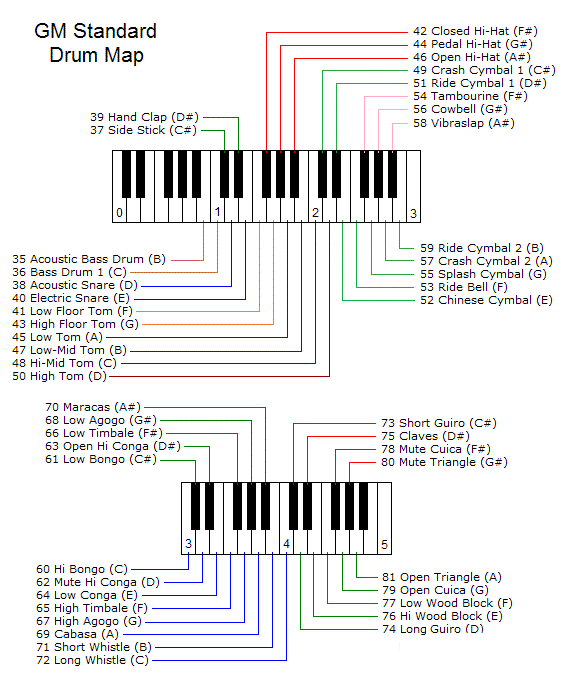
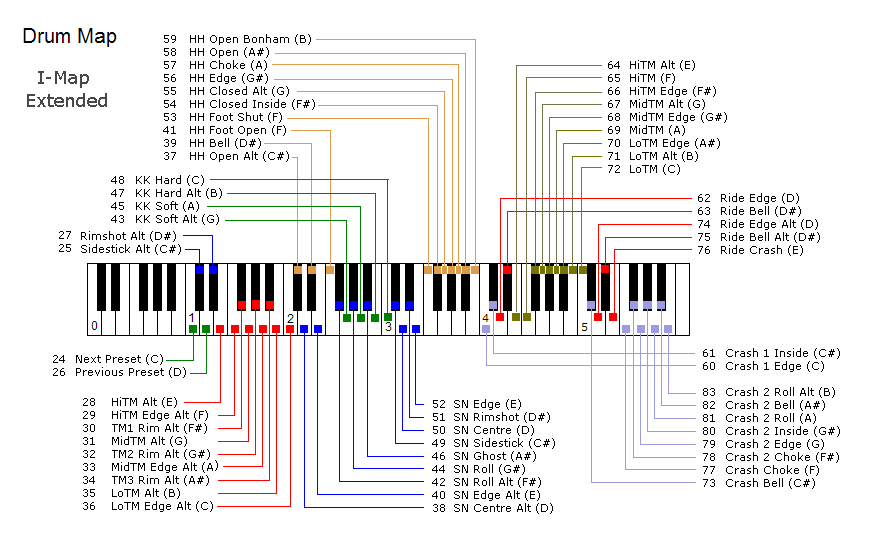
By the way! I looked all over Google and cannot find this: What key is a rim shot? For that matter, rim shots for snare, Tom(s), etc.?

Edit: Okay, forget the mapping. I tried a different approach to the search, and looked for images with the mapping on it. I managed to find two images from the same Imgur account and I will check them out. I assume "edge" means rim shot? Pretty cool, actually. I'm sure none of you need it, but just in case anyone wants them, here they are:
Image
Image

Post

I don't want to start another thread for this, but I am definitely sending the keyboard I bought back to Amazon. I can get used to the stiff keys, but the intermittent double/triple notes played with one press of the pads is just a total deal-breaker for me.

The more I think about it, the more I am sure that I am going to be using this enough that spending a few dollars more is just a wise investment. I just looked at the Oxygen 25 again, and on Amazon noticed that there is apparently a newer version of the one I was looking at. See below. It's $10.00 than the older version, but it looks solid, and I am about to do a Google comparison in a sec. Anyone have any experience with this MIDI Keyboard or the older model one? Even the newer version is only $40.00 more than the one I have now and am sending back.

https://www.amazon.com/gp/product/B092X ... X0DER&th=1

Image

Post

Looks like it has MANY more features. From reviews, lighter touch and more synth-like action.

Only red flag was from one or 2 reviews that implied you MAY have to load drivers manually for Windows 10 - so may not "auto-install" when you plug it in - but that's a one-time thing.
Waveform 13; Win10 desktop/8 Gig; Win11 Laptop; MPK261; VFX+disfunctional ESQ-1

Post

Thanks for the answer. Plug-and-play is great, and all these devices should be capable of it out of the box, but it's not a deal-breaker. As long as any installation and mapping software and drivers are not a nebulous nightmare of a hazy maze of circuitous instructions. If I had to bet money, I would assume that this would just work right out of the box, and that for some functionality that would be more sophisticated, you might need the drivers and software, but nothing surprises me these days. I have Windows 11, but whatever. I am going to wait a little while for maybe one or two more people who might have experience with this unit to chime in, then I will buy this one and set up an Amazon return for the other one.

Post

Edit:

Just deleting the post, since restarting my computer got everything to work. Not sure why I didn't think to try that first lol

Post

Okay, so it turns out that the Oxygen needs to go back, too. lol

Just WAAAAY too many problems interacting with Waveform, and I have spent a ridiculous amount of time with it, including looking for updated drivers, which there are none for Windows 11. I did confirm that ALL the problems I am having with the Oxygen 25 MKV are not present with the Alesis. It works flawlessly. Well, other than that REALLY annoying propensity to sounds multiple notes with one drum pad press, which is an issue that a lot of people are complaining about. Thank God I didn't send the Alesis back yet, so I was able to see if the problems I was having with the Oxygen were possibly user error.

I even tried to get M-Audio's tech support on the phone, and it was damn near impossible, and I just gave up. It's a shame because I love everything about this keyboard in terms of features, feel of the keys, even the aesthetics.

So any other suggestions?

lol I briefly considered the Oxygen Pro Mini. That thing looks like a BEAST, and all the Youtube reviews are really glowing. I'm not a piano player, so I am not too concerned about the smaller keys. I even like the fact that they can squeeze 32 keys on about the same surface area. But then I risk having the same problem with another M-Audio product, and their absurdly ubiquitous tech support is a deal breaker for me.

I am going to check out a few of the video reviews. Maybe the Nektar LX25+.

Note: I may even just keep the Alesis and cancel the return. I guess I can stick with using the keys rather than the pads for individual drums.

Post

Looks like you would have to upgrade firmware in the Oxygen to LOAD the class-compliant driver .
https://m-audio.com/support/download/fi ... dows-v0.50
Instructions are included in the package. However, not sure how returns work if the firmware update fails.

PS - I think there is also an update for the Alesis that may improve the double-pads, same caveat applies.
Waveform 13; Win10 desktop/8 Gig; Win11 Laptop; MPK261; VFX+disfunctional ESQ-1

Post

I tried the Firmware update, and the unit seems to connect a little easier, but the problems mostly persists, and I still have trouble playing MIDI sounds through Waveform, and can only still record on one of my two MIDI tracks. lol Oh and sending it back isn't a problem, since Amazon takes returns within 30 days of receiving a purchase, which was only two days ago.

Post

Chirovette--

Jumping in here late, and Peter's got you covered as always, but am confused by your comment that you can record on only of of your two MIDI tracks.

Not sure what that means.

I'm thinking you probably *want* to record on one track at a time:

1. Set a track's input to your controller
2. Arm it to record
3. Record, and play along
4. MIDI data is recorded on that track.

If you're unable to record on a different track, separately...

1. Remove the input from the first track
2. Set the next track's input to your controller
3. Arm it to record
4. Record and play along...
5. MIDI data is now recorded on *that* track.

If you're trying to record one stream of MIDI data to two tracks at once, you'll want to set up a virtual input. I can get into the steps to do that, but am not sure this is what you're after.

It's possible you're saying you're unable to record to a certain track for some reason. If that's the case, let us know.
Spotify, Apple Music, YouTube, and even Deezer, whatever the hell Deezer is.

More fun at Twitter @watchfulactual

Post

Watchful wrote: Wed Jun 01, 2022 7:56 pm Chirovette--
but am confused by your comment that you can record on only of of your two MIDI tracks.
Not as confused as me, I promise. :lol:
Watchful wrote: Wed Jun 01, 2022 7:56 pmNot sure what that means.

I'm thinking you probably *want* to record on one track at a time:

1. Set a track's input to your controller
2. Arm it to record
3. Record, and play along
4. MIDI data is recorded on that track.
Yes, of course I agree, I only want to record on one track at a time. To give more details, I have two MIDI tracks right now on a song I am sort of practicing on. One is the bass drum and the other is the high hat. So I decided to try and record more symbols to the track with the high hat. So going through all of the steps, including arming the track, the computer shows it recording, but it doesn't actually record any of the notes I am playing on that second track. BUT when I switch to the track with the bass drum, then do all the same steps, that track it records on. It's very weird. I will say that the Powerdrumkit plug in is a little odd to me, as I literally have to activate it on every track I want to use it on every time I boot up the project. Otherwise the drums don't even play on that track. But that is the same with the Alesis as well. It seems like you have to go through the "Do you want to purchase this software" prompt every time you boot up Waveform and you have to do it on each track you want to record drums on.
Watchful wrote: Wed Jun 01, 2022 7:56 pm If you're unable to record on a different track, separately...

1. Remove the input from the first track
2. Set the next track's input to your controller
3. Arm it to record
4. Record and play along...
5. MIDI data is now recorded on *that* track.

If you're trying to record one stream of MIDI data to two tracks at once, you'll want to set up a virtual input. I can get into the steps to do that, but am not sure this is what you're after.

It's possible you're saying you're unable to record to a certain track for some reason. If that's the case, let us know.
It is definitely NOT a Tracktion/Waveform issue. Because using the Alesis, it is all smooth sailing. I mean, other than having to bypass the subscription splash screen for Powerdrumkit, but that is something that will go away if I give them some cash lol. But the Alesis is recording smoothly and easily while The Oxygen is giving me nothing but grief, even after the firmware update.

It's a shame, because all else being equal, the Oxygen MKV is a beautiful keyboard, and I hate to send it back to Amazon, I really do.

I am toying with the idea of just keeping the Alesis and cancelling that return. I am starting to really like using the keyboard for the drums. Although, I have to download the Alesis software to play with the velocity curves, because right not it is set at the default velocity for the keys, which I think it 127, so it doesn't respond to harder and softer attacks on the keys, only the pads. I will try a firmware update and getting the drivers on the Alesis.

Post

Make sure you have the drum plugin on the track you're recording on.
Spotify, Apple Music, YouTube, and even Deezer, whatever the hell Deezer is.

More fun at Twitter @watchfulactual

Post

Watchful wrote: Wed Jun 01, 2022 9:00 pm Make sure you have the drum plugin on the track you're recording on.
Of course. And like I said, it all works fine with the Alesis, just not with the Oxygen. At first, I assumed it was user-error, and I was making mistakes, but thankfully I haven't sent the V25 back to Amazon yet. so I was able to test it by replacing the Oxygen with the Alesis in the USB port, and it all worked fine.

Post

So when you go to add drums to the second track, what do you see on the MIDI input meters on the left? Do BOTH bounce when you have set input to the second track ?

Now, one of the things you may come across is that the controller actually acts as 2 or more devices; and potentially (intentionally?) on multiple MIDI channels. This is useful in some instances; I set keyboard to MIDI channel 1 and pads to MIDI channel 10, so I can filter keys and pads and record or play with both at the same time. It DOES have a side-effect that the keyboard has 2 devices by default, and one of those I create a virtual of. I think I described it here 20 posts or so ago ?

MIDI monitor on each of the tracks, just before the MT plugin, lets you see what's going on (note number and velocity and channel). Very useful tool when you get confused.
Waveform 13; Win10 desktop/8 Gig; Win11 Laptop; MPK261; VFX+disfunctional ESQ-1

Post

The only way to visually explain this, and I know I’m not using the right word here, but when I’m recording a track, especially MIDI, when I pre-load the track to record, and I start recording, It almost looks like it’s “painting” over the track, and as you observed you could see whatever you’re playing or tapping being “written to“ the track. When I work with the Oxygen, it only writes tracks to the kick drum, which is track number one, which also happens to be my first drum track. When I try to record anything on any other MIDI track, it’s still “paints“ (I know that’s the wrong word lol) as it goes. Only there are no notes/beats being written, and when I’m finished, nothing is recorded. When I yank that keyboard out, and put the Alessis in, everything works as I would expect it to, and “painting” the track, you can actually see the notes/beats being written, and at the end of it I have an actual track recorded.

And this is only one problem I’m having with that keyboard. It is giving me a hell of a time every time I either unplug it and plug it back in, shut down waveform, or turn the keyboard off and then on again. I have to jump through like four or five hoops before I can get the software to allow the keyboard to play anything on it. The weird thing is, the software does see the keyboard connected, after I have refreshed the midi list in the settings.

You know how when you have the virtual keyboard up, either in the settings, or in the main page when you click on the left of the track and it brings up the big keyboard on the bottom? When you press the keyboard notes, you can see the keys turn yellow and are the press on the screen.

It is very difficult to get that to happen with the oxygen, I literally have to disable all the drivers in the settings and then re-enable them, and then I have to cycle through making one of the three on the bottom, the default. And it’s not consistent as to which one needs to be turned to default in order to get the keyboard to finally work. And sometimes I even have to reboot my computer before any of this works.

And just to reiterate, I did the firmware update. And to reiterate again, the Alessis works fine. The second I plug it in and refresh the midi device list, it automatically sees it, and immediately works.

Post

ChiroVette wrote: Sun May 29, 2022 3:58 pm the intermittent double/triple notes played with one press of the pads is just a total deal-breaker for me.
I have this issue with the built-in pads on every keyboard-type controller I have ever tried (admittedly not any particularly $$$ ones) and even on a number of dedicated pad controllers.

I ended up with the Nectar Aura, which has been working perfectly for me - have not had the double-strike issue come up once - and I just ignore the pads on the keyboard controller when I happen to use one (as more often I am using a "real" keyboard with MIDI output).

Post Reply

Return to “Tracktion”