


Blue Cat's PatchWork 2.6 Released
-
- KVRer
- 5 posts since 2 Nov, 2019
Thanks for the reply, friend. It’s a more informative and thoughtful reply than I’ve received from Blue Cat support. Their tech support and user documentation suck and I won’t buy another of their products because of it. Without comprehensible and functioning I/O and literally no tech support, this software is pointless.
-
 Blue Cat Audio Blue Cat Audio https://www.kvraudio.com/forum/memberlist.php?mode=viewprofile&u=39981
 - KVRAF
- Topic Starter
- 6343 posts since 8 Sep, 2004 from Paris (France)
I am sorry if our reply did not help, it was meant to explain the same thing, maybe with a few less words and details, indeed. Can you maybe provide more information about what you have tried and what "does not work" ? There are two sides for the routing here: internal to PatchWork (using the Audio I/O menu item for each synth plug-in), where you select the output channels for each synth (by pair if you are working with stereo tracks), and then in Live, where you select the appropriate aux channel pair (Aux 1-7) for each track.tonepot wrote: Tue Jan 03, 2023 12:43 pm Thanks for the reply, friend. It’s a more informative and thoughtful reply than I’ve received from Blue Cat support. Their tech support and user documentation suck and I won’t buy another of their products because of it. Without comprehensible and functioning I/O and literally no tech support, this software is pointless.
-
Blue Cat Audio Blue Cat Audio https://www.kvraudio.com/forum/memberlist.php?mode=viewprofile&u=39981
- KVRAF
- Topic Starter
- 6343 posts since 8 Sep, 2004 from Paris (France)
Here is a short video example to explain the process with more details:
-
- KVRer
- 1 posts since 24 Mar, 2023
Hi, I'm a new Patchwork/Connector user. I am setting up a VST3 server using a direct Ethernet connection between 2 Windows 10 PCs. I am struggling with the setup shown at the end of tutorial "Offloading Plug-Ins Processing Onto Another Computer".
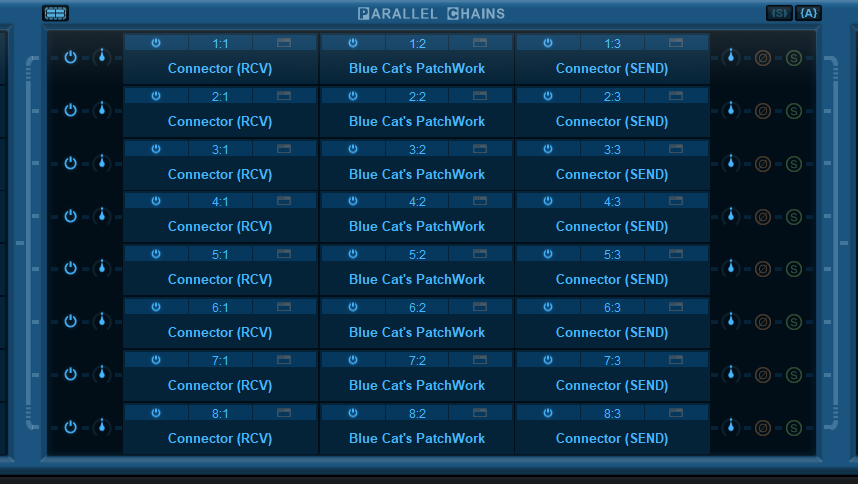
Has anyone gotten this to work with the latest PW release?
I am not sure how to configure the Audio I/O settings for Patchwork and for the connector instances inserted in the parallel processing chains. Does this use the BC Connector ASIO device type or the new Network Audio/Connector Slave driver and device types?
I assume each parallel chain is receiving through a different port number, right?
I am able to receive audio over the network from my DAW (Reaper), but the audio sent back to the DAW is not received. The Connector plugin (receiver) in my DAW says it is connected and shows the name of the sending connector instance on the remote server.
Any help would be appreciated!
Thanks,
Dave
Has anyone gotten this to work with the latest PW release?
I am not sure how to configure the Audio I/O settings for Patchwork and for the connector instances inserted in the parallel processing chains. Does this use the BC Connector ASIO device type or the new Network Audio/Connector Slave driver and device types?
I assume each parallel chain is receiving through a different port number, right?
I am able to receive audio over the network from my DAW (Reaper), but the audio sent back to the DAW is not received. The Connector plugin (receiver) in my DAW says it is connected and shows the name of the sending connector instance on the remote server.
Any help would be appreciated!
Thanks,
Dave
-
- KVRer
- 7 posts since 20 Feb, 2023
great software.... thank you so much!
-
Blue Cat Audio Blue Cat Audio https://www.kvraudio.com/forum/memberlist.php?mode=viewprofile&u=39981
- KVRAF
- Topic Starter
- 6343 posts since 8 Sep, 2004 from Paris (France)
Each send/receive pair in PatchWork should indeed have its own port number, which corresponds to the ports selected in the instances in Reaper that do the send/receive.SD-Dave wrote: Fri Mar 24, 2023 9:51 pm Hi, I'm a new Patchwork/Connector user. I am setting up a VST3 server using a direct Ethernet connection between 2 Windows 10 PCs. I am struggling with the setup shown at the end of tutorial "Offloading Plug-Ins Processing Onto Another Computer".
Has anyone gotten this to work with the latest PW release?
I am not sure how to configure the Audio I/O settings for Patchwork and for the connector instances inserted in the parallel processing chains. Does this use the BC Connector ASIO device type or the new Network Audio/Connector Slave driver and device types?
I assume each parallel chain is receiving through a different port number, right?
I am able to receive audio over the network from my DAW (Reaper), but the audio sent back to the DAW is not received. The Connector plugin (receiver) in my DAW says it is connected and shows the name of the sending connector instance on the remote server.
Any help would be appreciated!
Thanks,
Dave
If PatchWork is in server mode (not using an audio interface), you need to make sure that and extra instance of Connector in Reaper sends a signal to the PatchWork erver, or it will not process anything.
-
JTBrownell1998 JTBrownell1998 https://www.kvraudio.com/forum/memberlist.php?mode=viewprofile&u=596065
- KVRer
- 21 posts since 4 Jan, 2023
Hello, I have a question: for future Patchwork updates, are there any plans to allow the user to assign parameters a "default" value? I.e. when you right-click a parameter, it resets to a specified value, not just 0% every time? I could see this fitting into the control settings window along with the min/max values, it would be great if we could also set a default "reset" value. It might not seem like much, but this would be incredibly valuable to someone like me, who has a patchwork patch setup for almost every instrument/effect.
Another feature that would be tremendously useful would be this: when the user saves a plugin/patch, the current values of assigned parameters become their "default" when recalled later (this is how Ableton Live's macros behave on Instrument and Effect racks, again it may sound gimmicky but it is so useful, nay, essential for power users.
By the way, this would also be a very, very welcome feature in Remote Control.
Thanks for your time! By the way, I see that the Patchwork v2.66 preview has drag-and-drop support for the parameter editor -- that's fantastic! Kudos to Blue Cat Audio!!
Another feature that would be tremendously useful would be this: when the user saves a plugin/patch, the current values of assigned parameters become their "default" when recalled later (this is how Ableton Live's macros behave on Instrument and Effect racks, again it may sound gimmicky but it is so useful, nay, essential for power users.
By the way, this would also be a very, very welcome feature in Remote Control.
Thanks for your time! By the way, I see that the Patchwork v2.66 preview has drag-and-drop support for the parameter editor -- that's fantastic! Kudos to Blue Cat Audio!!

-
Blue Cat Audio Blue Cat Audio https://www.kvraudio.com/forum/memberlist.php?mode=viewprofile&u=39981
- KVRAF
- Topic Starter
- 6343 posts since 8 Sep, 2004 from Paris (France)
Yes having the right default value would indeed be nice, it's in the list! The current drag and drop implementation in the preview is very basic and far from perfect and will be much better when released  .
.
.-
JTBrownell1998 JTBrownell1998 https://www.kvraudio.com/forum/memberlist.php?mode=viewprofile&u=596065
- KVRer
- 21 posts since 4 Jan, 2023
That's great to hear!! I've been testing out the preview build for a couple days now and the changes you have made to the Parameters Editor are already saving me TONS of time with patch building. The only thing I think it's still missing, functionally, is the ability to re-order parameters, whether it's via button or drag-and drop. I can't imagine it'd be an easy feature to implement, since parameters, MIDI control messages, etc. can be finnicky -- but the day I can move around controls/assignments as easily as I can with plugins in a patch, I will be in heaven..Blue Cat Audio wrote: Wed Apr 19, 2023 3:06 pm Yes having the right default value would indeed be nice, it's in the list! The current drag and drop implementation in the preview is very basic and far from perfect and will be much better when released
Also when I first opened the preview 2.66, I was surprised to see not just one, but TWO new hamburger menus in the Parameter Editor! So you've taken the power we have already with plugins in Patchwork, specifically the ability to copy/paste/save/load pieces of our patch setup to use wherever, and applied it to BOTH Controls and Assignments! Really nice idea from ya'll, well done! I'm excited to see what other improvements are in store for the final build of this version