


Hi guys. I just update to Waveform 13 and can´t locate the option to "Return to start on stop", has it been moved or it's just not there?
Thanks in advance.
Waveform 13 missing option
-
- KVRAF
- 2772 posts since 28 Mar, 2007
Its at "actions\options" ( "actions" is the arrow at the bottom on the left hand side.)snexus wrote: Thu Apr 04, 2024 8:14 am Hi guys. I just update to Waveform 13 and can´t locate the option to "Return to start on stop", has it been moved or it's just not there?
Thanks in advance.
-
- KVRer
- Topic Starter
- 12 posts since 7 Nov, 2023
dellboy wrote: Thu Apr 04, 2024 8:45 amIts at "actions\options" ( "actions" is the arrow at the bottom on the left hand side.)snexus wrote: Thu Apr 04, 2024 8:14 am Hi guys. I just update to Waveform 13 and can´t locate the option to "Return to start on stop", has it been moved or it's just not there?
Thanks in advance.
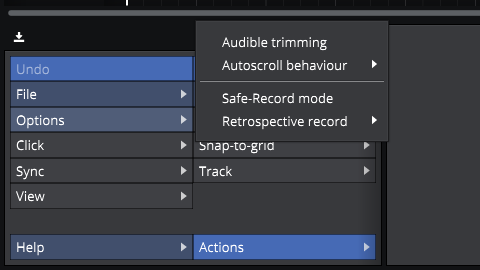
This is what appears when selecting options.
-
- KVRAF
- 2772 posts since 28 Mar, 2007
Yes, you now need to click on "options". Its in there.snexus wrote: Thu Apr 04, 2024 10:08 amdellboy wrote: Thu Apr 04, 2024 8:45 amIts at "actions\options" ( "actions" is the arrow at the bottom on the left hand side.)snexus wrote: Thu Apr 04, 2024 8:14 am Hi guys. I just update to Waveform 13 and can´t locate the option to "Return to start on stop", has it been moved or it's just not there?
Thanks in advance.
This is what appears when selecting options.
-

- KVRian
- 615 posts since 30 Apr, 2003 from London, UK
Your screenshot doesn't look like 13 PRO. There should be two more menu items, Return to start on play and Quantize transport position changes. If you are not seeing these then maybe you have 13 free installed and these are absent there?
Does Return to start on play appear in your settings->keyboard shortcuts in which case you can apply a shortcut to toggle?
Return to start on stop has been replaced by Return to start on play.
Does Return to start on play appear in your settings->keyboard shortcuts in which case you can apply a shortcut to toggle?
Return to start on stop has been replaced by Return to start on play.
'He craved immortality so much, he was prepared to die for it.'
-
- KVRer
- Topic Starter
- 12 posts since 7 Nov, 2023
The image is what appears when clicking options.dellboy wrote: Thu Apr 04, 2024 10:48 amYes, you now need to click on "options". Its in there.snexus wrote: Thu Apr 04, 2024 10:08 amdellboy wrote: Thu Apr 04, 2024 8:45 amIts at "actions\options" ( "actions" is the arrow at the bottom on the left hand side.)snexus wrote: Thu Apr 04, 2024 8:14 am Hi guys. I just update to Waveform 13 and can´t locate the option to "Return to start on stop", has it been moved or it's just not there?
Thanks in advance.
This is what appears when selecting options.
-
- KVRAF
- 2772 posts since 28 Mar, 2007
That is where it is in the Pro version. And it has been changed to "Return to start on play" as was already mentioned. So maybe it has been removed in the free version?snexus wrote: Thu Apr 04, 2024 11:19 amThe image is what appears when clicking options.dellboy wrote: Thu Apr 04, 2024 10:48 amYes, you now need to click on "options". Its in there.snexus wrote: Thu Apr 04, 2024 10:08 amdellboy wrote: Thu Apr 04, 2024 8:45 amIts at "actions\options" ( "actions" is the arrow at the bottom on the left hand side.)snexus wrote: Thu Apr 04, 2024 8:14 am Hi guys. I just update to Waveform 13 and can´t locate the option to "Return to start on stop", has it been moved or it's just not there?
Thanks in advance.
This is what appears when selecting options.
-

- KVRist
- 82 posts since 28 Nov, 2023
right-click on the bar's bar.. bar... timeline
You do not have the required permissions to view the files attached to this post.
Ryzen 5 3600 | 32GB | GPU RX 590 | Lewitt Connect 6 + LCT440 Vida | Ubuntu 24.04 LTS / Windows 11 | Waveform 13 PRO | Bitwig 5
-
- KVRer
- Topic Starter
- 12 posts since 7 Nov, 2023
Ok, It seems that this option is removed from the Free version, but I have a workarround for that.
1. Go to the program settings.
2. Select the "Advance" category (the one at the botton with the gear icon)
3. Click the first option that says "Feature set" on Application (it ussualy says "Best available in Tracktion account")
4. Select "Pro"
5. Restart the program
6. Select the option to continue with the demo version
7. Open your project
8. Select the option to "Restart to start on play"
9. Save the edit
10. Repeat the process from point 1 to 3
11. Select again the option "Best available in Tracktion account"
12. Restart the app
Now, the "Restart to start on play" is enabled in your project.
1. Go to the program settings.
2. Select the "Advance" category (the one at the botton with the gear icon)
3. Click the first option that says "Feature set" on Application (it ussualy says "Best available in Tracktion account")
4. Select "Pro"
5. Restart the program
6. Select the option to continue with the demo version
7. Open your project
8. Select the option to "Restart to start on play"
9. Save the edit
10. Repeat the process from point 1 to 3
11. Select again the option "Best available in Tracktion account"
12. Restart the app
Now, the "Restart to start on play" is enabled in your project.
-
- KVRer
- 13 posts since 3 Jul, 2024
Hi all,
This fix has not worked for me in Waveform Free v13. Has anyone tried it?
This input issue is really frustrating. I am repeatedly getting no input when trying to record. I've fixed it by restarting Waveform at times, but this does not always work.
Any suggestions would be much appreciated.
This fix has not worked for me in Waveform Free v13. Has anyone tried it?
This input issue is really frustrating. I am repeatedly getting no input when trying to record. I've fixed it by restarting Waveform at times, but this does not always work.
Any suggestions would be much appreciated.
-
Peter Widdicombe Peter Widdicombe https://www.kvraudio.com/forum/memberlist.php?mode=viewprofile&u=336849
- KVRian
- 1205 posts since 29 Aug, 2014
You are getting "no input" when trying to record, or it is recording at the wrong place (i.e. starting wherever the playback or record session last paused) ? These would be different issues.
Also the device recording from - MIDI or audio ?
Also the device recording from - MIDI or audio ?
Waveform 13; Win10 desktop/8 Gig; Win11 Laptop; MPK261; VFX+disfunctional ESQ-1
-
- KVRer
- 13 posts since 3 Jul, 2024
Hi Peter,
I'm getting this when I'm ready to record, and have armed the input button to check levels. I'm recording audio via my digital interface. Recording does not happen until I get this input signal showing on the track that I'm wanting to record on.
I'm getting this when I'm ready to record, and have armed the input button to check levels. I'm recording audio via my digital interface. Recording does not happen until I get this input signal showing on the track that I'm wanting to record on.
-
Peter Widdicombe Peter Widdicombe https://www.kvraudio.com/forum/memberlist.php?mode=viewprofile&u=336849
- KVRian
- 1205 posts since 29 Aug, 2014
Do you have click enabled at the time; and do you hear the click? If you have click enabled but it's output is sent to an inaudible location, that can be an annoying gap?
Do you see the playback cursor moving (assuming you'd passed over the lead-in bars for the click track)? If click is not enabled, the cursor should start moving immediately, I believe; with no count-in.
Do you have punch-in recording enabled?
Oh, and what platform, versions, OS level of the computer ?
Audio - OS, ASIO, ASIO4all ?
Do you see the playback cursor moving (assuming you'd passed over the lead-in bars for the click track)? If click is not enabled, the cursor should start moving immediately, I believe; with no count-in.
Do you have punch-in recording enabled?
Oh, and what platform, versions, OS level of the computer ?
Audio - OS, ASIO, ASIO4all ?
Waveform 13; Win10 desktop/8 Gig; Win11 Laptop; MPK261; VFX+disfunctional ESQ-1