PreSonus Studio One 7 apparently imminent

Audio Plugin Hosts and other audio software applications discussion
Post Reply New Topic
RELATED
PRODUCTS
Fender Studio Pro

Post

dellboy wrote: Tue Oct 29, 2024 11:24 am
Trancit wrote: Tue Oct 29, 2024 8:58 am
I.e. you save a project with clips in the new clip launcher of V7... what shall V6 do with this information??
I have exported Bitwig sessions that included the clip launcher clips using the DAWproject format and imported them into Studio One. Certain information will obviously be missing, but the basic structure of the song is retained. So maybe it is possible to export from version 7 as a DAWproject file and re~import into version 6 using that method?
This could most likely work!
Nonetheless I
1. wouldn´t rely on that...
and 2. what if this is exactly the part your collaborator wants you to work on or it´s important in general... not just the clip launcher but other new stuff which could be important for the song in general??

Post

jamcat wrote: Tue Oct 29, 2024 1:54 am Because you can’t open a song that was saved in Studio One v7 in Studio One v6.
Seem rather drastic. I only got a warning from daws saying some things may not work, or similar.
- not total block of opening

But if they changed project format to not allow this at all, they really ought to create export/import alternatives in v7+.

For own purposes I think StudioOne allowed two installs on each license.
- but not for a collaborator then not up to date

Office applications, even OpenOffice has save/open like for spreadsheets and stuff.
- you can load and save in lots of old formats, Excel 97 xls and similar.

People should check if that might be there for file format options.
- there is usually to save project as midi, or some backup bundle etc

If one can take some things are not there, look at OMF and AAF formats as well.
- StudioOne is only AAF I believe though
- but back and forth with collaborators is a mess of course

For Reaper and Sampitude I used EDL format as another option.
- worked really well

Post

Well I should clarify regarding Studio One v7 songs in older versions of Studio One:

I do not own Studio One 7. I am only assuming you can’t because that has been the case for every new Studio One upgrade in the past, and I assume this is once again carried forward into version 7.

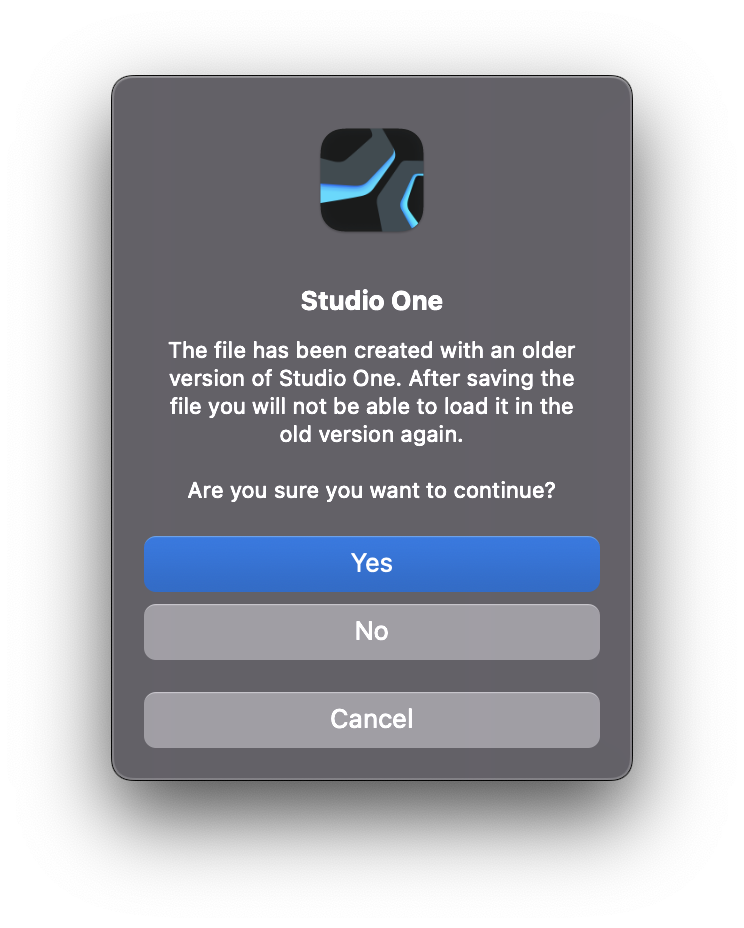
For as long as I can remember (and I’ve owned every version of Studio One since v1.0) when you save a song created in a past version for the first time in the new version, Studio One always pops up a warning like this:

Image
THIS MUSIC HAS BEEN MIXED TO BE PLAYED LOUD SO TURN IT UP

Post

I wonder if it's just a "we told you so" thingy and they are in the clear if you run into trouble.
- but better safe than sorry, as they say
- get it from the horses mouth

Post

jamcat wrote: Tue Oct 29, 2024 4:00 pm Well I should clarify regarding Studio One v7 songs in older versions of Studio One:

I do not own Studio One 7. I am only assuming you can’t because that has been the case for every new Studio One upgrade in the past, and I assume this is once again carried forward into version 7.

For as long as I can remember (and I’ve owned every version of Studio One since v1.0) when you save a song created in a past version for the first time in the new version, Studio One always pops up a warning like this:

Image
Just out of curiosity, what's the difference between "No" and "Cancel"?

Post

concealed identity wrote: Tue Oct 29, 2024 10:07 pm
jamcat wrote: Tue Oct 29, 2024 4:00 pm Well I should clarify regarding Studio One v7 songs in older versions of Studio One:

I do not own Studio One 7. I am only assuming you can’t because that has been the case for every new Studio One upgrade in the past, and I assume this is once again carried forward into version 7.

For as long as I can remember (and I’ve owned every version of Studio One since v1.0) when you save a song created in a past version for the first time in the new version, Studio One always pops up a warning like this:

Image
Just out of curiosity, what's the difference between "No" and "Cancel"?
Yes : save ( load ?) the file , or whatever the operation is
No : don’t save ( load ? )the file , or idem
Cancel : abort the operation
Eyeball exchanging
Soul calibrating ..frequencies

Post

gentleclockdivider wrote: Wed Oct 30, 2024 1:10 am
concealed identity wrote: Tue Oct 29, 2024 10:07 pm
jamcat wrote: Tue Oct 29, 2024 4:00 pm Well I should clarify regarding Studio One v7 songs in older versions of Studio One:

I do not own Studio One 7. I am only assuming you can’t because that has been the case for every new Studio One upgrade in the past, and I assume this is once again carried forward into version 7.

For as long as I can remember (and I’ve owned every version of Studio One since v1.0) when you save a song created in a past version for the first time in the new version, Studio One always pops up a warning like this:

Image
Just out of curiosity, what's the difference between "No" and "Cancel"?
Yes : save ( load ?) the file , or whatever the operation is
No : don’t save ( load ? )the file , or idem
Cancel : abort the operation
Thanks for the response! I guess what I don't understand is when saving or loading a file, what's the difference between "don't save/load" and "abort the operation (of saving/loading)"? Maybe this is a basic-level computer question, but I have no idea what the difference between the two is and would panic if I had to choose :lol:

Post

Just "save as" a new v7 version which will leave your old project untouched. Nothing to stress about, IMO

Post

I'm also just really, really curious :hihi:

Post

concealed identity wrote: Wed Oct 30, 2024 3:51 pm I'm also just really, really curious :hihi:
It is like real life! You 'think' there are many choices, but most of them have the same result :hihi:

Anyway back to v7. If I choose S1 as my main DAW, then mostly I will upgrade to v7 as I believe it will be more stable and with less bugs with time. Let's see the pricing (discount) during BF and Christmas time.
Using: Cubase Pro 15, Reason 13, Tascam US-4x4HR, MODX6, DM12D, LaunchKey 49, Yamaha guitar(Pacifica 612v) and bass (BB234) and some virtual instruments and synths.

Post

Does Studio One have a second hand resale value anymore?

I have just looked online and the difference in English pounds for an upgrade and a full perpetual licence at Gear for Music is just £15.

Post

BONES wrote: Sat Oct 19, 2024 12:02 pm A quick question, of a more general nature, if I may - which other DAWs come with a remote app like Studio One's? I've only just realised what a huge boost it is going to give us on stage, having confirmed that it can work with a Studio One install on the same computer. That allows me to use it properly with a mouse and keyboard in the studio and with a touch-based interface on stage, which will be very handy for us.
Yes, in REAPER, I'm not sure how elegant (functional); you can use mobile. And in REAPER 7 you can have projects within projects, so you can click these big icons. Would seem pretty easy to import audio stems into REAPER to recreate projects.

Post

Why is there no demo?
Intel Core2 Quad CPU + 4 GIG RAM

Post

electro wrote: Fri Nov 01, 2024 3:42 pm Why is there no demo?
Crossinger wrote: Sun Oct 27, 2024 11:57 am
woodsdenis wrote: Sun Oct 27, 2024 10:33 am the practical would say to get any critical bugs fixed.
True. Iirc, the demo version is usually released with x.0.1 or x.0.2 update.

Post

Is it worth jumping over to CLAP plugins where available instead of VST3 or is it still too much in its infancy for any real benefits and potential negatives ?

Post Reply

Return to “Hosts & Applications (Sequencers, DAWs, Audio Editors, etc.)”