🎶 Native Linux Plugins – New & Upcoming (VST | CLAP | LV2 | Standalone)

If you are new here check this forum first, your question may have been answered.
Post Reply New Topic
RELATED
PRODUCTS
Spaceship Delay The Great Escape

Post

NWSM wrote: Sun Mar 01, 2026 12:39 am Intersect

Version:0.9.0
Co author Claude Sonnet AI

https://github.com/tucktuckg00se/INTERSECT
https://www.kvraudio.com/product/inters ... ktuckg00se

is a non-destructive, time-stretching, and intersecting sample slicer plugin with independent per-slice parameter control. This Tools used the Bungee - Bungee is a modern, open-source C++ library for high-quality audio time-stretching and pitch-shifting in real-time

Image
This one looks cool! :)
Vendor‑Dependent Copy Protection: Customers lose. Pirates win.:mad:
(Also: I'm Accused of lying about Linux—it boots, runs my pro audio workflow, stays stable, updates--though yearly dismissed as “niche”. Yet I'm the deluded one.)
:roll:

Post

audiojunkie wrote: Sun Mar 01, 2026 12:43 am
NWSM wrote: Sun Mar 01, 2026 12:39 am Intersect

Version:0.9.0
Co author Claude Sonnet AI

https://github.com/tucktuckg00se/INTERSECT
https://www.kvraudio.com/product/inters ... ktuckg00se

is a non-destructive, time-stretching, and intersecting sample slicer plugin with independent per-slice parameter control. This Tools used the Bungee - Bungee is a modern, open-source C++ library for high-quality audio time-stretching and pitch-shifting in real-time

Image
This one looks cool! :)
The tool isn’t bad at all if you don’t have Bitwig. “Intersect” can be a bit cumbersome to use, though. The idea of slicing samples and adding effects has been implemented in a more streamlined way in other tools like HY Slicer, Slicer 2, or Glitch, or, of course, natively in Bitwig.

The slice layering feature is quite interesting, but accessing overlapped slices can be tricky—if you’ve stacked Slice 1 five times, getting to the ones underneath becomes cumbersome. I’d personally prefer knobs or sliders for parameter control, or at least some clearer visual separation between input fields.

On the bright side, transient splitting works well and feels intuitive.
Thanks to Bitwig’s built‑in operators, you don’t really need to use the plugin’s loop function. I can also slice a sample directly into a Bitwig Drum Machine and start modulating and add Effects much faster than I can within this plugin.

In short, “Intersect” isn’t a must‑have for me, but I’d still encourage others to give it a try, support the developer, and share feedback—projects like this are always valuable for the community.

Post

REVERSIDE Reverb Plugin — Possibly one of the most advanced reverb plugins is coming to Linux!!

Reverside is a sophisticated dual‑engine algorithmic reverb that combines Early and Late reflection processing into interlinked engines, each with independent diffusion, EQ, filtering, modulation and stereo/M‑S routing. Use it for believable spatialization, immersive staging or bold creative effects—from intimate close‑ups to wide cinematic placements.

The Early Reflection engine can host up to 200 reflections and lets you control virtual geometry with both relative and absolute dimension controls, shape, wall absorption, air‑induced decay, fill‑in and time‑warp parameters to create natural or artificial reflection patterns. The algorithm simulates sound propagation in 3D, so you can place source and listener anywhere in a virtual space to derive natural direct‑path timing and first‑reflection cues for coherent externalization and controllable distance and direction.

The Late Reflection engine delivers smooth long tails and strong envelopment. Twelve diffusion models and a non‑exponential FAT envelope let you sculpt onset and tail behavior. Frequency‑dependent decay profiles are set using a 3‑band filter whose band gains can be adjusted independently per channel, enabling asymmetric tonal and decay behaviors.

Both engines offer independent pre‑delays that can be set in milliseconds or tempo‑synced subdivisions, letting you create precise, rhythmic or spatial effects. Reverside uniquely supports setting many engine parameters independently per channel (L/R, M/S or anything between), enabling asymmetric tails, rotating perspectives and evolving spatial effects.

Reverside provides extensive internal modulation that preserves clarity and harmonic content. Each engine has its own modulation controls, and the interface exposes 100+ adjustable parameters for deep sound shaping without external tools.

FEATURES
Multi‑engine architecture: interlinked Early and Late processing for flexible tonal and spatial shaping
3D source/listener placement: position and orient source and listener in virtual geometry for realistic timing and spatial cues
Spatial FX: independent frequency‑dependent decay, reverb time and envelope profile per L/R or M/S channels for asymmetric and evolving stereo tails
ER engine: up to 200 reflections, geometry controls (absolute/relative), shape, wall absorption, air decay, fill‑in and time‑warp
LR engine: 12 diffusion models, FAT non‑exponential envelope, long smooth tails and envelopment control
Per‑engine pre‑delay with time and tempo modes: ms or tempo‑synced subdivisions, absolute and relative timing options
Spectral shaping: per‑reflection absorption, frequency‑dependent decay, 3‑band filters and multi‑band filtering/panning
Bidirectional filter routing: ER→LR, LR→ER or ER|LR modes for different material/decay interactions
Asymmetric parameter panning: split time‑domain and filter parameters between L/R or M/S for asymmetric decay and imaging
Advanced imaging: mid/side/rotation control, width, decorrelation and spectral panning for rich, stable fields
ER to LR routing with multiple pick‑up points for flexible signal flow
Modulation: extensive, artifact‑free modulation with per‑engine settings
Workflow & UI: param locks, A/B/C/D memory slots, preset management, customizable color schemes, fonts and skins, localization support
GPU‑accelerated UI (OpenGL) for smooth rendering

wont worry, Linux build is going to be available. just give me some time.

Denis
DEVPROAUDIO
https://devproaudio.com
viewtopic.php?p=9212413#p9212413
Vendor‑Dependent Copy Protection: Customers lose. Pirates win.:mad:
(Also: I'm Accused of lying about Linux—it boots, runs my pro audio workflow, stays stable, updates--though yearly dismissed as “niche”. Yet I'm the deluded one.)
:roll:

Post

Sorry for the self promo post, but I am a Linux user and we do support Linux.

Litmus is an internal plugin host that lives right in your mix chain and acts as an objective second set of ears for every decision you make. Instead of being just an analyzer, Litmus automatically gain‑stages your processing, lets you hear exactly what each plugin is doing, and helps you choose settings and tools based on evidence, not guesswork.

Insert Litmus on a track or bus, load your favourite VST3 or AU processors inside it, and mix as normal – compression, EQ, saturation, clipping, whatever you like. Litmus constantly matches loudness in the background using ITU‑R BS.1770‑4 LUFS, so every tweak you make is instantly level‑matched, forcing you to judge tone, punch and clarity instead of being fooled by "louder is better."

Whenever you want to zoom in, delta monitoring lets you solo the exact sonic footprint of a plugin or chain – the added harmonics from a saturator, the "air" an EQ boosts, or the transient changes from a compressor – so you can really learn what each tool contributes to your sound. When it's time to commit, blind A/B mode anonymises chains, plugins or dry vs wet, tracks your votes, and reveals the winner only at the end, helping you pick the best‑sounding option without brand or UI bias.

Back up your ears with Litmus’s built‑in spectral, harmonic, phase and loudness analysis, then collapse it back down and keep mixing – it's designed as an everyday utility that stays in your template, not a one‑off lab tool. Built with automatic latency compensation and crash‑safe scanning, Litmus runs as a VST3 (Win/macOS/Linux) and AU (macOS) effect and hosts your VST3/AU processors inside a single managed chain, with one license covering all formats and platforms.

Key features
  • Internal VST3/AU plugin host with up to 8 slots per chain (VST3 on Win/macOS/Linux, AU on macOS).
  • Per‑slot Auto Gain with ITU‑R BS.1770‑4 LUFS matching, three‑phase measurement, and 100 ms smoothed gain.
  • Delta monitoring with wet/dry blend, dedicated delta gain, LUFS/RMS/peak readouts, and latency‑compensated alignment.
  • Blind A/B engine for Chain vs Chain, Plugin vs Plugin, and Dry vs Wet with randomized labels, crossfaded switching, and vote history.
  • Analysis toolkit: 2048‑point FFT spectral comparison, harmonic analyzer (fundamental + 16 harmonics, note + THD%), phase correlation and full loudness metering (momentary, short‑term, integrated LUFS, RMS, peak).
  • Automatic and FFT‑based latency detection, crash‑safe plugin scanning, sidechain support and extensive DAW automation for hosted plugins.
Tech specs
  • Formats: VST3 (Win/macOS/Linux), AU (macOS).
  • Hosts: Any VST3‑ or AU‑compatible DAW (effects only; instruments are filtered out).
  • Audio: 32‑bit float, stereo I/O, optional stereo/mono sidechain.
  • OS: Windows 10+, macOS 11+, Ubuntu 22.04+ (x86_64; Apple Silicon and Intel on macOS).
Stop guessing. Hear what your plugins actually do. — Candela Audio | Litmus

Post

CandelaAudio wrote: Wed Mar 11, 2026 12:52 am Sorry for the self promo post, but I am a Linux user and we do support Linux.

Litmus is an internal plugin host that lives right in your mix chain and acts as an objective second set of ears for every decision you make. Instead of being just an analyzer, Litmus automatically gain‑stages your processing, lets you hear exactly what each plugin is doing, and helps you choose settings and tools based on evidence, not guesswork.

Insert Litmus on a track or bus, load your favourite VST3 or AU processors inside it, and mix as normal – compression, EQ, saturation, clipping, whatever you like. Litmus constantly matches loudness in the background using ITU‑R BS.1770‑4 LUFS, so every tweak you make is instantly level‑matched, forcing you to judge tone, punch and clarity instead of being fooled by "louder is better."

Whenever you want to zoom in, delta monitoring lets you solo the exact sonic footprint of a plugin or chain – the added harmonics from a saturator, the "air" an EQ boosts, or the transient changes from a compressor – so you can really learn what each tool contributes to your sound. When it's time to commit, blind A/B mode anonymises chains, plugins or dry vs wet, tracks your votes, and reveals the winner only at the end, helping you pick the best‑sounding option without brand or UI bias.

Back up your ears with Litmus’s built‑in spectral, harmonic, phase and loudness analysis, then collapse it back down and keep mixing – it's designed as an everyday utility that stays in your template, not a one‑off lab tool. Built with automatic latency compensation and crash‑safe scanning, Litmus runs as a VST3 (Win/macOS/Linux) and AU (macOS) effect and hosts your VST3/AU processors inside a single managed chain, with one license covering all formats and platforms.

Key features
  • Internal VST3/AU plugin host with up to 8 slots per chain (VST3 on Win/macOS/Linux, AU on macOS).
  • Per‑slot Auto Gain with ITU‑R BS.1770‑4 LUFS matching, three‑phase measurement, and 100 ms smoothed gain.
  • Delta monitoring with wet/dry blend, dedicated delta gain, LUFS/RMS/peak readouts, and latency‑compensated alignment.
  • Blind A/B engine for Chain vs Chain, Plugin vs Plugin, and Dry vs Wet with randomized labels, crossfaded switching, and vote history.
  • Analysis toolkit: 2048‑point FFT spectral comparison, harmonic analyzer (fundamental + 16 harmonics, note + THD%), phase correlation and full loudness metering (momentary, short‑term, integrated LUFS, RMS, peak).
  • Automatic and FFT‑based latency detection, crash‑safe plugin scanning, sidechain support and extensive DAW automation for hosted plugins.
Tech specs
  • Formats: VST3 (Win/macOS/Linux), AU (macOS).
  • Hosts: Any VST3‑ or AU‑compatible DAW (effects only; instruments are filtered out).
  • Audio: 32‑bit float, stereo I/O, optional stereo/mono sidechain.
  • OS: Windows 10+, macOS 11+, Ubuntu 22.04+ (x86_64; Apple Silicon and Intel on macOS).
This sounds useful and nice, but there is no web link to the homepage or shop, or download. Might that have been an unintentional oversight? 🙂
Vendor‑Dependent Copy Protection: Customers lose. Pirates win.:mad:
(Also: I'm Accused of lying about Linux—it boots, runs my pro audio workflow, stays stable, updates--though yearly dismissed as “niche”. Yet I'm the deluded one.)
:roll:

Post

audiojunkie wrote: Wed Mar 11, 2026 5:21 am
CandelaAudio wrote: Wed Mar 11, 2026 12:52 am Sorry for the self promo post, but I am a Linux user and we do support Linux.

Litmus is an internal plugin host that lives right in your mix chain and acts as an objective second set of ears for every decision you make. Instead of being just an analyzer, Litmus automatically gain‑stages your processing, lets you hear exactly what each plugin is doing, and helps you choose settings and tools based on evidence, not guesswork.

Insert Litmus on a track or bus, load your favourite VST3 or AU processors inside it, and mix as normal – compression, EQ, saturation, clipping, whatever you like. Litmus constantly matches loudness in the background using ITU‑R BS.1770‑4 LUFS, so every tweak you make is instantly level‑matched, forcing you to judge tone, punch and clarity instead of being fooled by "louder is better."

Whenever you want to zoom in, delta monitoring lets you solo the exact sonic footprint of a plugin or chain – the added harmonics from a saturator, the "air" an EQ boosts, or the transient changes from a compressor – so you can really learn what each tool contributes to your sound. When it's time to commit, blind A/B mode anonymises chains, plugins or dry vs wet, tracks your votes, and reveals the winner only at the end, helping you pick the best‑sounding option without brand or UI bias.

Back up your ears with Litmus’s built‑in spectral, harmonic, phase and loudness analysis, then collapse it back down and keep mixing – it's designed as an everyday utility that stays in your template, not a one‑off lab tool. Built with automatic latency compensation and crash‑safe scanning, Litmus runs as a VST3 (Win/macOS/Linux) and AU (macOS) effect and hosts your VST3/AU processors inside a single managed chain, with one license covering all formats and platforms.

Key features
  • Internal VST3/AU plugin host with up to 8 slots per chain (VST3 on Win/macOS/Linux, AU on macOS).
  • Per‑slot Auto Gain with ITU‑R BS.1770‑4 LUFS matching, three‑phase measurement, and 100 ms smoothed gain.
  • Delta monitoring with wet/dry blend, dedicated delta gain, LUFS/RMS/peak readouts, and latency‑compensated alignment.
  • Blind A/B engine for Chain vs Chain, Plugin vs Plugin, and Dry vs Wet with randomized labels, crossfaded switching, and vote history.
  • Analysis toolkit: 2048‑point FFT spectral comparison, harmonic analyzer (fundamental + 16 harmonics, note + THD%), phase correlation and full loudness metering (momentary, short‑term, integrated LUFS, RMS, peak).
  • Automatic and FFT‑based latency detection, crash‑safe plugin scanning, sidechain support and extensive DAW automation for hosted plugins.
Tech specs
  • Formats: VST3 (Win/macOS/Linux), AU (macOS).
  • Hosts: Any VST3‑ or AU‑compatible DAW (effects only; instruments are filtered out).
  • Audio: 32‑bit float, stereo I/O, optional stereo/mono sidechain.
  • OS: Windows 10+, macOS 11+, Ubuntu 22.04+ (x86_64; Apple Silicon and Intel on macOS).
This sounds useful and nice, but there is no web link to the homepage or shop, or download. Might that have been an unintentional oversight? 🙂
Sorry, I think it didn't let me post the link for some reason. It's in my signature. Thanks :tu:
Stop guessing. Hear what your plugins actually do. — Candela Audio | Litmus

Post

CandelaAudio wrote: Wed Mar 11, 2026 7:10 pm
audiojunkie wrote: Wed Mar 11, 2026 5:21 am
CandelaAudio wrote: Wed Mar 11, 2026 12:52 am Sorry for the self promo post, but I am a Linux user and we do support Linux.

Litmus is an internal plugin host that lives right in your mix chain and acts as an objective second set of ears for every decision you make....
Sorry, I think it didn't let me post the link for some reason. It's in my signature. Thanks :tu:
....
Thanks! This looks like a really cool and useful app!! :)
Vendor‑Dependent Copy Protection: Customers lose. Pirates win.:mad:
(Also: I'm Accused of lying about Linux—it boots, runs my pro audio workflow, stays stable, updates--though yearly dismissed as “niche”. Yet I'm the deluded one.)
:roll:

Post

CandelaAudio wrote: Wed Mar 11, 2026 7:10 pm Sorry, I think it didn't let me post the link for some reason. It's in my signature. Thanks :tu:
You are very new and less posts - this is KVR Law :)
Thank you a lot for your promotion, interesting tool i want to try out - if there is a demo or beta.

Post

NWSM wrote: Wed Mar 11, 2026 9:40 pm
CandelaAudio wrote: Wed Mar 11, 2026 7:10 pm Sorry, I think it didn't let me post the link for some reason. It's in my signature. Thanks :tu:
You are very new and less posts - this is KVR Law :)
Thank you a lot for your promotion, interesting tool i want to try out - if there is a demo or beta.
Yes, there is a fully functional 14 day demo. Thanks
Stop guessing. Hear what your plugins actually do. — Candela Audio | Litmus

Post

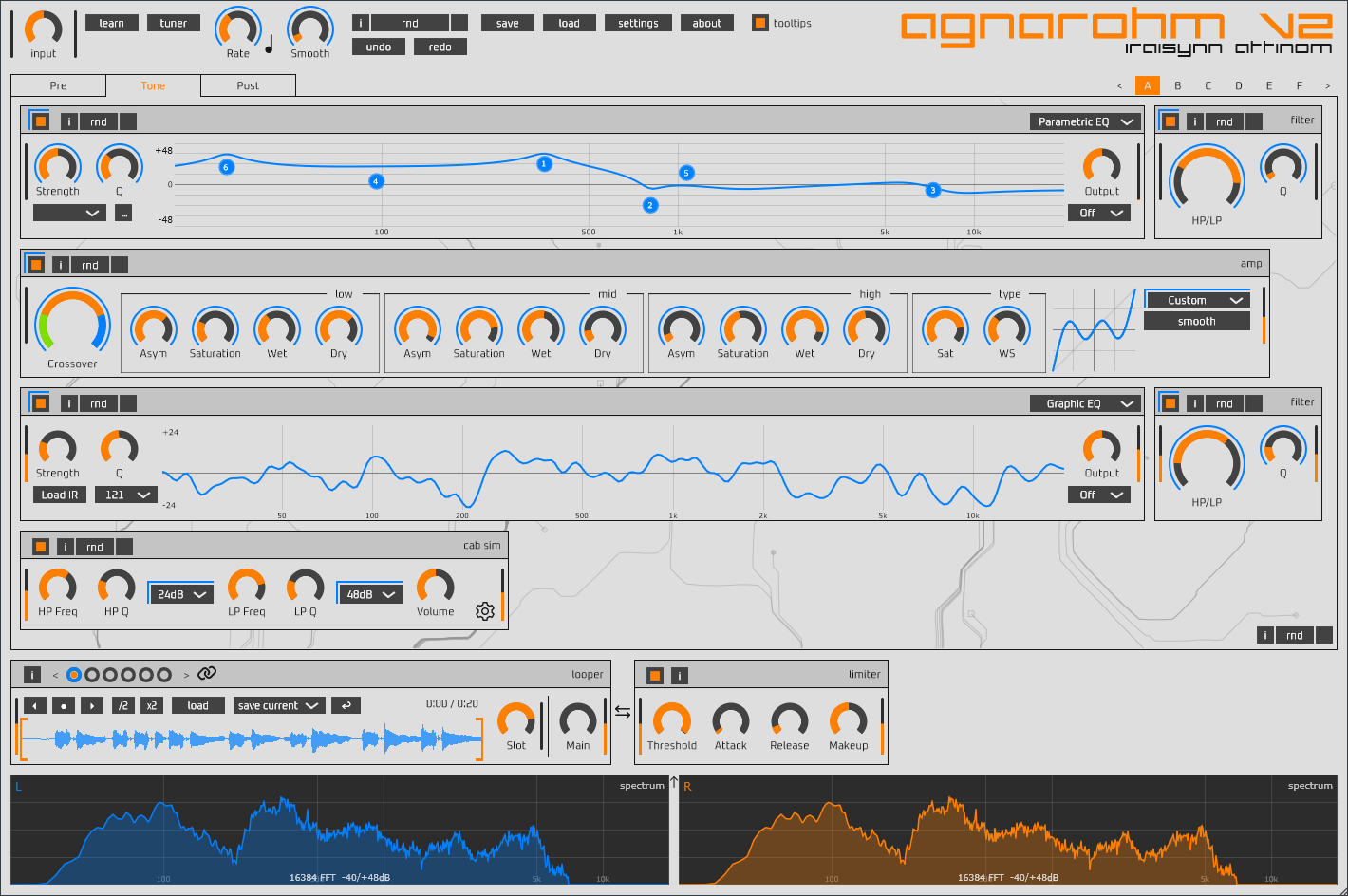
agnarohm-v2
https://iraisynn.attinom.net/_/agnarohm-v2/
agnarohm v2 is a comprehensive multi-effects audio/instrument processor.
It combines over 15 studio-grade effects into a single, streamlined signal chain with 6 snapshot system, advanced looping, and deep modulation capabilities.
Image

its also 3-OS.

80$

Post

Last edited by NWSM on Mon Mar 23, 2026 6:28 am, edited 1 time in total.

Post

There is a FREE "MPE Emulator" dropped for Linux:

(https://www.kvraudio.com/developer/attila-m-magyar)
(https://www.kvraudio.com/product/mpe-em ... a-m-magyar)

Known for: https://www.kvraudio.com/product/js80p- ... a-m-magyar

MPE Emulator is a VST plugin for enhancing ordinary MIDI controllers with MPE (MIDI Polyphonic Expression) capabilities based on configurable mappings and rules.

MPE Emulator is a MIDI proxy: an intermediary plugin which turns non-polyphonic, single channel aftertouch (channel pressure), pitch bend, or any MIDI control change (CC) message into polyphonic by applying them selectively to the lowest, highest, oldest, or newest note, either across the whole keyboard or restricted to a range of keys based on a configurable keyboard split point. It can also remap and reshape controller data, and do various other tricks to increase the expressiveness of a musical performance.

Post

Exacoustics seems have in Mind to build Linux Plugins or port them.

exacoustics wrote on discord:
I might have to support Linux soon due to the amount of people Microsoft seem to be pushing off...
Known for: Ghost FM Synth

Post

Plogue Chipsynth OPS7 - short review:

Code: Select all

MX Linux
Debian 12 - bookworm
Bitwig 5.3.13
I’ve been playing around with this nice-sounding plugin, and it seems to run pretty stable overall. The only issue I’ve noticed is with the GUI—it can act up when resizing or minimizing/maximizing the interface. Luckily, I found a quick fix: just open the “Settings” window and close it again, and everything works fine.

Since it’s a bit-accurate emulation of Yamaha’s 6-operator FM synth, using it feels a bit different from a typical synth. Plogue really went all-in here—by precisely matching the digitally captured output of the original EGS and OPS chips, they’ve recreated every nuance of the original keyboard’s sound. 100% no samples.

The ADSR envelopes behave differently, and saving or managing presets (especially with banks) can be a bit confusing at first. DX7 users will probably know what’s going on right away.
You can load tons of presets from cartridge files found online or shared by others. Banks from Dexed or other DX7 emulations also work perfectly. You can even generate random SYX banks online (for example, at thisdx7cartdoesnotexist.com).

So, you can easily have hundreds of presets to explore!

Linux Requirement:

CPU (Linux): x86_64 multi-core (SSE4.2 required) or aarch64 quad core (NEON required)

Post

Has anyone tried these? They seem to run a bit under the radar.

https://acmt.co.uk/products/

Post Reply

Return to “Getting Started (AKA What is the best...?)”