


Hi All
I pre-ordered Zebra 3 months ago, and held off from installing as I was planning on getting a new MacBook. I installed it yesterday along with Hive, Diva and Bazille, but now they are installed, none of them have any presets.
First thing I did was Google for some help, but didn't really find anything. I tried reinstalling all of the software and rebooted a few times. I don't see preset either in Ableton Live or Logic.
I'm on macOS Tahoe if that makes a difference.
Does anyone know what might be going on here? Apologies if this is a known issue with a documented resolution, but I can't seem to find anything.
Solved: Zebra 3 Preset Library missing
-

- u-he
- 30188 posts since 8 Aug, 2002 from Berlin
You need to look for the presets in the plug-ins themselves. We have our own storage format (".h2p") which is text based and contains meta data that other preset formats don't offer.
If you prefer to browse in Logic or Ableton, there are easy ways to convert the entire preset library to .aupreset - but I'd love to encourage you to try our built-in browser first as it is specifically designed to organise and access our libraries.
If you prefer to browse in Logic or Ableton, there are easy ways to convert the entire preset library to .aupreset - but I'd love to encourage you to try our built-in browser first as it is specifically designed to organise and access our libraries.
-
- KVRist
- Topic Starter
- 30 posts since 24 May, 2026
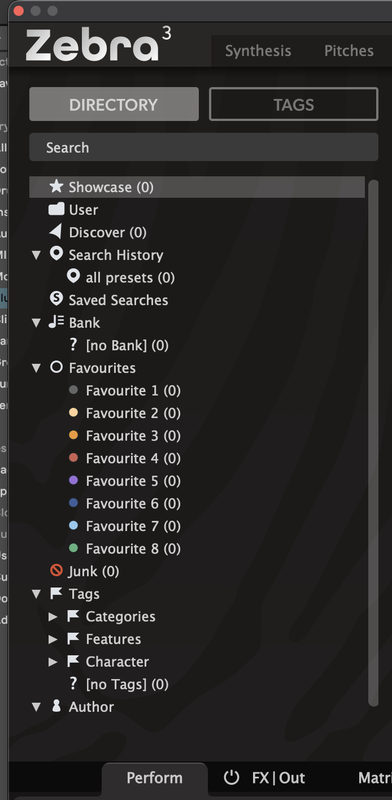
My apologies, I should have been more clear on this. I am opening the plugins in each of the DAWs, clicking the Presets button, and there are no presets. Each category shows a total of 0 in parentheses.
On my old MacBook the presets were available, but they are not on the new one. The only difference other than the MacBook itself is that the version of macOS is one higher (plus it’s now Zebra 3 rather than Zebra 2).
On my old MacBook the presets were available, but they are not on the new one. The only difference other than the MacBook itself is that the version of macOS is one higher (plus it’s now Zebra 3 rather than Zebra 2).
-

- KVRAF
- 37392 posts since 14 Sep, 2002 from In teh net
Are the hosts allowed full disk access?
I presume you have checked the preset files are actually installed on your hard drive in the correct locations?
I presume you have checked the preset files are actually installed on your hard drive in the correct locations?
-
- KVRist
- Topic Starter
- 30 posts since 24 May, 2026
I used the defaults for each installation, and went back to reinstall in case I hadn’t checked the presets check box in each case.
I’m not sure where the files should be installed, but I would think the defaults would be safe, and that’s exactly what I did on my prior MacBook and I could see the presets on that.
In general I install everything to be available to all users, and haven’t received any permissions error messages at any point.
I’m not sure where the files should be installed, but I would think the defaults would be safe, and that’s exactly what I did on my prior MacBook and I could see the presets on that.
In general I install everything to be available to all users, and haven’t received any permissions error messages at any point.
-
- u-he
- 30188 posts since 8 Aug, 2002 from Berlin
-
- u-he
- 30188 posts since 8 Aug, 2002 from Berlin
-
- KVRist
- Topic Starter
- 30 posts since 24 May, 2026
Yes, I saved a preset in Zebra and Diva, shut down everything and rebooted, and I could recall both presets.Urs wrote: Mon May 25, 2026 11:06 pm Hey, if you save a preset... does it get saved and can you recall it?
-
- KVRist
- 151 posts since 10 Mar, 2009 from Australia
Z3 and Tahoe here with no problems: so unfortunately it looks like you have the issue by yourself @Eyecloud.
Not enough time or talent. https://soundcloud.com/user-346125978?r ... rd&p=i&c=0 or https://soundcloud.com/richard-crane-64 ... rd&p=i&c=1
-
tasmaniandevil tasmaniandevil https://www.kvraudio.com/forum/memberlist.php?mode=viewprofile&u=62450
- KVRAF
- 2170 posts since 22 Mar, 2005 from a planet called u-he
You can contact our support, and we'll figure it out. Most likely it's a permission issue.
That QA guy from planet u-he.