Mini - interactive sample browser

VST, AU, AAX, CLAP, etc. Plugin Virtual Instruments Discussion
Post Reply New Topic
RELATED
PRODUCTS
AudioMap Mini$35.00Buy

Post

Uncle E wrote: Mon Jun 22, 2026 7:42 pm
dieterlaser wrote: Mon Jun 22, 2026 7:15 pm it still works with one shots only, right? I wish I could just throw a whole field recording or a weird noise jam into it and let it splice and organize

coalescence can do that, but this interface looks nicer to me
I use Beatforge for things like that. Coalescence looks cool, does have have any plans to make a plugin version?
I think Dillon Bastan, the creator, is focussing on other things these days. But I don't know

Coalescene is pretty noice
M5 Pro, 64GB RAM, MOTU UltraLite mk5, OS Tahoe, Ableton 12

Post

dieterlaser wrote: Mon Jun 22, 2026 7:15 pm it still works with one shots only, right? I wish I could just throw a whole field recording or a weird noise jam into it and let it splice and organize

coalescence can do that, but this interface looks nicer to me
Mini is sample-agnostic, and splicing is not planned in the near future. If you want splicing, there are plenty of good options already - Coalescence is one of them, SKataRT if you are feeling adventurous, Concatenator by DataMind or Graphiti by Red Timbre Audio :tu:

On that note, a 1.3.3 has been released recently with refreshed UI (see first post), and with stability/consistency checks.

Post

AudioMap wrote: Tue Jun 23, 2026 8:30 am
dieterlaser wrote: Mon Jun 22, 2026 7:15 pm it still works with one shots only, right? I wish I could just throw a whole field recording or a weird noise jam into it and let it splice and organize

coalescence can do that, but this interface looks nicer to me
Mini is sample-agnostic, and splicing is not planned in the near future. If you want splicing, there are plenty of good options already - Coalescence is one of them, SKataRT if you are feeling adventurous, Concatenator by DataMind or Graphiti by Red Timbre Audio :tu:

On that note, a 1.3.3 has been released recently with refreshed UI (see first post), and with stability/consistency checks.
Thanks AudioMap - I really appreciate your product, especially the performance of playing samples.

Is DAW tempo synched playback (and/or DAW scale) on the cards for future development?

Thanks for all your updates.

Post

zeph wrote: Tue Jun 23, 2026 8:50 am Is DAW tempo synched playback (and/or DAW scale) on the cards for future development?
Yes to sync :tu:

Post

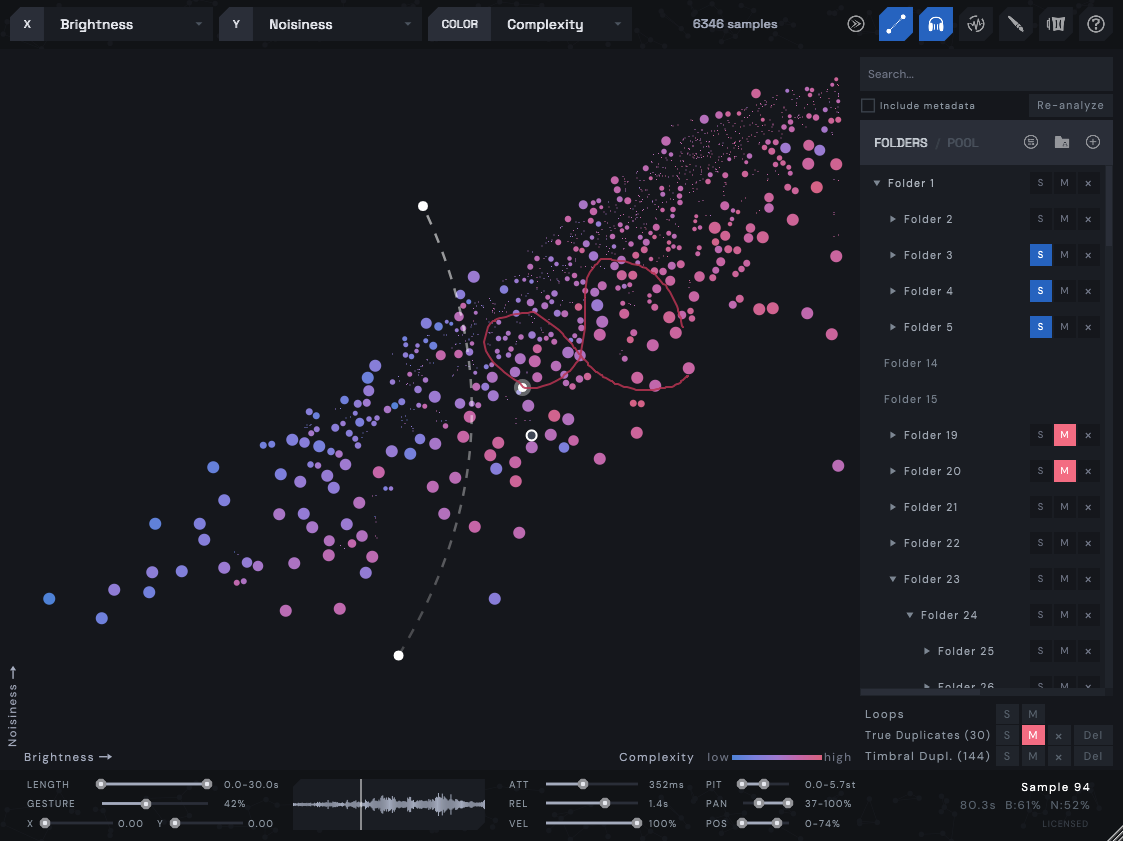
1.4.0 is now out! This is possibly one of the largest updates in quite some time, focused on pitch, capturing and optimizations.

Pitch & Key:
  • 4 new analysis axes: Chroma (most prominent pitch), Pitch (register of sample), Pitch Focus (how prominent pitch is), Harmonicity (same as pitch focus, but for multiple simultaneous notes)
  • New Filters panel + 3 playing modes:
    • Filter: only shows samples in the key
    • Harmonize: automatic retuning to a key
    • Shift: transpose the entire map relative to middle C
    • MIDI toggle: when on, Mini accepts incoming MIDI to affect Filter and Harmonize modes
    • Alt+Drag for per-sample retuning, Alt+DblClick to reset
    • Shift+Alt+Drag for per-sample volume change. Both Alt actions apply to multi-selections.
    • Shift+Alt+DblClick to reset
    • All analysis axes exposed as filters in Filters panel
Output capture:
  • Record performances in real-time as audio clips
  • Press C (or hit REC) to start/stop capturing
  • Takes show as clips, drag them to DAW or file manager
Playing & MIDI:
  • Attack and Release envelopes now apply to notes played on keyboard via MIDI line
  • Support for Sustain pedal
  • Support for pitch-bend with configurable range
Quantization & automation:
  • Quantize is now available for Gesture, Hover preview and Cursor (automation / CC / scrubbing) separately with own grids
  • Gesture sync to host tempo (1 / 2 / 4 / 8 bars)
  • Added automation for X / Y / Color axes, quantize grids, gesture sync
  • CC24 selects the key scale, CC25 selects the root, CC20-23 set quantization and gesture sync
Others:
  • Improved CPU performance during playback and analysis, reduced latency, UI polish
  • Faster analysis
  • "Avoid silent start positions" setting
Cross-platform & compatibility:
  • more in changelog
This version is backwards compatible, however, it is recommended to backup older plugin's cache before installing.

Image

Post

Is there an in depth tutorial for this anywhere or a Manual to delve into it's full capabilities?
Everything I can find online, though enticing, is scant and isn't able to reveal enough insight into what exactly is possible and it's inner workings.
I would hazard a guess you might get more interest with an in depth tutorial as it definitely comes across as an attractive addition but personally I need a little more substance to get my teeth into before a such an outlay.
We are all a unique vibration in a beautiful symphony of infinite creation

Post Reply

Return to “Instruments”